Introduction
Go to step 1 ↓The scroll wheel of my mouse had a bad connection. I originally planned to replace the part, but after cleaning it, the wheel returned to normal. I recorded the disassembly process and measured the component dimensions for future repair reference.
From my online search, model RJN-00001 might be the same as the following models — RJN-00025, RJN-00013, RJN-00037, RJQ-00065 — possibly just with different colors, but I cannot be certain.
What you need
Tools


-
-
-
Remove the AAA battery and back cover.
 Ask FixBot
-
-
-
Insert a spudger into the seam of the top cover. Using a metal spudger may leave scratch marks, so you may choose your preferred tool.
-
-
-
-
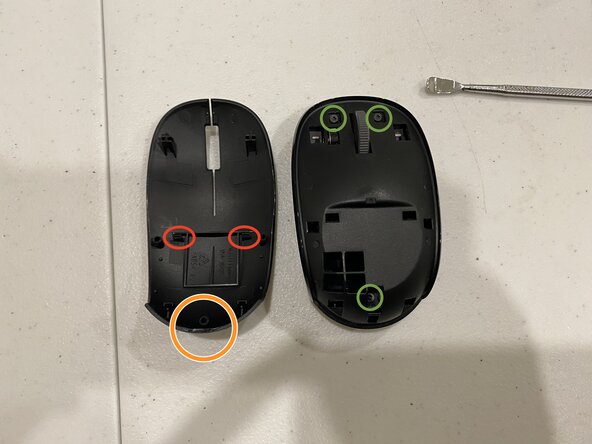
In the image, you can see two clips on the top cover (marked with red circles). Use a spudger to release them, then lift the top cover. There is also a hidden clip at the rear that can be easily disengaged (marked with orange circles).
-
After that, remove the three T5 screws (marked with green circles) to lift off the mid-frame.
-
-
-
Remove the three Phillips screws, then carefully separate the motherboard from the scroll wheel to complete the disassembly.
-
-
-
Measure the scroll wheel dimensions; you should be able to find the corresponding model online. I cleaned it using electronic contact cleaner, and the scroll wheel returned to normal. You can give this a try.
-
-
-
Finally, measure the button dimensions for future reference.
-
My English is not very good, so I used AI to translate this article into English. Please help correct any translation errors if there are mistakes.
-
-