Shop the Holiday Gift Guide
Free Shipping on Domestic Orders $75+

Introduction

Go to step 1 ↓

Eufy Video Doorbell 2K (Battery-Powered) a doorbell security camera that can be installed outdoors. Unfortunately for my unit, water got inside and fried a chip rendering the unit inoperable after 2 years of service. Since Eufy does not have a repair centre here in Malaysia, I decided to open it up and take a look inside.

note: Most of the images I took was is Portrait, thus images might be slightly weird or looks like it was rotated to the left.

This teardown is not a repair guide. To repair your Eufy Doorbell 2k (Battery-Powered), use our service manual.

    1. Eufy Video Doorbell 2k (Battery-Powered) Teardown, Eufy Video Doorbell 2k (Battery-Powered) Teardown: step 1, image 1 of 1
      • Using Phillips 000 screw driver remove 8 screws at the back.

      Ask FixBot

      Add Comment

    2. Eufy Video Doorbell 2k (Battery-Powered) Teardown: step 2, image 1 of 1
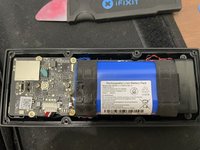
      • Using a metal or plastic prying tool, insert it in between the seems. Then carefully lift the back unit out. Once one side is open simply lift it out from the front cover.

      Ask FixBot

      Add Comment

    3. Eufy Video Doorbell 2k (Battery-Powered) Teardown: step 3, image 1 of 3 Eufy Video Doorbell 2k (Battery-Powered) Teardown: step 3, image 2 of 3 Eufy Video Doorbell 2k (Battery-Powered) Teardown: step 3, image 3 of 3
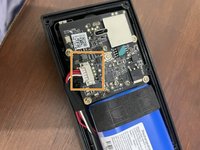
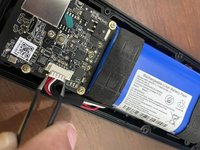
      • Battery is connected to the main board. Using a tweezer remove the battery connector.

      Ask FixBot

      Add Comment

    4. Eufy Video Doorbell 2k (Battery-Powered) Teardown: step 4, image 1 of 1
      • Water manage to get into my unit and fried this chip. Suggest you use a rain cover if this doorbell is expose to weather outdoors. There are a lot of 3D printed rain covers for this doorbell.

      Ask FixBot

      Add Comment

    5. Eufy Video Doorbell 2k (Battery-Powered) Teardown: step 5, image 1 of 2 Eufy Video Doorbell 2k (Battery-Powered) Teardown: step 5, image 2 of 2
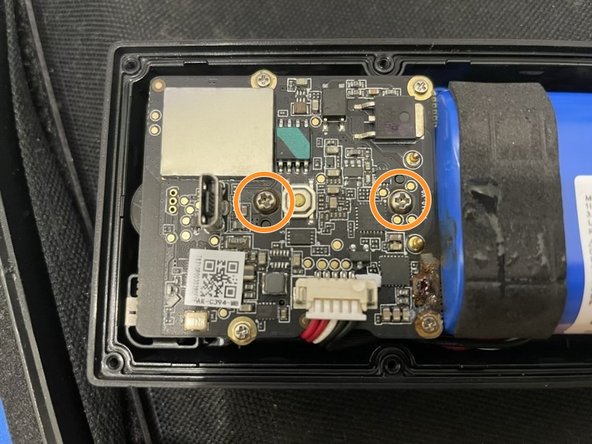
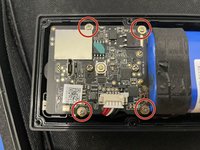
      • Remove 4 screws with a Phillips 000.

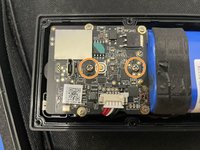
      • Remove 2 screws with a Phillips 0.

      Ask FixBot

      Add Comment

    6. Eufy Video Doorbell 2k (Battery-Powered) Teardown: step 6, image 1 of 1
      • Disconnect the connector.

      • Disconnect the connector.

      • CCD of the camera

      • Do not touch the CCD. If finger prints got stuck it will be difficult to clean.

      Ask FixBot

      Add Comment

    7. Eufy Video Doorbell 2k (Battery-Powered) Teardown: step 7, image 1 of 2 Eufy Video Doorbell 2k (Battery-Powered) Teardown: step 7, image 2 of 2
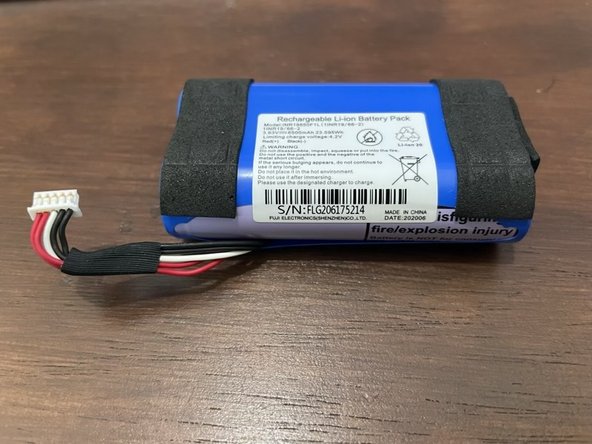
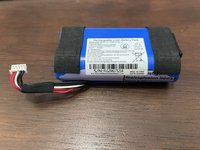
      • Battery details and specification.

      • You can use a multimeter to check the voltage of the battery. Mine was still good at 3.9V. Unfortunately the chip got fried.

      Ask FixBot

      Add Comment

Author

with

Muzaffar

Member since: 05/12/19

175 Reputation

1 Guide authored

12 Guide Comments

Goodacternoon po Maam/Sir?

pwedi poba mag order board lang

LAMPUTE VENT - Reply Share

And what happends next?

kubakumate - Reply Share

This is great. Any suggestions for sourcing a new battery pack?

Tezza - Reply Share

My battery may be shot. Same as in pics. Where can I get a replacement?

Joe Guy - Reply Share

I tried changing the battery in mine. Got it sourced individual cell and attached to the existing points (by removing old cells). It got really hot. Seems my chip got fried as well. Not sure how to check if there is anything else faulty than BAttery Chip?

Rishi Gaurav Gupta - Reply Share

Add Comment

View Statistics:

Past 24 Hours: 26

Past 7 Days: 105

Past 30 Days: 423

All Time: 11,401