Shop the Holiday Gift Guide
Free Shipping on Domestic Orders $75+

iMac G4 17 800 MHz EMC 1936 Logic Board Assembly Replacement

Views: 13K

View statistics:

Past 24 Hours:
3
Past 7 Days:
16
Past 30 Days:
120
All Time:
12,506
Comments: 2

1 comment on steps, 1 guide comment.

Go to guide comments
Completed: 9

9 people have marked this guide "completed." Will you be next?

Favorites: 5

5 people have favorited (and subscribed to) this guide. Will you be next?

Time Required: No estimate
Difficulty: Moderate
iMac G4 17 800 MHz EMC 1936 Logic Board Assembly Replacement

Introduction

Go to step 1 ↓

Removing the logic board assembly to replace it with a new one.

What you need

Tools

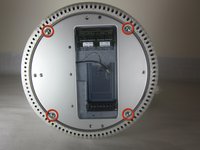
    1. iMac G4 17 800 MHz EMC 1936 Logic Board Assembly Replacement, Bottom Plate: step 1, image 1 of 1
      • Unplug all the cables from the computer, including the power cable. Lay the computer face-down, supporting the neck and base with a soft cloth under the screen.

      Ask FixBot

      Add Comment

    2. iMac G4 17 800 MHz EMC 1936 Logic Board Assembly Replacement: step 2, image 1 of 1
      • Loosen the four Phillips #0 screws.

      Ask FixBot

      Add Comment

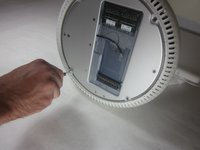
    3. iMac G4 17 800 MHz EMC 1936 Logic Board Assembly Replacement: step 3, image 1 of 1
      • Carefully remove the base access panel.

      Ask FixBot

      Add Comment

    1. iMac G4 17 800 MHz EMC 1936 Logic Board Assembly Replacement, Bottom Plate Housing: step 4, image 1 of 2 iMac G4 17 800 MHz EMC 1936 Logic Board Assembly Replacement, Bottom Plate Housing: step 4, image 2 of 2
      • Remove the four 25mm T-15 screws.

      Ask FixBot

      Add Comment

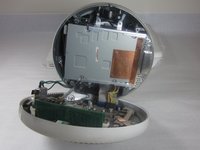
    2. iMac G4 17 800 MHz EMC 1936 Logic Board Assembly Replacement: step 5, image 1 of 2 iMac G4 17 800 MHz EMC 1936 Logic Board Assembly Replacement: step 5, image 2 of 2
      • Open the housing plate.

      • Be gentle with the wires still connected to the logic board so as not to ruin the cables.

      • A fixed plug connector between the logic board and upper unit will cause some resistance. Pull gently but firmly.

      Ask FixBot

      Add Comment

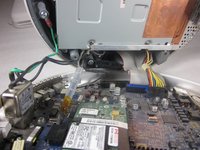
    1. iMac G4 17 800 MHz EMC 1936 Logic Board Assembly Replacement, Logic Board Assembly: step 6, image 1 of 1
      • Gently remove the cables marked in red.

      Ask FixBot

      Add Comment

    2. iMac G4 17 800 MHz EMC 1936 Logic Board Assembly Replacement: step 7, image 1 of 1
      • Remove the three metal 10mm T-15 screws.

      • Remove the one nylon 10mm T-15 screw.

      Ask FixBot

      Add Comment

    3. iMac G4 17 800 MHz EMC 1936 Logic Board Assembly Replacement: step 8, image 1 of 1
      • Using thumbs and forefingers, firmly grasp the battery holder in one hand while grasping the metal bar in the other. Gently lift and pull the logic board to release it.

      Ask FixBot

      Add Comment

Conclusion

To reassemble your device, follow these instructions in reverse order.

Cancel: I did not complete this guide.

9 other people completed this guide.

Author

with

Justin

Member since: 10/05/11

315 Reputation

3 Guides authored

Team

Cal Poly, Team 21-22, Maness Fall 2011 Member of Cal Poly, Team 21-22, Maness Fall 2011

CPSU-MANESS-F11S21G22

4 Members

144 Guides authored

1 Guide Comment

We need to say what cables to remove in step 6 of Logic Board Assembly

Courtney - Reply Share

Add Comment

View Statistics:

Past 24 Hours: 3

Past 7 Days: 16

Past 30 Days: 120

All Time: 12,506