Free Shipping on Domestic Orders $75+

iMac G4 15" 700 MHz EMC 1873 Optical Drive Replacement

What you need

  1. iMac G4 15" 700 MHz EMC 1873 Optical Drive Replacement, Outer Base Plate: step 1, image 1 of 2 iMac G4 15" 700 MHz EMC 1873 Optical Drive Replacement, Outer Base Plate: step 1, image 2 of 2
    • Place the computer monitor face down on a safe, harmless surface.

    • Using a Phillips #00 screw driver, remove the four 6.86 mm screws from the metal plate.

    Ask FixBot

    Add Comment

  2. iMac G4 15" 700 MHz EMC 1873 Optical Drive Replacement: step 2, image 1 of 1
    • Remove the metal plate from bottom of the iMac G4.

    • The four screws do not completely separate from the metal plate.

    Ask FixBot

    Add Comment

  3. iMac G4 15" 700 MHz EMC 1873 Optical Drive Replacement, AirPort Card: step 3, image 1 of 1
    • Use a spudger to lift and remove the AirPort's antenna connector.

    • This step is only applicable to iMacs that came with an AirPort card installed.

    Ask FixBot

    Add Comment

  4. iMac G4 15" 700 MHz EMC 1873 Optical Drive Replacement, RAM DIMM: step 4, image 1 of 2 iMac G4 15" 700 MHz EMC 1873 Optical Drive Replacement, RAM DIMM: step 4, image 2 of 2
    • Release the tabs on each side of the module by simultaneously pushing each tab away from the RAM.

    • These tabs lock the module in place and releasing them will cause the module to "pop" up.

    • Remove the RAM module from the iMac.

    Ask FixBot

    Add Comment

  5. iMac G4 15" 700 MHz EMC 1873 Optical Drive Replacement, Removing the Lower Case: step 5, image 1 of 1
    • Remove the four 28.07mm Torx #15 screws from the lower case.

    Ask FixBot

    Add Comment

  6. iMac G4 15" 700 MHz EMC 1873 Optical Drive Replacement: step 6, image 1 of 2 iMac G4 15" 700 MHz EMC 1873 Optical Drive Replacement: step 6, image 2 of 2
    • Open the base by carefully pulling straight off, do not rotate the cover.

    • Open slowly to ensure that no cables are damaged or disconnected.

    Ask FixBot

    Add Comment

  7. iMac G4 15" 700 MHz EMC 1873 Optical Drive Replacement: step 7, image 1 of 1
    • Squeeze the small black tab and wiggle gently to remove the colored power cable.

    • Do not pull directly on the colored wires.

    • Do not remove black grounding wire.

    Ask FixBot

    Add Comment

  8. iMac G4 15" 700 MHz EMC 1873 Optical Drive Replacement: step 8, image 1 of 1
    • Grab both sides of the blue connector and firmly pull to remove it from the mother board.

    • Do not pull directly on the ribbon cable.

    Ask FixBot

    Add Comment

  9. iMac G4 15" 700 MHz EMC 1873 Optical Drive Replacement, Optical Drive: step 9, image 1 of 2 iMac G4 15" 700 MHz EMC 1873 Optical Drive Replacement, Optical Drive: step 9, image 2 of 2
    • Using a Torx #9 screw driver, remove the two 8.77mm screws holding the drive's shield onto your iMac G4.

    • Remove the drive shield from your iMac.

    Ask FixBot

    Add Comment

  10. iMac G4 15" 700 MHz EMC 1873 Optical Drive Replacement: step 10, image 1 of 1
    • Using a Torx # 10 screw driver, remove the four 19.12mm screws that mount the optical drive.

    Ask FixBot

    Add Comment

  11. iMac G4 15" 700 MHz EMC 1873 Optical Drive Replacement: step 11, image 1 of 1
    • Grasp the HD/Optical Drive bundle by the by the sides and gently wiggle it loose from the sides.

    • Ensure there are no wires passing over the top of the drive bundle when removing it, as it may unintentionally disconnect something.

    Ask FixBot

    Add Comment

  12. iMac G4 15" 700 MHz EMC 1873 Optical Drive Replacement: step 12, image 1 of 1
    • Unplug the power source from the optical drive by pinching the plastic base of the connector and wiggling it gently.

    • Do not use excessive force, or pull on the wires directly, in order to unplug the connector from the drive.

    Ask FixBot

    Add Comment

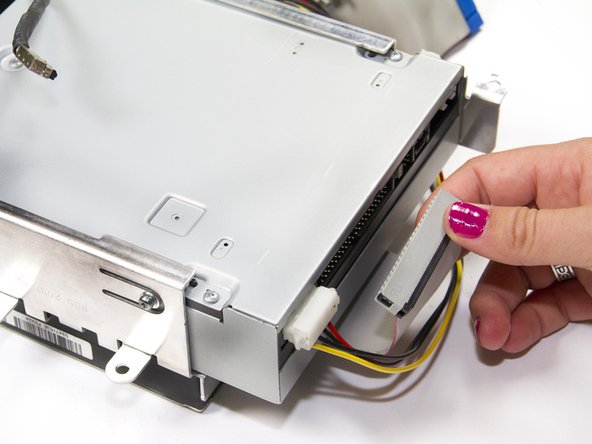
  13. iMac G4 15" 700 MHz EMC 1873 Optical Drive Replacement: step 13, image 1 of 1
    • Unplug the ribbon cable from the optical drive by grasping the plastic base of the connector and wiggling it gently.

    • Do not pull on the ribbon cable directly.

    Ask FixBot

    Add Comment

  14. iMac G4 15" 700 MHz EMC 1873 Optical Drive Replacement: step 14, image 1 of 1
    • Remove the four 6.75mm Torx # 10 screws mounting the drive.

    • There are two screws on both sides of drive mount.

    Ask FixBot

    Add Comment

  15. iMac G4 15" 700 MHz EMC 1873 Optical Drive Replacement: step 15, image 1 of 1
    • Slide the optical drive out from the metal support mounted to hard drive.

    Ask FixBot

    Add Comment

Conclusion

To reassemble your device, follow these instructions in reverse order.

Cancel: I did not complete this guide.

17 other people completed this guide.

Ryan Kozak

Member since: 10/10/11

1,783 Reputation

3 Guides authored

Team

Cal Poly, Team 5-32, Amido Fall 2011 Member of Cal Poly, Team 5-32, Amido Fall 2011

CPSU-AMIDO-F11S5G32

4 Members

18 Guides authored

0 Guide Comments

Add Comment

View Statistics:

Past 24 Hours: 3

Past 7 Days: 16

Past 30 Days: 98

All Time: 12,735