
Zeki TBQG884B Rear Case Replacement

David Wyman and
Last updated on Jan 4, 2024
Views: 961
View statistics:
- Past 24 Hours:
- 3
- Past 7 Days:
- 20
- Past 30 Days:
- 70
- All Time:
- 961
Comments: 0
No one has left comments on this guide. Will you be first?
Go to guide commentsCompleted: 0 1
No one has marked this guide "completed." Will you be the first?
1 person has marked this guide "completed." It's you — great job!
Favorites: 0 1
No one has favorited (and subscribed to) this guide. Will you be the first?
1 person has favorited (and subscribed to) this guide — and that's you!
Introduction
Go to step 1 ↓This guide will assist you in replacing the rear cover of your Zeki TBQG884B tablet, or as a prerequisite for repairs on any of the device's other internal components. It is important to remember before beginning this guide that the device is extremely delicate and to complete each step of this guide very carefully.
What you need
Tools


-
-
-
Remove the two screws from the end of the device where the ports are located using a Phillips #1 screwdriver.
 Ask FixBot
-
-
-
-
Place the tablet down so that the screen is facing away from you.
-
Insert the tip of your opening tool into the small gap between the gray and white plastic covering. Pry it open and you should hear the clips opening up.
-
Gently work your way around the perimeter of the tablet's edge.
-
-
-
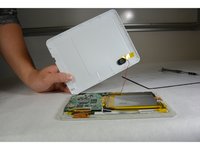
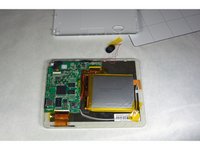
Remove the back cover
-
Remove any tape on the speaker and detach the speaker from the back plate.
-
-


To reassemble your device, follow these instructions in reverse order.

Team

IUPUI, Team 1-3, Harley Fall 2015 Member of IUPUI, Team 1-3, Harley Fall 2015
IUPUI-HARLEY-F15S1G3
5 Members
60 Guides authored
