
Xiaomi Mi Pad Motherboard Replacement

Kiefer Sivitz and
Last updated on Apr 11, 2017
Views: 9.1K
View statistics:
- Past 24 Hours:
- 15
- Past 7 Days:
- 54
- Past 30 Days:
- 212
- All Time:
- 9,146
Comments: 7
3 comments on steps, 4 guide comments.
Go to guide commentsCompleted: 13 14
13 people have marked this guide "completed." Will you be next?
14 people have marked this guide "completed." Including you — great job!
Favorites: 1 2
1 person has favorited (and subscribed to) this guide. Will you be next?
2 people have favorited (and subscribed to) this guide — including you!
Needs More Images
A few more images would make this guide's procedures crystal clear.
Featured Student Guide
This guide has been the hard work of our awesome students and is found to be exceptionally cool by the iFixit staff.
Introduction
Go to step 1 ↓Use this guide to remove the motherboard from your Xiaomi Mi Pad.
What you need
Tools


-
-
-
Remove the micro SD card slot from the left side of the device using either the metal pin included with the device or a SIM card eject tool.
 Ask FixBot
-
-
-
Use a plastic opening tool and/or opening pick to gently pry the back panel away from the device. Work your way around the device, slowly increasing the gap.
-
-
-
-
-
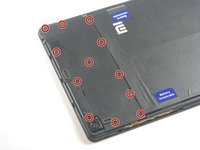
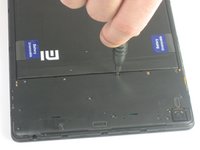
Remove the twelve 3 mm Phillips #00 screws on the upper cover of the device.
-
-
-
-
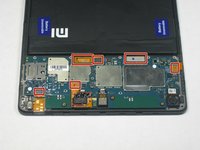
Remove the two 3.0 mm Phillips #00 screws securing the motherboard to the device.
-
-
-
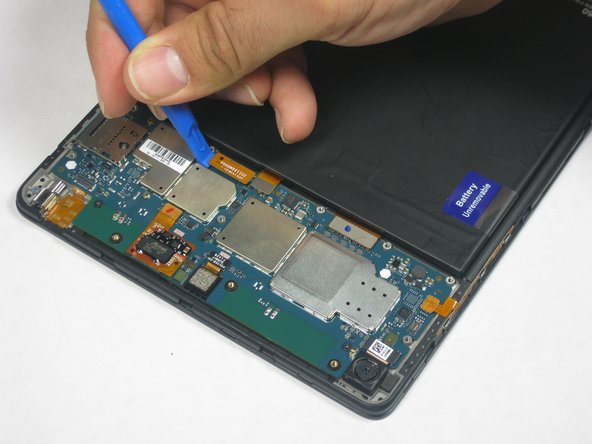
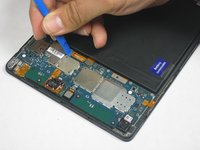
Disconnect the six ribbon cables attached to the motherboard using a plastic opening tool.
-
-





To reassemble your device, follow these instructions in reverse order.
Cancel: I did not complete this guide.
13 other people completed this guide.

Team

USF Tampa, Team 12-5, Blackwell Fall 2015 Member of USF Tampa, Team 12-5, Blackwell Fall 2015
USFT-BLACKWELL-F15S12G5
3 Members
72 Guides authored
4 Guide Comments
It's my email
amaank987321.msk@gmail.com
i'm looking to buy a motherboard for my died mi pad and i couldn't find it any were. Do you know were i can bay one , please help
