Free Shipping on Domestic Orders $75+

Sony Handycam DCR-SR68 Hard Disk Drive (HDD) Replacement

What you need

    1. Sony Handycam DCR-SR68 Hard Disk Drive (HDD) Replacement, Hard Disk Drive (HDD): step 1, image 1 of 1
      • Undo Hand Strap

      • Remove battery.

      • Get the iFixit screwdriver and remove the extension.

      • Use a JO Philips head bit.

      Ask FixBot

      Add Comment

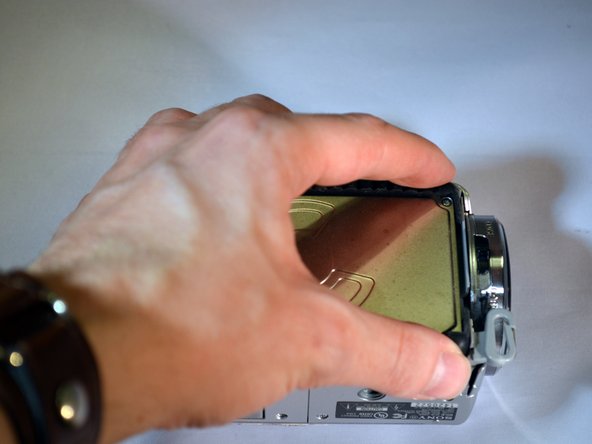
    2. Sony Handycam DCR-SR68 Hard Disk Drive (HDD) Replacement: step 2, image 1 of 2 Sony Handycam DCR-SR68 Hard Disk Drive (HDD) Replacement: step 2, image 2 of 2
      • Place device on left side with lens facing right.

      • Using the screwdriver, unscrew the left middle 3mm Philips screw.

      • Open the "DC IN" tabe. (Second 3mm Philips screw is revealed)

      • Unscrew this screw.

      Ask FixBot

      Add Comment

    3. Sony Handycam DCR-SR68 Hard Disk Drive (HDD) Replacement: step 3, image 1 of 1
      • Turn device over onto it's top with the lens facing right.

      • Unscrew the top left and top right 3mm Philips screws.

      • The right side casing is now free.

      Ask FixBot

      Add Comment

    4. Sony Handycam DCR-SR68 Hard Disk Drive (HDD) Replacement: step 4, image 1 of 2 Sony Handycam DCR-SR68 Hard Disk Drive (HDD) Replacement: step 4, image 2 of 2
      • Remove the right side casing by pulling up and away.

      • The HDD is now revealed.

      Ask FixBot

      Add Comment

    5. Sony Handycam DCR-SR68 Hard Disk Drive (HDD) Replacement: step 5, image 1 of 3 Sony Handycam DCR-SR68 Hard Disk Drive (HDD) Replacement: step 5, image 2 of 3 Sony Handycam DCR-SR68 Hard Disk Drive (HDD) Replacement: step 5, image 3 of 3
      • Using your fingers, lift the HDD from it's right end, pivoting on it's left end.

      • The HDD ribbon wire is now exposed.

      Ask FixBot

      Add Comment

    6. Sony Handycam DCR-SR68 Hard Disk Drive (HDD) Replacement: step 6, image 1 of 2 Sony Handycam DCR-SR68 Hard Disk Drive (HDD) Replacement: step 6, image 2 of 2
      • Using your fingers, gently pull the ribbon wire out of it's socket.

      • The HDD is now free from the device.

      Ask FixBot

      Add Comment

    7. Sony Handycam DCR-SR68 Hard Disk Drive (HDD) Replacement: step 7, image 1 of 2 Sony Handycam DCR-SR68 Hard Disk Drive (HDD) Replacement: step 7, image 2 of 2
      • Using your fingers, pull the black rubber bumpers off of the HDD.

      • Set the old HDD aside.

      Ask FixBot

      Add Comment

Conclusion

To reassemble your device, follow these instructions in reverse order.

Cancel: I did not complete this guide.

18 other people completed this guide.

9 Guide Comments

Hi. Would you know if the hard drive of the sr67 would work in a sr 68? My sony handycam dcr sr67 Got water damage and I need to download videos. Can't find an old 67. 0nly 68. No one can fix the old one. Thanks renee

Renee - Reply Share

What does the letter H after hte HDD1818 stands for?

guimoramirez - Reply Share

My dcr-sr68 hdd not formting please find salution

Naman Jain - Reply Share

My SONY HANDYCAM DCR - SR68 HDD FORMATING shows Error E:31.00

What does it mean ?

Daanish - Reply Share

My sony handycam DCR-SR68 HDD not formating plz find

bharat kumar solanki - Reply Share

Add Comment

View Statistics:

Past 24 Hours: 6

Past 7 Days: 37

Past 30 Days: 176

All Time: 13,644