Free Shipping on Domestic Orders $75+

Sony DVP-SR200P Power Supply Circuit Board Replacement

Views: 9.5K

View statistics:

Past 24 Hours:
5
Past 7 Days:
16
Past 30 Days:
118
All Time:
9,539
Comments: 3

1 comment on steps, 2 guide comments.

Go to guide comments
Completed: 4

4 people have marked this guide "completed." Will you be next?

Favorites: 3

3 people have favorited (and subscribed to) this guide. Will you be next?

Time Required: 20 minutes
Difficulty: Moderate
Needs Better Images

Better photos will improve this guide. Help out by taking, editing, or uploading new ones!

Action Shots

Be an action hero! This guide needs images that better demonstrate how to perform specific actions.

Sony DVP-SR200P Power Supply Circuit Board Replacement

Introduction

Go to step 1 ↓

The following instruction is designed to help you replace the Sony DVP-SR200P power supply circuit board and power cord. Extreme caution must be used while handling the motherboard and other fragile internal components to prevent damage. Furthermore, there's a chance of electric shock, so you need to be extra cautious. You may confidently do this installation with moderate difficulty if you carefully follow our comprehensive instructions.

In order to ensure that the power supply circuit board and power cable replacement goes smoothly and successfully, this guide attempts to give you a clear and concise set of instructions. Throughout the procedure, be mindful of the exposed motherboard's fragility and handle it with extreme caution. Let's get started on revitalizing your Sony DVP-SR200P with a new power supply system, following our step-by-step instructions for a hassle-free experience.


What you need

Tools

    1. Sony DVP-SR200P Power Supply Circuit Board Replacement, Top Cover: step 1, image 1 of 2 Sony DVP-SR200P Power Supply Circuit Board Replacement, Top Cover: step 1, image 2 of 2
      • Remove the five #1 Phillips screws (black, 3/16") attaching the cover to the DVD player.

      • One 3/16" screw on the right side of the DVD player.

      • One 3/16" screw on the left side of the DVD player (directly opposite of other screw).

      • Three 3/16" screws on the back of the DVD player.

      Ask FixBot

      Add Comment

    2. Sony DVP-SR200P Power Supply Circuit Board Replacement: step 2, image 1 of 2 Sony DVP-SR200P Power Supply Circuit Board Replacement: step 2, image 2 of 2
      • Slide the cover away from the front of the DVD player until it is off.

      Ask FixBot

      Add Comment

    1. Sony DVP-SR200P Power Supply Circuit Board Replacement, Processing Board: step 3, image 1 of 1
      • Remove the blue tape from the processing board by gently pulling upward.

      Ask FixBot

      Add Comment

    2. Sony DVP-SR200P Power Supply Circuit Board Replacement: step 4, image 1 of 2 Sony DVP-SR200P Power Supply Circuit Board Replacement: step 4, image 2 of 2
      Tool used on this step:
      Tweezers
      $4.99
      Buy
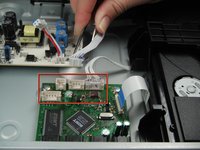
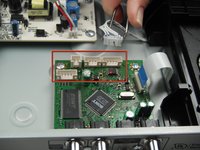
      • Use the tweezers to remove the four sets of wires connected to the processing board. Start with the cord located in front of the row of three cords.

      • The wires may be difficult to remove. Wiggling them while lifting them up may help remove them.

      Ask FixBot

      Add Comment

    3. Sony DVP-SR200P Power Supply Circuit Board Replacement: step 5, image 1 of 1
      • Handle the processing board with care. It is fragile.

      • Unscrew the two #1 Phillips screws (silver, 3/16") located on the two edge corners of the processing board.

      Ask FixBot

      Add Comment

    4. Sony DVP-SR200P Power Supply Circuit Board Replacement: step 6, image 1 of 1
      • Orient the DVD player so that you are facing the video and audio jacks.

      • Unscrew the two #1 Phillips screws (silver, 3/16") located on the outside of the DVD player

      • The processing board is now free to be removed and replaced.

      Ask FixBot

      Add Comment

    1. Sony DVP-SR200P Power Supply Circuit Board Replacement, Power Supply Circuit Board: step 7, image 1 of 1
      • Caution: The circuit board contains capacitors (they look like cylinders) that can shock you if they discharge. Be careful not to touch them as you work. If possible, use a capacitor discharge probe to safely rid the capacitors of dangerous charges.

      • Unhook the power supply connector from the power supply board by pressing down on the small latch.

      Ask FixBot

      Add Comment

    2. Sony DVP-SR200P Power Supply Circuit Board Replacement: step 8, image 1 of 1
      • Orient the DVD player so the back of the DVD player is opposite of you.

      • Unscrew the two silver 4.8 mm Phillips #1 screws that attach the power supply circuit board to the bottom of the DVD player.

      Ask FixBot

      Add Comment

Conclusion

To reassemble your device, follow these instructions in reverse order.

Cancel: I did not complete this guide.

4 other people completed this guide.

Brian Hua

Member since: 01/11/13

80 Reputation

3 Guides authored

Team

Cal Poly, Team 5-17, Forte Winter 2013 Member of Cal Poly, Team 5-17, Forte Winter 2013

CPSU-FORTE-W13S5G17

5 Members

72 Guides authored

2 Guide Comments

my sony home theater showing push power protector how to resolve it.

Vinod Kumar - Reply Share

Service center said that we need to change motherboard. plz help me out if you can

Vinod Kumar - Reply Share

Add Comment

View Statistics:

Past 24 Hours: 5

Past 7 Days: 16

Past 30 Days: 118

All Time: 9,539