Free Shipping on Domestic Orders $75+

Sony α6500 LCD Screen Replacement

Views: 5.1K

View statistics:

Past 24 Hours:
2
Past 7 Days:
28
Past 30 Days:
123
All Time:
5,135
Comments: 3

1 comment on steps, 2 guide comments.

Go to guide comments
Completed: 4

4 people have marked this guide "completed." Will you be next?

Favorites: 0

No one has favorited (and subscribed to) this guide. Will you be the first?

Time Required: 20 minutes
Difficulty: Moderate
Featured Student Guide

This guide has been the hard work of our awesome students and is found to be exceptionally cool by the iFixit staff.

Sony α6500 LCD Screen Replacement

Introduction

Go to step 1 ↓

In order to interface with the camera and access its functions, it is important to have a working LCD screen. If your LCD screen has problems such as distortion and flickering, it may be damaged and in need of replacement. This guide will walk you through disassembling the camera and removing the LCD screen; avoid tearing the flat ribbon cables exposed in the process. When removing the screen from the plastic frame, you will break the adhesive attaching it. If desired, you may reglue the replacement screen to the frame with any super glue or epoxy. This guide requires JIS 00 and 000 screwdrivers, opening tools, a spudger, and tweezers.

What you need

Parts

Tools

    1. Sony α6500 LCD Screen Replacement, Battery: step 1, image 1 of 1
      • Verify the camera is powered off by setting the switch to OFF.

      Ask FixBot

      Add Comment

    2. Sony α6500 LCD Screen Replacement: step 2, image 1 of 2 Sony α6500 LCD Screen Replacement: step 2, image 2 of 2
      • Flip the camera upside down.

      • Slide the battery compartment lock to OPEN to unlock it.

      Ask FixBot

      Add Comment

    3. Sony α6500 LCD Screen Replacement: step 3, image 1 of 2 Sony α6500 LCD Screen Replacement: step 3, image 2 of 2
      • Push the blue lever aside to release the battery.

      Ask FixBot

      Add Comment

    4. Sony α6500 LCD Screen Replacement: step 4, image 1 of 1
      • Remove the released battery from the compartment.

      Ask FixBot

      Add Comment

    1. Sony α6500 LCD Screen Replacement, LCD Screen: step 5, image 1 of 3 Sony α6500 LCD Screen Replacement, LCD Screen: step 5, image 2 of 3 Sony α6500 LCD Screen Replacement, LCD Screen: step 5, image 3 of 3
      • To access the LCD assembly we need to remove the screws attaching its hinge to the camera body.

      • Remove four 3mm JIS 000 screws.

      • Remove one 3mm JIS 00 screw.

      • After dismounting the screen hinge be careful to not tear the black wire ribbon connecting the screen to the camera body.

      Ask FixBot

      Add Comment

    2. Sony α6500 LCD Screen Replacement: step 6, image 1 of 2 Sony α6500 LCD Screen Replacement: step 6, image 2 of 2
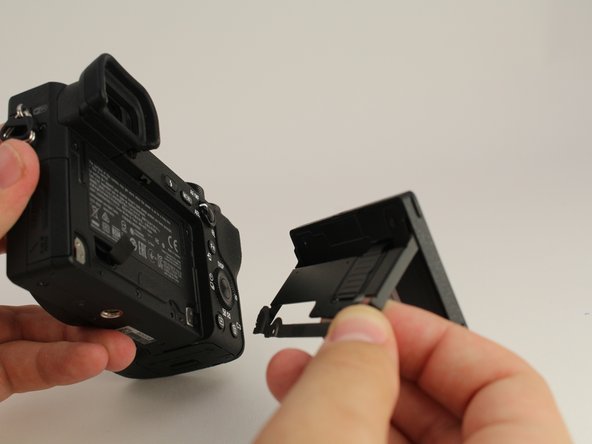
      • Remove the screen hinge from the camera.

      • Be careful to not tear the black flat cable connecting the lcd screen to the main body of the camera. This particular camera's cable has been cut for demonstration purposes.

      Ask FixBot

      Add Comment

    3. Sony α6500 LCD Screen Replacement: step 7, image 1 of 1
      • Flip the LCD screen up.

      • Remove two 2mm JIS 000 screws on the bottom edge.

      Ask FixBot

      Add Comment

    4. Sony α6500 LCD Screen Replacement: step 8, image 1 of 2 Sony α6500 LCD Screen Replacement: step 8, image 2 of 2
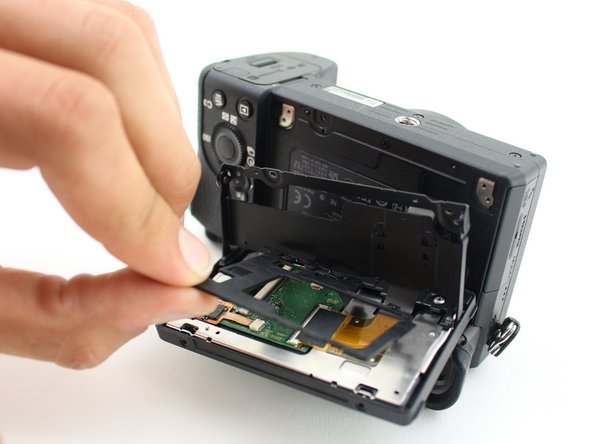
      • Flip the LCD screen down to access the back side.

      • Remove two 2mm JIS 000 screws to release the back panel of the screen.

      Ask FixBot

      Add Comment

    5. Sony α6500 LCD Screen Replacement: step 9, image 1 of 2 Sony α6500 LCD Screen Replacement: step 9, image 2 of 2
      • Use the opening tool to pry open the back panel.

      • Remove the black plastic spacer laying on top of the circuit board.

      Ask FixBot

      Add Comment

    6. Sony α6500 LCD Screen Replacement: step 10, image 1 of 2 Sony α6500 LCD Screen Replacement: step 10, image 2 of 2
      Tool used on this step:
      Tweezers
      $4.99
      Buy
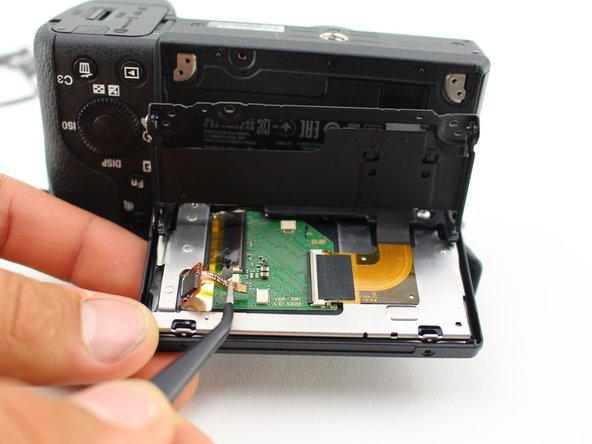
      • Carefully unplug the three wire ribbons from the circuit board with tweezers.

      • Likely you will need to wiggle the ribbons for a while before they come loose.

      • The ribbons can rip very easily, grasp the black plastic with the tweezers, on the two top ribbons, not the orange wires.

      Ask FixBot

      Add Comment

    7. Sony α6500 LCD Screen Replacement: step 11, image 1 of 3 Sony α6500 LCD Screen Replacement: step 11, image 2 of 3 Sony α6500 LCD Screen Replacement: step 11, image 3 of 3
      • Slide the spudger around all sides of the screen's plastic frame, gently breaking the adhesive.

      • Remove the screen from the camera by prying it out.

      Ask FixBot

      Add Comment

Conclusion

To reassemble your device, follow these instructions in reverse order.

Cancel: I did not complete this guide.

4 other people completed this guide.

Micah Fitzgerald

Member since: 10/03/19

674 Reputation

2 Guides authored

Team

Cal Poly, Team S11-G5, Regan Fall 2019 Member of Cal Poly, Team S11-G5, Regan Fall 2019

CPSU-REGAN-F19S11G5

5 Members

84 Guides authored

2 Guide Comments

Hello, do you have an updated link with a currently available lcd screen replacement part?

JRS - Joe’s Random Stuff - Reply Share

Can I use an a6500 screen to replace an a6600 screen? Are they interchangeable?

Connor Snyder - Reply Share

Add Comment

View Statistics:

Past 24 Hours: 2

Past 7 Days: 28

Past 30 Days: 123

All Time: 5,135