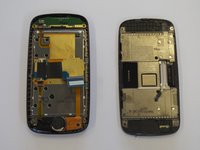
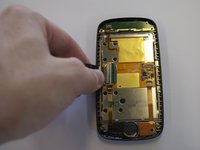
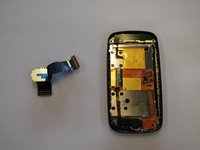
Samsung Impression Ear Speaker Replacement

What you need

  1. Samsung Impression Ear Speaker Replacement, Battery: step 1, image 1 of 1
    • Orient the phone with the screen facing downward.

    • Slide the panel away from the camera using your thumb. This will expose the battery.

  2. Samsung Impression Ear Speaker Replacement: step 2, image 1 of 2 Samsung Impression Ear Speaker Replacement: step 2, image 2 of 2
    • Insert the tip of the spudger on the left side of the battery.

    • Pry the battery out. It will pivot in the direction of the white arrow.

  3. Samsung Impression Ear Speaker Replacement, Back Cover: step 3, image 1 of 1
    • Remove the six 3.5 mm screws using a Phillips #000 screwdriver. Unscrew in a counterclockwise direction.

  4. Samsung Impression Ear Speaker Replacement: step 4, image 1 of 1
    • Gently pry around the edges with the spudger to remove back panel.

    • It may help to slide the touchscreen upwards when removing the back panel.

    • The side buttons will become loose and will fall out, so put these in a safe place.

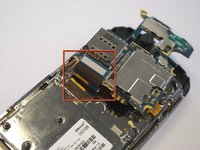
  5. Samsung Impression Ear Speaker Replacement, Circuit Board: step 5, image 1 of 1
    • Gently remove the black wire to free the circuit board.

    • Remove the wire by gently prying up the gold terminator attached to the green circuit board.

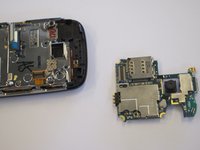
  6. Samsung Impression Ear Speaker Replacement: step 6, image 1 of 2 Samsung Impression Ear Speaker Replacement: step 6, image 2 of 2
    • Gently tug the black and blue ribbon upwards to release the circuit board.

  7. Samsung Impression Ear Speaker Replacement, Keyboard: step 7, image 1 of 1
    • Remove the two base screws along the edge of the silver piece, where you just removed the black end piece.

    • The screws are 2.7mm in length.

    • The bottom black end cap will snap out.

  8. Samsung Impression Ear Speaker Replacement: step 8, image 1 of 2 Samsung Impression Ear Speaker Replacement: step 8, image 2 of 2
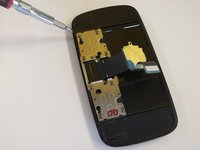
    • Remove the six 2.7 mm screws holding the silver plate on and set aside (fig. 1).

    • Separate the silver plate and phone frame (fig. 2).

  9. Samsung Impression Ear Speaker Replacement: step 9, image 1 of 1
    • The silver piece you are left with is the physical keyboard assembly.

  10. Samsung Impression Ear Speaker Replacement, LCD Flex Cable: step 10, image 1 of 2 Samsung Impression Ear Speaker Replacement, LCD Flex Cable: step 10, image 2 of 2
    • Remove the 3 screws holding down the flex cable.

    • The two screws on the black frame are 2.0 mm in length.

    • The top right screw that goes through the circle port on the flex cable is 2.3 mm.

    • Remove the keyboard slider frame. The flex cable should be exposed, but not free.

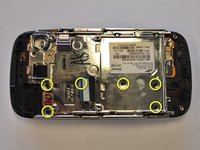
  11. Samsung Impression Ear Speaker Replacement: step 11, image 1 of 1
    • Remove the four 3.5 mm outer screws.

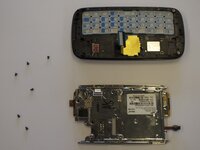
  12. Samsung Impression Ear Speaker Replacement: step 12, image 1 of 3 Samsung Impression Ear Speaker Replacement: step 12, image 2 of 3 Samsung Impression Ear Speaker Replacement: step 12, image 3 of 3
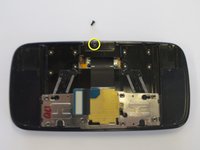
    • Slide the phone apart and remove the 3.5 mm screw on the top middle (fig. 1).

    • Remove the outer shell by prying the edges off with your fingers or a small screwdriver (fig. 2).

    • The device will now be in two pieces (fig. 3).

  13. Samsung Impression Ear Speaker Replacement: step 13, image 1 of 2 Samsung Impression Ear Speaker Replacement: step 13, image 2 of 2
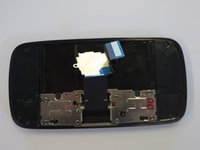
    • Lift the tab underneath the blue tape and gently pull the flex cable (fig. 1).

    • The flex cable will now be completely free (fig. 2).

  14. Samsung Impression Ear Speaker Replacement, Ear Speaker: step 14, image 1 of 1
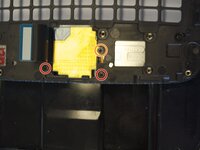
    • Remove the 2.25 mm screw.

    • Lift the black tab at the end of the ribbon.

    • Gently pull the speaker and ribbon free.

Conclusion

To reassemble your device, follow these instructions in reverse order.

Saul Villatoro

Member since: 04/25/11

260 Reputation

7 Guides authored

Team

Cal Poly, Team 8-10, Regan Spring 2011 Member of Cal Poly, Team 8-10, Regan Spring 2011

CPSU-REGAN-S11S8G10

4 Members

23 Guides authored

0 Guide Comments

Add Comment

View Statistics:

Past 24 Hours: 0

Past 7 Days: 0

Past 30 Days: 6

All Time: 3,385