Free Shipping on Domestic Orders $75+

Samsung Galaxy J3 Luna Pro Motherboard Change Replacement

Views: 3.5K

View statistics:

Past 24 Hours:
3
Past 7 Days:
14
Past 30 Days:
75
All Time:
3,517
Comments: 1

1 comment on steps.

Completed: 5

5 people have marked this guide "completed." Will you be next?

Favorites: 1

1 person has favorited (and subscribed to) this guide. Will you be next?

Time Required: 30 seconds
Difficulty: Moderate
Samsung Galaxy J3 Luna Pro Motherboard Change Replacement

Introduction

Go to step 1 ↓

If you ever find yourself in a scenario where you have a completely normal phone and then out of nowhere it ceases to operate. It may be time for a motherboard change. This guide will provide the step by step process of switching the processing component of the Samsung Galaxy J3 Luna Pro.

What you need

Tools

    1. Samsung Galaxy J3 Luna Pro Motherboard Change Replacement, Motherboard Change: step 1, image 1 of 1
      • Turn off the phone.

      • Remove the back cover and battery

      Ask FixBot

      Add Comment

    2. Samsung Galaxy J3 Luna Pro Motherboard Change Replacement: step 2, image 1 of 3 Samsung Galaxy J3 Luna Pro Motherboard Change Replacement: step 2, image 2 of 3 Samsung Galaxy J3 Luna Pro Motherboard Change Replacement: step 2, image 3 of 3
      • Attach a suction cup to the screen and pry upwards.

      • Insert the plastic opening tool into the gap under the screen and work your way around the perimeter.

      • Don't remove the screen completely as there are cables still connection the two pieces.

      Ask FixBot

      Add Comment

    3. Samsung Galaxy J3 Luna Pro Motherboard Change Replacement: step 3, image 1 of 3 Samsung Galaxy J3 Luna Pro Motherboard Change Replacement: step 3, image 2 of 3 Samsung Galaxy J3 Luna Pro Motherboard Change Replacement: step 3, image 3 of 3
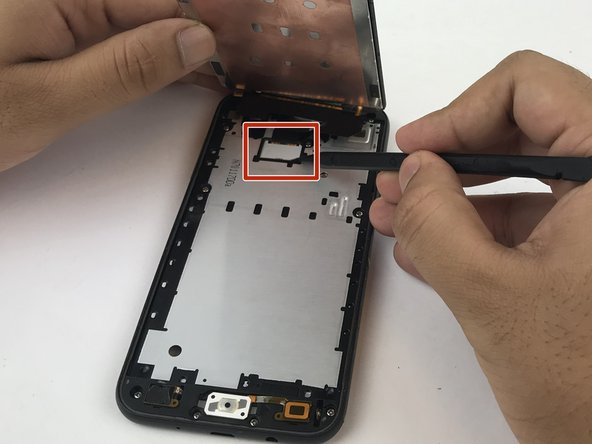
      • Use the pointy end of a spudger to remove the white plastic cover from the display cover.

      • Use the spudger to pry up the display cable from the motherboard.

      • Remove the screen.

      Ask FixBot

      Add Comment

    4. Samsung Galaxy J3 Luna Pro Motherboard Change Replacement: step 4, image 1 of 3 Samsung Galaxy J3 Luna Pro Motherboard Change Replacement: step 4, image 2 of 3 Samsung Galaxy J3 Luna Pro Motherboard Change Replacement: step 4, image 3 of 3
      • Remove the eleven JIS 00 screws from the mid-frame.

      • Using a spudger, pry the mid-frame from the screen.

      Ask FixBot

      Add Comment

    5. Samsung Galaxy J3 Luna Pro Motherboard Change Replacement: step 5, image 1 of 3 Samsung Galaxy J3 Luna Pro Motherboard Change Replacement: step 5, image 2 of 3 Samsung Galaxy J3 Luna Pro Motherboard Change Replacement: step 5, image 3 of 3
      • Remove the motherboard from the mid-frame.

      Ask FixBot

      Add Comment

Conclusion

To reassemble your device, follow these instructions in reverse order.

Cancel: I did not complete this guide.

5 other people completed this guide.

shima1h

Member since: 03/28/18

185 Reputation

1 Guide authored

Team

USF Tampa, Team S5-G5, Passmore Spring 2018 Member of USF Tampa, Team S5-G5, Passmore Spring 2018

USFT-PASSMORE-S18S5G5

5 Members

60 Guides authored

0 Guide Comments

Add Comment

View Statistics:

Past 24 Hours: 3

Past 7 Days: 14

Past 30 Days: 75

All Time: 3,517