
SENNHEISER GSP 500 Gaming Headset / Headphones Disassembly and Audio Fix

hectorhmoreno and
Last updated on Mar 10, 2026
Views: 5.4K
View statistics:
- Past 24 Hours:
- 5
- Past 7 Days:
- 52
- Past 30 Days:
- 213
- All Time:
- 5,403
Comments: 6
1 comment on steps, 5 guide comments.
Go to guide commentsCompleted: 4 5
4 people have marked this guide "completed." Will you be next?
5 people have marked this guide "completed." Including you — great job!
Favorites: 1 2
1 person has favorited (and subscribed to) this guide. Will you be next?
2 people have favorited (and subscribed to) this guide — including you!
Community-Contributed Guide
An awesome member of our community made this guide. It was not created by iFixit staff.
Introduction
Go to step 1 ↓This will guide you with disassembly of the right speaker and volume knob; and fix for Audio cutting out when adjusting the volume knob on the headphones. The fix bypasses the volume knob so you will no longer be able to adjust the volume on the headphones. If you want you can replace the Thumbwheel Potentiometer.
What you need
Tools


-
-
-
Remove right ear pad by pulling outward. See attached PDF on how to remove.
-
Remove 5 screw covers with a toothpick.
-
Remove 5 screws with #1 Philips screw driver.
 Ask FixBot
-
-
-
Remove right speaker. But be careful with speaker cable as it is not very long.
-
Set volume knob all the way to 0% muted. Should fell a click by turning all the way counter-clockwise.
-
Remove 3 #00 Philips screws on circuit board.
-
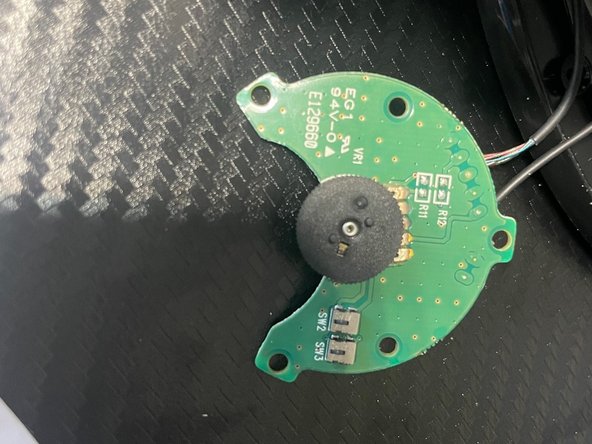
Volume circuit board should come off. Some of the glue might hold it in, un-stick the glue with a very small flat head screw driver by prying it off the plastic housing.
-
-
-
-
Remove Philips screw in the center and this will allow you to remove the knob.
-
Careful with not to touch the very sticky grease that makes the knob turning motion smooth.
-
-
-
To bypass the Thumb-wheel POT volume control: Solider a jumper wire (red wire in picture) from pin #2 to last pin #5 and pin #3 to pin #4 (solider bridge). Also leave the volume at the MAX position. This will prevent shorting the POT to Vcc to GND.
-
To bypass the mute switches: Solider R11 with a jumper wire and R12 with a jumper wire, as shown. This will bypass the mute switches.
-
-




To reassemble your device, follow these instructions in reverse order.
Cancel: I did not complete this guide.
4 other people completed this guide.
Attached Documents

5 Guide Comments
I had the right speaker break loose inside the housing. Thankfully the wires didn't break. I was able to glue it back in place and it's working fine again. Thanks for the teardown guide. I wasn't sure how to get into it to fix it.
Awesome! Glad you got them works again.
