This translation was generated by a machine and has not been reviewed by a person yet. Speak this language? Review it.

Replacing the Ecovacs Deebot T8 replacement battery

Wulfie and
Last updated on Oct 23, 2026
Views: 731
View statistics:
- Past 24 Hours:
- 8
- Past 7 Days:
- 79
- Past 30 Days:
- 314
- All Time:
- 731
Comments: 0
No one has left comments on this guide. Will you be first?
Go to guide commentsCompleted: 1 2
1 person has marked this guide "completed." Will you be next?
2 people have marked this guide "completed." Including you — great job!
Favorites: 0 1
No one has favorited (and subscribed to) this guide. Will you be the first?
1 person has favorited (and subscribed to) this guide — and that's you!
Community-Contributed Guide
An awesome member of our community made this guide. It was not created by iFixit staff.
Introduction
Go to step 1 ↓If the robot no longer completes its tasks—for example, if it suddenly stops in the middle of a run and returns to the charging dock—it is a sign that the replacement battery is no longer functioning properly and needs to be replaced.
What you need
Tools

-
-
-
Turn off the device using the red main switch under the flap!
-
Lay the device on its "back" and remove the brushes. These can be easily pulled off upwards.
 Ask FixBot
-
-
-
Remove the 8 case screws using a standard Phillips screwdriver.
-
The cover can then be removed easily - it just sits on top and can be lifted off.
-
-
-
-
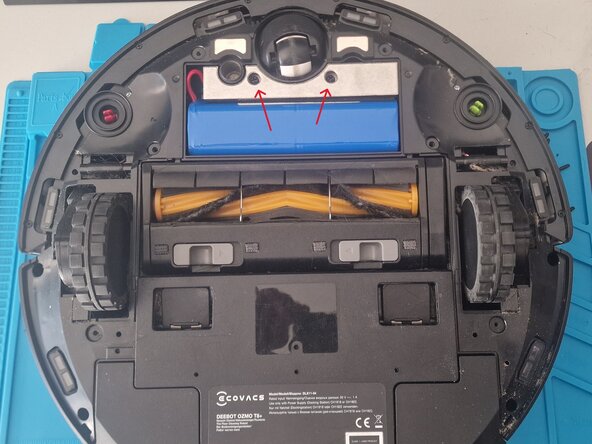
Remove the two screws from the battery bracket.
-
And remove the battery bracket. (this can also be easily removed)
-
-
-
Remove the battery.
-
Disconnect the cable.
-
Connect the cable to the new replacement battery (the connector is keyed, so it only fits in one direction).
-
-




Follow the steps in reverse order to reassemble your device.
Cancel: I did not complete this guide.
One other person completed this guide.

