Free Shipping on Domestic Orders $75+

Replacement of the motherboard of Xiaomi Redmi Note 7 Pro Motherboard Replacement

Views: 15K

View statistics:

Past 24 Hours:
5
Past 7 Days:
51
Past 30 Days:
185
All Time:
15,322
Comments: 3

2 comments on steps, 1 guide comment.

Go to guide comments
Completed: 26

26 people have marked this guide "completed." Will you be next?

Favorites: 0

No one has favorited (and subscribed to) this guide. Will you be the first?

Time Required: 20 - 25 minutes
Difficulty: Moderate
Community-Contributed Guide

An awesome member of our community made this guide. It was not created by iFixit staff.

Replacement of the motherboard of Xiaomi Redmi Note 7 Pro Motherboard Replacement

Introduction

Go to step 1 ↓

This guide will show you how to remove or replace the motherboard on the Xiaomi Redmi Note 7 Pro. You will need some replacement adhesive to reattach the components when you reassemble the device.

    1. Replacement of the motherboard of Xiaomi Redmi Note 7 Pro Motherboard Replacement, The motherboard: step 1, image 1 of 1
      • Before you begin, switch off your phone.

      • Heat your phone to about 195 degrees Fahrenheit (90 C).

      Ask FixBot

      Add Comment

    2. Replacement of the motherboard of Xiaomi Redmi Note 7 Pro Motherboard Replacement: step 2, image 1 of 1
      • Lift the back cover to create a gap between the glass and the frame.

      • Insert an opening pick into the gap.

      Ask FixBot

      Add Comment

    3. Replacement of the motherboard of Xiaomi Redmi Note 7 Pro Motherboard Replacement: step 3, image 1 of 1
      • Start sliding the opening pick from the lower left corner along the side of the device to cut the adhesive

      • Leave the opening pick in the side to prevent the adhesive from resealing.

      Ask FixBot

      Add Comment

    4. Replacement of the motherboard of Xiaomi Redmi Note 7 Pro Motherboard Replacement: step 4, image 1 of 1
      • Lift the cover open like a book, but be careful to make sure you do not damage the flex cable while it’s still connected.

      Ask FixBot

      Add Comment

    5. Replacement of the motherboard of Xiaomi Redmi Note 7 Pro Motherboard Replacement: step 5, image 1 of 2 Replacement of the motherboard of Xiaomi Redmi Note 7 Pro Motherboard Replacement: step 5, image 2 of 2
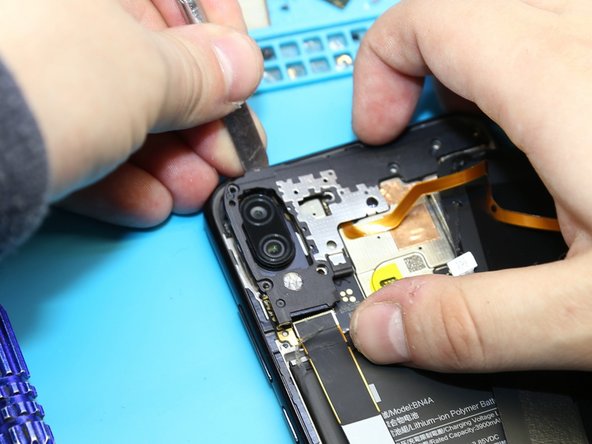
      • Using a screwdriver (1.5 mm ), unscrew 4 screw and remove the bracket holding the connector.

      Ask FixBot

      Add Comment

    6. Replacement of the motherboard of Xiaomi Redmi Note 7 Pro Motherboard Replacement: step 6, image 1 of 1
      • Disconnect the connector to avoid a possible short circuit during disassembly.

      • Disconnect connectors and remove the inter-board cable.

      Ask FixBot

      Add Comment

    7. Replacement of the motherboard of Xiaomi Redmi Note 7 Pro Motherboard Replacement: step 7, image 1 of 3 Replacement of the motherboard of Xiaomi Redmi Note 7 Pro Motherboard Replacement: step 7, image 2 of 3 Replacement of the motherboard of Xiaomi Redmi Note 7 Pro Motherboard Replacement: step 7, image 3 of 3
      • Using a screwdriver (1.5 mm), unscrew the 7 screws.

      • Remove the cover.

      Ask FixBot

      Add Comment

    8. Replacement of the motherboard of Xiaomi Redmi Note 7 Pro Motherboard Replacement: step 8, image 1 of 1
      • Pry up on the connector and remove the fingerprint sensor cable.

      Ask FixBot

      Add Comment

    9. Replacement of the motherboard of Xiaomi Redmi Note 7 Pro Motherboard Replacement: step 9, image 1 of 1
      • Disconnect the connector on PCB, and remove the front facing (selfie) camera.

      Ask FixBot

      Add Comment

    10. Replacement of the motherboard of Xiaomi Redmi Note 7 Pro Motherboard Replacement: step 10, image 1 of 1
      • Disconnect the connectors on the PCB.

      Ask FixBot

      Add Comment

    11. Replacement of the motherboard of Xiaomi Redmi Note 7 Pro Motherboard Replacement: step 11, image 1 of 1
      • Pull off and remove the PCB.

      Ask FixBot

      Add Comment

Conclusion

To reassemble your device, follow these instructions in reverse order.

Cancel: I did not complete this guide.

26 other people completed this guide.

Special thanks to these translators:

es en

100%

These translators are helping us fix the world! Want to contribute?
Start translating ›

Remphone.ru

Member since: 10/02/19

846 Reputation

1 Guide authored

1 Guide Comment

Give Me Your Phone Number..

The Comedy King - Reply Share

Add Comment

View Statistics:

Past 24 Hours: 5

Past 7 Days: 51

Past 30 Days: 185

All Time: 15,322