
Redragon Impact M908 Optical Pixart PMW3327 Sensor Replacement

Alex Johnson and
Last updated on Jun 1, 2026
Views: 464
View statistics:
- Past 24 Hours:
- 2
- Past 7 Days:
- 22
- Past 30 Days:
- 100
- All Time:
- 464
Comments: 0
No one has left comments on this guide. Will you be first?
Go to guide commentsCompleted: 1 2
1 person has marked this guide "completed." Will you be next?
2 people have marked this guide "completed." Including you — great job!
Favorites: 0 1
No one has favorited (and subscribed to) this guide. Will you be the first?
1 person has favorited (and subscribed to) this guide — and that's you!
Introduction
Go to step 1 ↓The optical sensor is responsible for detecting surface movement as the mouse moves. A malfunctioning optical sensor can make the mouse input feel laggy or erratic, severely reducing its functionality. This replacement guide will walk you through the steps to replace the Redragon Impact M908's Optical Pixart PMW3327 sensor.
Before replacing your Optical Pixart PMW3327 sensor, check our mouse lagging and freezing troubleshooting page to see if the sensor may not be the issue.
Additionally, we use a metal spudger; however, any flat object with a pointed edge will work. A soldering iron is also needed. Before beginning, ensure your mouse is unplugged from all devices.
What you need
Tools


-
-
-
Pick up your mouse and flip it over.
-
Reposition the mouse so that the four feet pads are facing you.
 Ask FixBot
-
-
-
Place the pointed edge of a spudger under the corner of one of the feet pads.
-
Press the tool forward, lifting the foot pad until it is fully removed.
-
-
-
-
-
-
Unscrew the right 3mm screw using a Phillips #000 screwdriver.
-
Unscrew the remaining four 4mm screws using a Phillips #00 screwdriver.
-
-
-
Lift the mouse's top and remove it from the bottom.
-
Place the top to the side, out of the way.
-
-
-
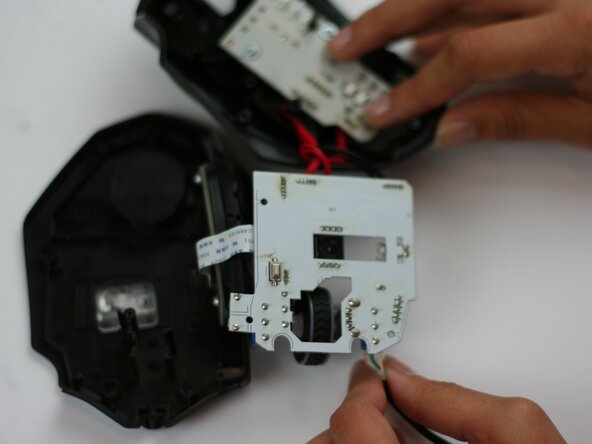
Unscrew the 3.5mm screw holding the circuit board in place near the scroll wheel using a Phillips #00 screwdriver.
-
-
-
Use the soldering iron to desolder the first optical sensor pin.
-
Repeat for the remaining 7 pins.
-
-




To reassemble your device, follow these instructions in reverse order.
Cancel: I did not complete this guide.
One other person completed this guide.

Team

Texas Tech, Team 16-2, Samson Spring 2026 Member of Texas Tech, Team 16-2, Samson Spring 2026
TTU-SAMSON-S26S16G2
5 Members
60 Guides authored
