Free Shipping on Domestic Orders $75+

PowerBeats2 Wireless Headphones by Dr. Dre Battery Replacement

Views: 29K

View statistics:

Past 24 Hours:
2
Past 7 Days:
26
Past 30 Days:
136
All Time:
28,638
Comments: 1

1 comment on steps.

Completed: 9

9 people have marked this guide "completed." Will you be next?

Favorites: 1

1 person has favorited (and subscribed to) this guide. Will you be next?

Time Required: 30 minutes
Difficulty: Moderate
Community-Contributed Guide

An awesome member of our community made this guide. It was not created by iFixit staff.

PowerBeats2 Wireless Headphones by Dr. Dre Battery Replacement

What you need

Parts

Tools

    1. PowerBeats2 Wireless Headphones by Dr. Dre Battery Replacement, Locate Battery.: step 1, image 1 of 1
      • The battery is located inside the right side ear piece.

      Ask FixBot

      Add Comment

    2. PowerBeats2 Wireless Headphones by Dr. Dre Battery Replacement, Heat Right Side.: step 2, image 1 of 1
      • Heat the right side gently at 140 F for about 3 minutes.

      • Do not over heat or it will melt the housing.

      Ask FixBot

      Add Comment

    3. PowerBeats2 Wireless Headphones by Dr. Dre Battery Replacement, Remove Battery Cover/Casing: step 3, image 1 of 2 PowerBeats2 Wireless Headphones by Dr. Dre Battery Replacement, Remove Battery Cover/Casing: step 3, image 2 of 2
      • After heating, gently remove the cover/casing as shown in the picture.

      • Take your time and re-heat if cover/casing does not remove smoothly.

      Ask FixBot

      Add Comment

    4. PowerBeats2 Wireless Headphones by Dr. Dre Battery Replacement, Desolder & Replace Battery: step 4, image 1 of 1
      • Desolder battery using soldering iron and replace with replacement battery.

      Ask FixBot

      Add Comment

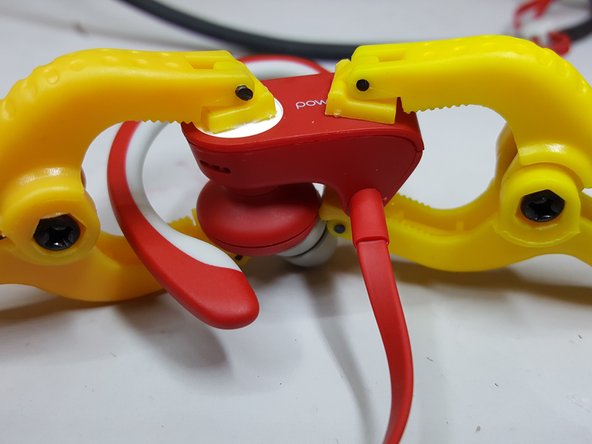
    5. PowerBeats2 Wireless Headphones by Dr. Dre Battery Replacement, Reattach Battery Cover/Casing: step 5, image 1 of 2 PowerBeats2 Wireless Headphones by Dr. Dre Battery Replacement, Reattach Battery Cover/Casing: step 5, image 2 of 2
      • After battery is replaced, apply super glue to the border of the inside of the battery cover/casing and put it back in place.

      • Use small clamps/binder clip to hold the housing in place while the super glue dries up.

      Ask FixBot

      Add Comment

Conclusion

To reassemble your device, follow these instructions in reverse order.

Cancel: I did not complete this guide.

9 other people completed this guide.

Faizan Naveed

Member since: 04/12/17

3,540 Reputation

8 Guides authored

Team

Mobile Device Repair Factory Member of Mobile Device Repair Factory

Business

1 Member

96 Guides authored

0 Guide Comments

Add Comment

View Statistics:

Past 24 Hours: 2

Past 7 Days: 26

Past 30 Days: 136

All Time: 28,638