
Polar V800 Charging Port Cover Replacement

Nick B. and
Last updated on May 30, 2018
Views: 3.6K
View statistics:
- Past 24 Hours:
- 3
- Past 7 Days:
- 15
- Past 30 Days:
- 58
- All Time:
- 3,593
Comments: 1
1 guide comment.
Go to guide commentsCompleted: 1 2
1 person has marked this guide "completed." Will you be next?
2 people have marked this guide "completed." Including you — great job!
Favorites: 0 1
No one has favorited (and subscribed to) this guide. Will you be the first?
1 person has favorited (and subscribed to) this guide — and that's you!
Introduction
Go to step 1 ↓This guide will show how to replace the charging port cover of the Polar V800 sports watch. Replacement may be needed if the charging port cover wears out from use or if the charging port cover breaks off. The charging port cover provides the charging port with much need protection from the elements to avoid corrosion and residue build-up.
What you need
Tools

-
-
-
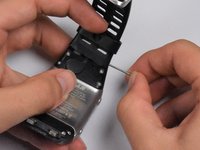
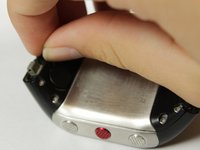
Using a narrow object like a paperclip, push the pins located in the watch band in the direction of the arrow indicated on the watch.
-
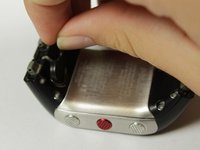
Completely pull out the pins.
 Ask FixBot
-
-
-
-
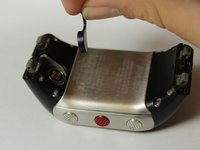
To remove the watch band, pull each end of the watch band away from the watch frame.
-
-
-




To reassemble your device, follow these instructions in reverse order.
Cancel: I did not complete this guide.
One other person completed this guide.

Team

Cal Poly, Team S17-G6, Livingston Spring 2018 Member of Cal Poly, Team S17-G6, Livingston Spring 2018
CPSU-LIVINGSTON-S18S17G6
4 Members
72 Guides authored
