Free Shipping on Domestic Orders $75+

PlayStation SCPH-5501 Motor Speed Adjustment (KSM-440ADM/AEM+)

What you need

    1. PlayStation SCPH-5501 Motor Speed Adjustment (KSM-440ADM/AEM+), Change note: step 1, image 1 of 2 PlayStation SCPH-5501 Motor Speed Adjustment (KSM-440ADM/AEM+), Change note: step 1, image 2 of 2
      Tool used on this step:
      Essential Electronics Toolkit
      $29.95
      Buy
      • Due to the EET missing several components present in the Pro Tech Go and only being $20 cheaper, the EET has been removed. The EET will work for this guide as-is, but if you are shopping for a new toolkit to complete this guide, the Pro Tech Go (new or refurbished, refurbished is ~$32 cheaper), or Pro Tech ($79 new/~$59.95 refurb) is the current recommended toolkit for this guide.

      • If you are interested in a refurbished kit stock levels change frequently but can be found here.

      Ask FixBot

      Add Comment

    1. PlayStation SCPH-5501 Motor Speed Adjustment (KSM-440ADM/AEM+), Is your system recoverable?: step 2, image 1 of 1
      • Before starting, make sure you have a die cast laser. Plastic lasers are not repairable.

      • If your laser is plastic: You must replace the laser due to uneven wear.

      • If you have a Die cast laser, this fix may improve the read rate. However, this is an age based failure. Note: In some cases, the laser resistance will need to be adjusted.

      Ask FixBot

      Add Comment

    2. PlayStation SCPH-5501 Motor Speed Adjustment (KSM-440ADM/AEM+), Opening the system: step 3, image 1 of 3 PlayStation SCPH-5501 Motor Speed Adjustment (KSM-440ADM/AEM+), Opening the system: step 3, image 2 of 3 PlayStation SCPH-5501 Motor Speed Adjustment (KSM-440ADM/AEM+), Opening the system: step 3, image 3 of 3
      • EET owners: Your kit has this bit. No purchase needed.

      • Remove the 6 screws from the bottom of the PlayStation. Use a Phillips #2 screwdriver.

      • Lift the top cover off.

      Ask FixBot

      Add Comment

    3. PlayStation SCPH-5501 Motor Speed Adjustment (KSM-440ADM/AEM+), Disconnect the laser: step 4, image 1 of 3 PlayStation SCPH-5501 Motor Speed Adjustment (KSM-440ADM/AEM+), Disconnect the laser: step 4, image 2 of 3 PlayStation SCPH-5501 Motor Speed Adjustment (KSM-440ADM/AEM+), Disconnect the laser: step 4, image 3 of 3
      • Disconnect the laser from the system.

      Ask FixBot

      Add Comment

    4. PlayStation SCPH-5501 Motor Speed Adjustment (KSM-440ADM/AEM+), Repair sanity check: step 5, image 1 of 3 PlayStation SCPH-5501 Motor Speed Adjustment (KSM-440ADM/AEM+), Repair sanity check: step 5, image 2 of 3 PlayStation SCPH-5501 Motor Speed Adjustment (KSM-440ADM/AEM+), Repair sanity check: step 5, image 3 of 3
      • EET owners: Your kit has this bit. No purchase needed.

      • With the laser removed from the system, remove the 2 Phillips PH1 screws. Check if the laser is plastic.

      • If the laser is plastic, it cannot be repaired and must be replaced. The example shown can be adjusted.

      Ask FixBot

      Add Comment

    5. PlayStation SCPH-5501 Motor Speed Adjustment (KSM-440ADM/AEM+), Adjust the motor trimpot: step 6, image 1 of 3 PlayStation SCPH-5501 Motor Speed Adjustment (KSM-440ADM/AEM+), Adjust the motor trimpot: step 6, image 2 of 3 PlayStation SCPH-5501 Motor Speed Adjustment (KSM-440ADM/AEM+), Adjust the motor trimpot: step 6, image 3 of 3
      • EET owners: Your kit has this bit. No purchase needed.

      • Only adjust this enough to reliably read games and music CDs again. If the speed is too slow, the laser may physically "burn" your games, albeit very unlikely unless you adjust the laser trimpot on the mainboard.

      • Consider anything less then a 80-90% read rate a failure. These are hard to recover reliably.

      • Before starting, mark the original adjustment point and write down the factory setting as tested. It will be difficult to take it back to stock without this information.

      • Adjust the trimpot incrementally using a Phillips PH1 or other compatible bit. Do this until the laser is reading games more consistently.

      Ask FixBot

      Add Comment

    6. PlayStation SCPH-5501 Motor Speed Adjustment (KSM-440ADM/AEM+), Test the repaired system: step 7, image 1 of 2 PlayStation SCPH-5501 Motor Speed Adjustment (KSM-440ADM/AEM+), Test the repaired system: step 7, image 2 of 2
      • If possible, test on a known good system first.

      • Improving the read percentage: If you are not happy with the results, keep adjusting the motor. Repeat until you are happy with the passing read rate, or the motor doesn't spin.

      • If you see the Insert PlayStation CD-ROM screen, the motor is running slow. Adjust the speed to be faster.

      • Partially reassemble the system and test it. If it is sufficient, reassemble the system.

      • To test the read percentage, get a few known good games and see which ones load. A minimum of 5 test games is recommended. Only adjust the laser again after each full test is done.

      • If the game loads, test play the system for a few minutes to check the stability. Important: Some early revisions have FMV issues - THIS IS EXPECTED.

      Ask FixBot

      Add Comment

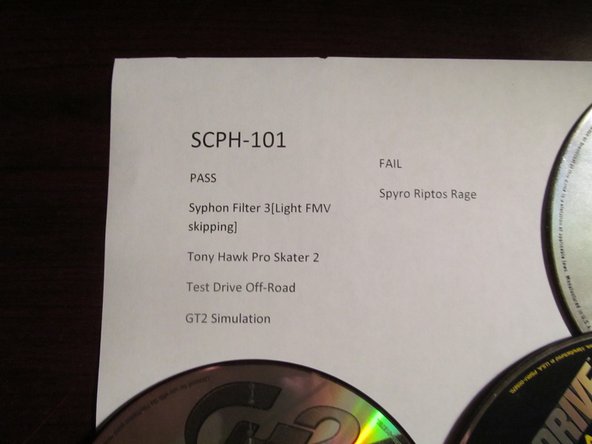
    7. PlayStation SCPH-5501 Motor Speed Adjustment (KSM-440ADM/AEM+), Test data - control system (SCPH-101): step 8, image 1 of 2 PlayStation SCPH-5501 Motor Speed Adjustment (KSM-440ADM/AEM+), Test data - control system (SCPH-101): step 8, image 2 of 2
      • Control system results

      Ask FixBot

      Add Comment

    8. PlayStation SCPH-5501 Motor Speed Adjustment (KSM-440ADM/AEM+), Test data - repaired system (SCPH-5501): step 9, image 1 of 2 PlayStation SCPH-5501 Motor Speed Adjustment (KSM-440ADM/AEM+), Test data - repaired system (SCPH-5501): step 9, image 2 of 2
      • Repaired SCPH-5501 results

      Ask FixBot

      Add Comment

Conclusion

To reassemble your device, follow these instructions in reverse order.

Cancel: I did not complete this guide.

5 other people completed this guide.

Nick

Member since: 11/10/09

105,983 Reputation

72 Guides authored

3 Guide Comments

Do you have the specifics as to the spacers and trimpot adjustment when using a new KSM-440BAM (with extension cable if needed) on either SCPH-1001 or SCPH-5501?

leafybye - Reply Share

No - I do not.

Nick - Reply Share

Hello, I recently attempted to replace my weak laser in my 5501 with a 440BAM and it did not work, I even tried putting back the old laser but it wouldn't work again at all no motor spin or anything. Any ideas as to what I'm doing wrong or how to fix? Thanks!

James Whitson - Reply Share

Add Comment

View Statistics:

Past 24 Hours: 9

Past 7 Days: 67

Past 30 Days: 241

All Time: 29,646