Free Shipping on Domestic Orders $75+

Photive Artisan Portable Bluetooth Speaker Battery Pack Replacement

What you need

  1. Photive Artisan Portable Bluetooth Speaker Battery Pack Replacement, Front Panel: step 1, image 1 of 1
    • Before continuing, be sure your device is powered off.

    • Remove two 9mm Phillips #0 head screws from the bottom side of the speaker.

    Ask FixBot

    Add Comment

  2. Photive Artisan Portable Bluetooth Speaker Battery Pack Replacement: step 2, image 1 of 1
    • Peel back the rubber feet from either side of the base.

    Ask FixBot

    Add Comment

  3. Photive Artisan Portable Bluetooth Speaker Battery Pack Replacement: step 3, image 1 of 1
    • Remove four 9mm Phillips #0 head screws from the bottom of the speaker.

    Ask FixBot

    Add Comment

  4. Photive Artisan Portable Bluetooth Speaker Battery Pack Replacement: step 4, image 1 of 1
    • Separate the base of the speaker from the upper housing.

    Ask FixBot

    Add Comment

  5. Photive Artisan Portable Bluetooth Speaker Battery Pack Replacement: step 5, image 1 of 1
    • Remove four 9mm Phillips #0 head screws from the inside of the speaker case.

    Ask FixBot

    Add Comment

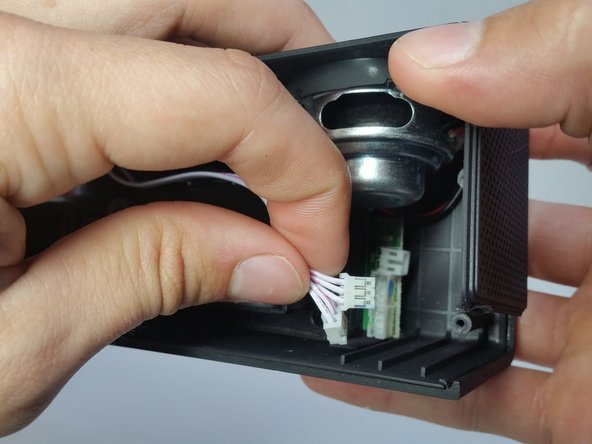
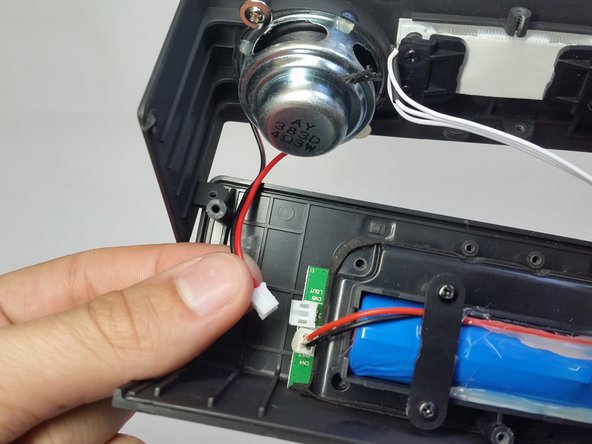
  6. Photive Artisan Portable Bluetooth Speaker Battery Pack Replacement: step 6, image 1 of 3 Photive Artisan Portable Bluetooth Speaker Battery Pack Replacement: step 6, image 2 of 3 Photive Artisan Portable Bluetooth Speaker Battery Pack Replacement: step 6, image 3 of 3
    • Remove all cable connectors from the speaker motherboard.

    Ask FixBot

    Add Comment

  7. Photive Artisan Portable Bluetooth Speaker Battery Pack Replacement, Battery Pack: step 7, image 1 of 1
    • Remove two 9mm Phillips head #0 screws from the battery holder.

    Ask FixBot

    Add Comment

  8. Photive Artisan Portable Bluetooth Speaker Battery Pack Replacement: step 8, image 1 of 1
    • Remove four 9mm Phillips #0 head screws holding the battery pack in place.

    Ask FixBot

    Add Comment

  9. Photive Artisan Portable Bluetooth Speaker Battery Pack Replacement: step 9, image 1 of 1
    • Disconnect the battery cable from the motherboard.

    Ask FixBot

    Add Comment

  10. Photive Artisan Portable Bluetooth Speaker Battery Pack Replacement: step 10, image 1 of 1
    • Lift the battery pack from the board.

    Ask FixBot

    Add Comment

Conclusion

To reassemble your device, follow these instructions in reverse order.

Cancel: I did not complete this guide.

One other person completed this guide.

David Lennon

Member since: 04/14/15

10,198 Reputation

10 Guides authored

Team

Cal Poly, Team 4-5, Maness Spring 2015 Member of Cal Poly, Team 4-5, Maness Spring 2015

CPSU-MANESS-S15S4G5

4 Members

49 Guides authored

1 Guide Comment

TJmart.pk is one of the main Online Wholesale and Retail Shopping

Websites in Pakistan. our Company provides the latest and good quality of '''Bluetooth devices in Pakistan'''.

7 Days Money Back Guarantee. Authentic &

Reliable Products with High-Quality Standards Guaranteed. Fast

Deliveries All Over Pakistan.

No Fake Listing, No Hidden Charges Cash on Delivery

tjmart pakistan - Reply Share

Add Comment

View Statistics:

Past 24 Hours: 0

Past 7 Days: 5

Past 30 Days: 39

All Time: 2,707