Free Shipping on Domestic Orders $75+

Panasonic Lumix DMC-FX37 Photoreceptor Replacement

Views: 999

View statistics:

Past 24 Hours:
2
Past 7 Days:
10
Past 30 Days:
89
All Time:
999
Comments: 0

No one has left comments on this guide. Will you be first?

Go to guide comments
Completed: 1

1 person has marked this guide "completed." Will you be next?

Favorites: 0

No one has favorited (and subscribed to) this guide. Will you be the first?

Time Required: 15 - 20 minutes
Difficulty: Moderate
Panasonic Lumix DMC-FX37 Photoreceptor Replacement

Introduction

Go to step 1 ↓

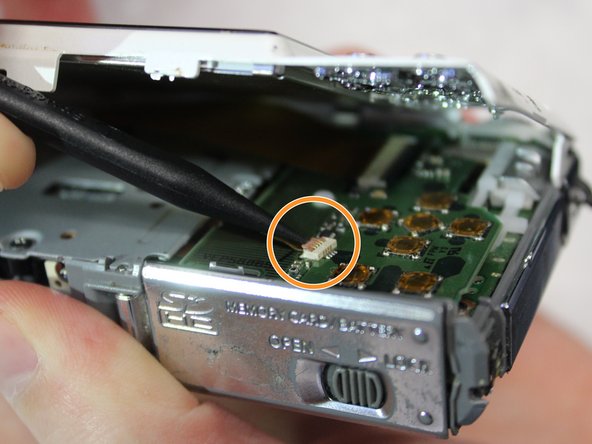
This guide will show you how to access and remove the photoreceptor from the camera. It features three ribbon cables that you should handle carefully due to their delicate nature. As always, you should take note as to what screws go where so that you do not cause internal damage to your device.

What you need

Parts

Tools

  • Spudger
    4.9
  • Phillips #000 Screwdriver
    4.9
    1. Panasonic Lumix DMC-FX37 Photoreceptor Replacement, Panasonic Lumix DMC-FX37 Disassembly: step 1, image 1 of 2 Panasonic Lumix DMC-FX37 Photoreceptor Replacement, Panasonic Lumix DMC-FX37 Disassembly: step 1, image 2 of 2
      • Remove both of the 3 mm screws on the bottom of the camera connected to the side panel.

      Ask FixBot

      Add Comment

    2. Panasonic Lumix DMC-FX37 Photoreceptor Replacement: step 2, image 1 of 2 Panasonic Lumix DMC-FX37 Photoreceptor Replacement: step 2, image 2 of 2
      • Remove the remaining 3 mm screw holding on the side panel and remove the panel entirely.

      Ask FixBot

      Add Comment

    3. Panasonic Lumix DMC-FX37 Photoreceptor Replacement: step 3, image 1 of 2 Panasonic Lumix DMC-FX37 Photoreceptor Replacement: step 3, image 2 of 2
      • On the opposite side of the camera, remove the two 3 mm screws.

      • Remove the bottom side panel and place it with its respective 3 mm screw.

      Ask FixBot

      Add Comment

    4. Panasonic Lumix DMC-FX37 Photoreceptor Replacement: step 4, image 1 of 3 Panasonic Lumix DMC-FX37 Photoreceptor Replacement: step 4, image 2 of 3 Panasonic Lumix DMC-FX37 Photoreceptor Replacement: step 4, image 3 of 3
      • Remove the front panel (the panel around the lens casing) from the camera.

      • Remove the two ribbon cables connected to the back panel (the panel this the LCD screen) by lifting up on their respective tabs and gently pulling out the cord.

      • Caution: When removing the back panel, the two ribbon cables are relatively delicate and must both be disconnected before the panel can be entirely removed.

      • Remove the back panel from the camera.

      Ask FixBot

      Add Comment

    5. Panasonic Lumix DMC-FX37 Photoreceptor Replacement: step 5, image 1 of 1
      • Remove the top control panel (connected to the flash battery) from the camera.

      • The top control panel is connected to the rest of the camera by a delicate multi-pin plug. Be careful as to not bend the pins!

      Ask FixBot

      Add Comment

    1. Panasonic Lumix DMC-FX37 Photoreceptor Replacement, Photoreceptor: step 6, image 1 of 2 Panasonic Lumix DMC-FX37 Photoreceptor Replacement, Photoreceptor: step 6, image 2 of 2
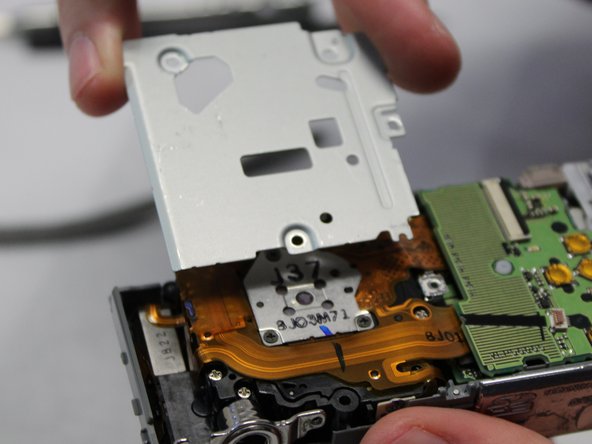
      • Locate and remove the silver 2mm screw on the protection panel.

      • Remove the three black 8mm screws that remain.

      • Be sure to remember which length of screw goes to which slot. Failing to do so could damage your device.

      • Proceed to remove the protection panel entirely.

      Ask FixBot

      Add Comment

    2. Panasonic Lumix DMC-FX37 Photoreceptor Replacement: step 7, image 1 of 1
      • Insert the flat end of a plastic spudger underneath the motherboard and twist. This will disconnect the board from the device and allow it to be removed.

      Ask FixBot

      Add Comment

    3. Panasonic Lumix DMC-FX37 Photoreceptor Replacement: step 8, image 1 of 1
      • Use the pointed end of the spudger to lift the black tabs holding the ribbon cable connected to the photoreceptor in place.

      • Before pulling the cable free, be sure to complete the next step (removing the screws) as the ribbon cables are delicate and must be handled with care.

      Ask FixBot

      Add Comment

    4. Panasonic Lumix DMC-FX37 Photoreceptor Replacement: step 9, image 1 of 2 Panasonic Lumix DMC-FX37 Photoreceptor Replacement: step 9, image 2 of 2
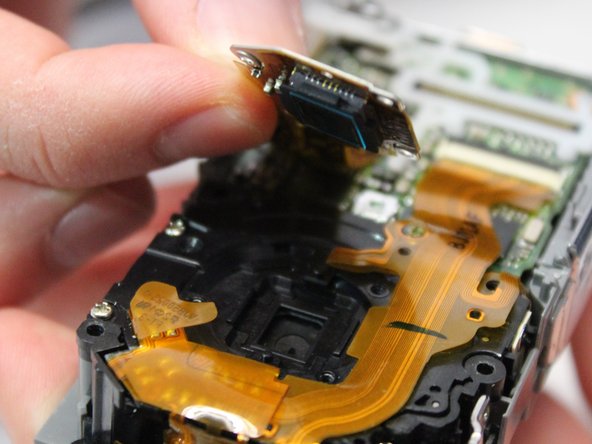
      • Remove the three 3mm screws holding the photoreceptor in place.

      • Carefully lift the photoreceptor, disconnecting the ribbon cable and remove the photoreceptor from the device.

      Ask FixBot

      Add Comment

Conclusion

To reassemble your device, follow these instructions in reverse order.

Cancel: I did not complete this guide.

One other person completed this guide.

Zhentao

Member since: 01/30/18

247 Reputation

2 Guides authored

Team

Baylor, Team S2-G3, Johnson Spring 2018 Member of Baylor, Team S2-G3, Johnson Spring 2018

BU-JOHNSON-S18S2G3

3 Members

72 Guides authored

0 Guide Comments

Add Comment

View Statistics:

Past 24 Hours: 2

Past 7 Days: 10

Past 30 Days: 89

All Time: 999