
Motorola Moto G Stylus 5G 2023 Speaker Replacement

Amy Steinert and
Last updated on Dec 31, 2025
Views: 436
View statistics:
- Past 24 Hours:
- 1
- Past 7 Days:
- 26
- Past 30 Days:
- 77
- All Time:
- 436
Comments: 0
No one has left comments on this guide. Will you be first?
Go to guide commentsCompleted: 1 2
1 person has marked this guide "completed." Will you be next?
2 people have marked this guide "completed." Including you — great job!
Favorites: 0 1
No one has favorited (and subscribed to) this guide. Will you be the first?
1 person has favorited (and subscribed to) this guide — and that's you!
Introduction
Go to step 1 ↓Motorola Moto G Stylus 5G 2023, Model XT2315, Speaker Replacement.
If the speaker is damaged, broken or no longer able to produce sound, follow this guide to aid in replacement.
When replacing the speaker module and removing the graphite film, a new graphite film is required for reassembly
What you need
Tools


-
-
-
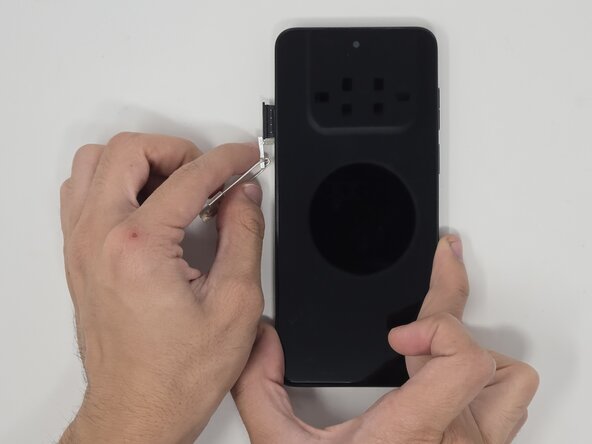
Use a SIM eject tool to remove the SIM tray.
-
Gently pull the SIM tray from the left side when the screen is facing upward.
 Ask FixBot
-
-
-
Push the tip of the stylus to release the lock.
-
With the screen facing up, remove the stylus from the bottom-right corner of the phone.
-
-
-
Place the screen facing downward.
-
Use the small suction cup to create a gap for the opening pick to fit.
-
Insert the opening pick into a corner of the phone and move around the backing to release the adhesive.
-
Pull the backing off of the phone.
-
-
-
-
-
-
Remove the six 3.2 mm screws from the speaker using a Phillips #0 screwdriver.
-



To reassemble your device, follow these instructions in reverse order.
Cancel: I did not complete this guide.
One other person completed this guide.

Team

Utah Tech University, Team 1-5, McMurrin Fall 2025 Member of Utah Tech University, Team 1-5, McMurrin Fall 2025
UTAHTECH-MCMURRIN-F25S1G5
3 Members
72 Guides authored
