Shop the Holiday Gift Guide
Free Shipping on Domestic Orders $75+

Motorola Moto G Stylus 5G 2023 Charging Port Replacement

Views: 733

View statistics:

Past 24 Hours:
3
Past 7 Days:
22
Past 30 Days:
97
All Time:
733
Comments: 0

No one has left comments on this guide. Will you be first?

Go to guide comments
Completed: 3

3 people have marked this guide "completed." Will you be next?

Favorites: 0

No one has favorited (and subscribed to) this guide. Will you be the first?

Time Required: 20 minutes
Difficulty: Easy
Motorola Moto G Stylus 5G 2023 Charging Port Replacement

Introduction

Go to step 1 ↓

Motorola Moto G Stylus 5G 2023, Model XT2315, Charging Port Replacement.

If the charging port is damaged, broken or no longer charges a USB-C cord follow this guide to aid in replacement. When disconnecting the silver coaxial cables do not pull coaxial cables out of the device.

What you need

Tools

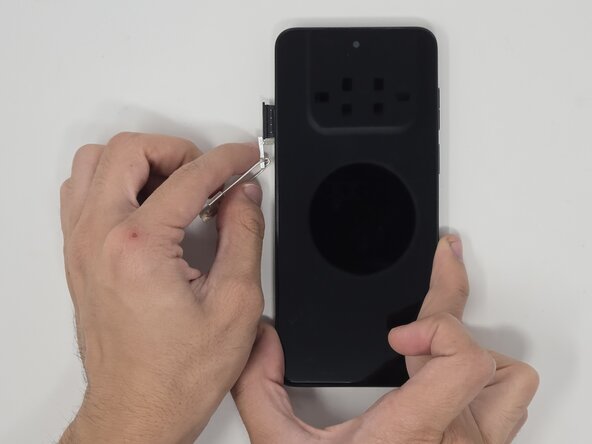
    1. Motorola Moto G Stylus 5G 2023 Charging Port Replacement, Back Cover: step 1, image 1 of 3 Motorola Moto G Stylus 5G 2023 Charging Port Replacement, Back Cover: step 1, image 2 of 3 Motorola Moto G Stylus 5G 2023 Charging Port Replacement, Back Cover: step 1, image 3 of 3
      • Use a SIM eject tool to remove the SIM tray.

      • Gently pull the SIM tray from the left side when the screen is facing upward.

      Ask FixBot

      Add Comment

    2. Motorola Moto G Stylus 5G 2023 Charging Port Replacement: step 2, image 1 of 3 Motorola Moto G Stylus 5G 2023 Charging Port Replacement: step 2, image 2 of 3 Motorola Moto G Stylus 5G 2023 Charging Port Replacement: step 2, image 3 of 3
      • Push the tip of the stylus to release the lock.

      • With the screen facing up, remove the stylus from the bottom-right corner of the phone.

      Ask FixBot

      Add Comment

    3. Motorola Moto G Stylus 5G 2023 Charging Port Replacement: step 3, image 1 of 3 Motorola Moto G Stylus 5G 2023 Charging Port Replacement: step 3, image 2 of 3 Motorola Moto G Stylus 5G 2023 Charging Port Replacement: step 3, image 3 of 3
      • Place the screen facing downward.

      • Use the small suction cup to create a gap for the opening pick to fit.

      • Place the suction cup near a corner for easier access to insert the opening pick.

      • Insert the opening pick into a corner of the phone and move around the backing to release the adhesive.

      • Pull the backing off of the phone.

      Ask FixBot

      Add Comment

    1. Motorola Moto G Stylus 5G 2023 Charging Port Replacement, Speaker: step 4, image 1 of 1
      • Use tweezers to remove the yellow tape.

      Ask FixBot

      Add Comment

    2. Motorola Moto G Stylus 5G 2023 Charging Port Replacement: step 5, image 1 of 1
      • Remove the six 3.2 mm screws from the speaker using a Phillips #0 screwdriver.

      Ask FixBot

      Add Comment

    3. Motorola Moto G Stylus 5G 2023 Charging Port Replacement: step 6, image 1 of 2 Motorola Moto G Stylus 5G 2023 Charging Port Replacement: step 6, image 2 of 2
      • Peel off the graphite film with tweezers.

      Ask FixBot

      Add Comment

    4. Motorola Moto G Stylus 5G 2023 Charging Port Replacement: step 7, image 1 of 3 Motorola Moto G Stylus 5G 2023 Charging Port Replacement: step 7, image 2 of 3 Motorola Moto G Stylus 5G 2023 Charging Port Replacement: step 7, image 3 of 3
      • Pry off the speaker module with the iFixit opening pick.

      Ask FixBot

      Add Comment

    1. Motorola Moto G Stylus 5G 2023 Charging Port Replacement, Charging Port: step 8, image 1 of 2 Motorola Moto G Stylus 5G 2023 Charging Port Replacement, Charging Port: step 8, image 2 of 2
      • Disconnect the cable attached to the back panel with tweezers.

      • Disconnect the silver coaxial cables on the right side of the phone.

      Ask FixBot

      Add Comment

    2. Motorola Moto G Stylus 5G 2023 Charging Port Replacement: step 9, image 1 of 2 Motorola Moto G Stylus 5G 2023 Charging Port Replacement: step 9, image 2 of 2
      • Remove the silver 2.1 mm screw using a Phillips #0 screwdriver.

      Ask FixBot

      Add Comment

    3. Motorola Moto G Stylus 5G 2023 Charging Port Replacement: step 10, image 1 of 2 Motorola Moto G Stylus 5G 2023 Charging Port Replacement: step 10, image 2 of 2
      • Use iFixit tweezers or the opening pick to find an opening and remove the entire charging port.

      Ask FixBot

      Add Comment

Conclusion

To reassemble your device, follow these instructions in reverse order.

Cancel: I did not complete this guide.

3 other people completed this guide.

Author

with

Daniel Osorio Ospina

Member since: 09/07/25

389 Reputation

2 Guides authored

Team

0 Guide Comments

Add Comment

View Statistics:

Past 24 Hours: 3

Past 7 Days: 22

Past 30 Days: 97

All Time: 733