
Motorola Moto G Stylus 5G 2023 Back Cover Replacement

Becca Smiley and
Last updated on Dec 16, 2025
Views: 534
View statistics:
- Past 24 Hours:
- 3
- Past 7 Days:
- 11
- Past 30 Days:
- 73
- All Time:
- 534
Comments: 0
No one has left comments on this guide. Will you be first?
Go to guide commentsCompleted: 2 3
2 people have marked this guide "completed." Will you be next?
3 people have marked this guide "completed." Including you — great job!
Favorites: 0 1
No one has favorited (and subscribed to) this guide. Will you be the first?
1 person has favorited (and subscribed to) this guide — and that's you!
Introduction
Go to step 1 ↓This guide will show you how to replace the back cover of the Motorola Moto G Stylus 5G 2023, Model XT2315.
If the back cover is cracked or damaged, follow this guide to aid in replacing it. This device requires an adhesive to seal the back cover, protecting the internal components. When replacing the back cover, a new adhesive is required to reseal the Motorola.
Additionally, the back cover must be removed when replacing or repairing any other internal components.
What you need
Tools


-
-
-
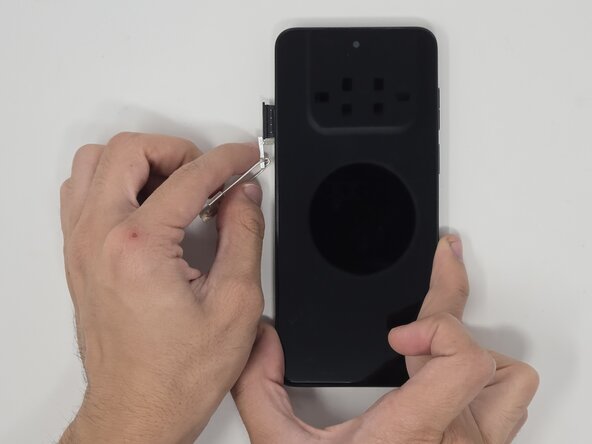
Use a SIM eject tool to remove the SIM tray.
-
Gently pull the SIM tray from the left side when the screen is facing upward.
 Ask FixBot
-
-
-
-
Push the tip of the stylus to release the lock.
-
With the screen facing up, remove the stylus from the bottom-right corner of the phone.
-
-
-
Place the screen facing downward.
-
Use the small suction cup to create a gap for the opening pick to fit.
-
Insert the opening pick into a corner of the phone and move around the backing to release the adhesive.
-
Pull the backing off of the phone.
-
-



To reassemble your device, follow these instructions in reverse order.
Cancel: I did not complete this guide.
2 other people completed this guide.

Team

Utah Tech University, Team 1-5, McMurrin Fall 2025 Member of Utah Tech University, Team 1-5, McMurrin Fall 2025
UTAHTECH-MCMURRIN-F25S1G5
3 Members
72 Guides authored
