
Lite-On LightScribe SHM-165H6S Drive Belt Replacement

James Biggs and
Last updated on May 7, 2024
Views: 7.6K
View statistics:
- Past 24 Hours:
- 4
- Past 7 Days:
- 15
- Past 30 Days:
- 86
- All Time:
- 7,631
Comments: 3
2 comments on steps, 1 guide comment.
Go to guide commentsCompleted: 6 7
6 people have marked this guide "completed." Will you be next?
7 people have marked this guide "completed." Including you — great job!
Favorites: 6 7
6 people have favorited (and subscribed to) this guide. Will you be next?
7 people have favorited (and subscribed to) this guide — including you!
Featured Guide
This guide has been found to be exceptionally cool by the iFixit staff.
Action Shots
Be an action hero! This guide needs images that better demonstrate how to perform specific actions.
Bullets!
Better coordination with markups and the color/type of bullets will help make this guide more clear!
Community-Contributed Guide
An awesome member of our community made this guide. It was not created by iFixit staff.
Introduction
Go to step 1 ↓If your drive is having problems opening, the drive belt may have broken or fallen out of the track and you will need to replace it.
What you need
Tools


-
-
-
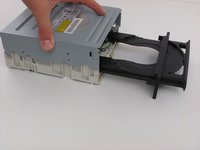
Insert an open paper clip into the small hole on the left side of the faceplate.
-
After the tray opens, extend it fully.
 Ask FixBot
-
-
-
Use an opening device to push in the black tabs on the left, right and bottom of the outer chassis to unhook the faceplate.
-
-
-
-
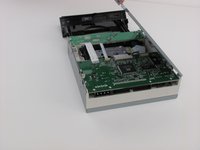
Unscrew the four 8.5 mm screws on the bottom chassis using a Philips #2 screwdriver.
-
-
-
-
Tool used on this step:Tweezers$4.99
-
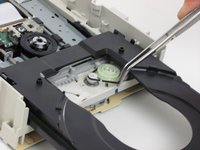
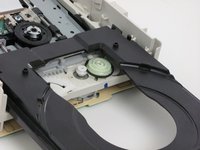
Extend the tray so that the belt is accessible.
-
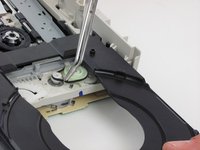
Remove the old belt using tweezers.
-
-
-
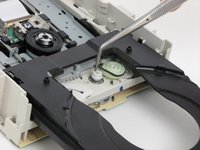
Carefully replace with the new belt by wrapping it around the larger gear first, followed by the smaller gear.
-
-






To reassemble your device, follow these instructions in reverse order.
Cancel: I did not complete this guide.
6 other people completed this guide.

Team

Cal Poly, Team 6-5, Regan Fall 2011 Member of Cal Poly, Team 6-5, Regan Fall 2011
CPSU-REGAN-F11S6G5
2 Members
36 Guides authored
1 Guide Comment
In case anyone is interested, I used a 11/16” OD x 9/16” I.D. x 1/16” wall, for this exact drive (was a tight fit) and seems to work perfect.
I was so tired of replacing rubber bands every few months!
And yes this is an “O-ring” it should be less than a buck five eighty at your local big box hardware store.
