
Lenovo Yoga 720-15IKB Fan Replacement

Shaina Bagri and
Last updated on Dec 6, 2023
Views: 5.1K
View statistics:
- Past 24 Hours:
- 3
- Past 7 Days:
- 19
- Past 30 Days:
- 78
- All Time:
- 5,095
Comments: 4
4 comments on steps.
Completed: 7 8
7 people have marked this guide "completed." Will you be next?
8 people have marked this guide "completed." Including you — great job!
Favorites: 0 1
No one has favorited (and subscribed to) this guide. Will you be the first?
1 person has favorited (and subscribed to) this guide — and that's you!
Introduction
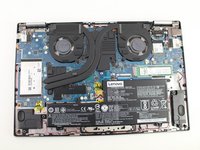
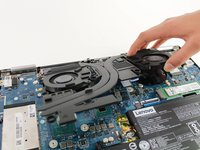
Go to step 1 ↓This guide shows you how to replace the Lenovo Yoga 720 15-IKB (88YG7000828) fan. This laptop is very similar to the Lenovo Yoga 720 13-inch , the Yoga 710, and the Yoga 730. The fan replacement for all of these models will be similar. A faulty fan can cause the laptop to overheat, slowing down performance. These symptoms are further explained on the troubleshooting page. The thermal paste is located underneath the fan. Refer to this guide if you would like to replace the thermal paste.
What you need
Parts


Tools


-
-
-
Power off the device before starting.
-
Flip the device over with the hinges facing away from you.
-
Remove seven 5.0 mm Torx T5 screws.
-
Remove three 9.5 mm Torx T5 screws.
 Ask FixBot
-
-
-
Pry around the edges from one side to another with a plastic opening tool.
-
Lift the case from the front until you feel resistance.
-
Pull the cover towards you, away from the hinges.
-
Completely lift off the cover.
-
-
-
-
-
-
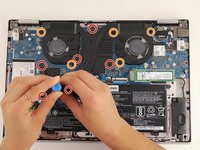
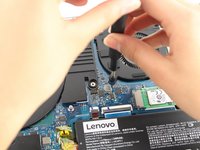
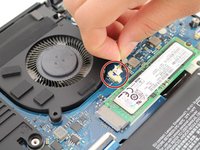
Remove the six 5.2mm Torx T5 screws holding the fan in place.
-
Remove the five 5.0mm Torx T5 screws holding the fan in place.
-
-







To reassemble your device, follow these instructions in reverse order.
Cancel: I did not complete this guide.
7 other people completed this guide.

Team

Cal Poly, Team S19-G3, White Winter 2020 Member of Cal Poly, Team S19-G3, White Winter 2020
CPSU-WHITE-W20S19G3
4 Members
84 Guides authored
