
Lenovo 14e Chromebook Motherboard Replacement

Katelyn Fielder and
Last updated on Dec 19, 2025
Views: 449
View statistics:
- Past 24 Hours:
- 1
- Past 7 Days:
- 10
- Past 30 Days:
- 78
- All Time:
- 449
Comments: 0
No one has left comments on this guide. Will you be first?
Go to guide commentsCompleted: 0 1
No one has marked this guide "completed." Will you be the first?
1 person has marked this guide "completed." It's you — great job!
Favorites: 0 1
No one has favorited (and subscribed to) this guide. Will you be the first?
1 person has favorited (and subscribed to) this guide — and that's you!
Introduction
Go to step 1 ↓If your Lenovo 14e Chromebook motherboard is facing issues, this guide will help you replace it! This process involves disconnection of multiple internal components, so make sure to have a clean, clutter-free surface to work on. We recommend taking a look at the Troubleshooting Guide before you get started to assess if there are minor issues causing the problem before replacing the entire part.
Before moving forward, make sure you have all the listed tools, your chromebook is powered off, and unplugged.
What you need


-
-
-
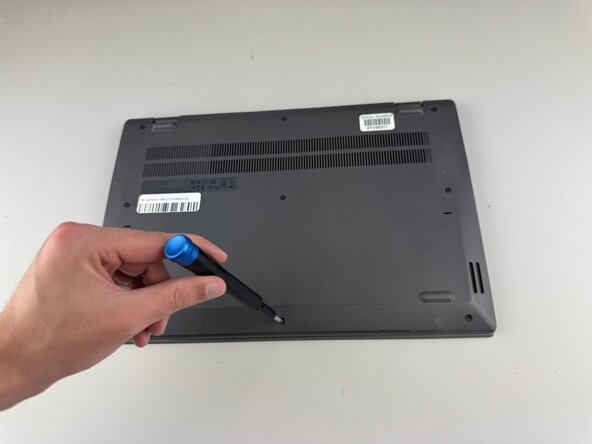
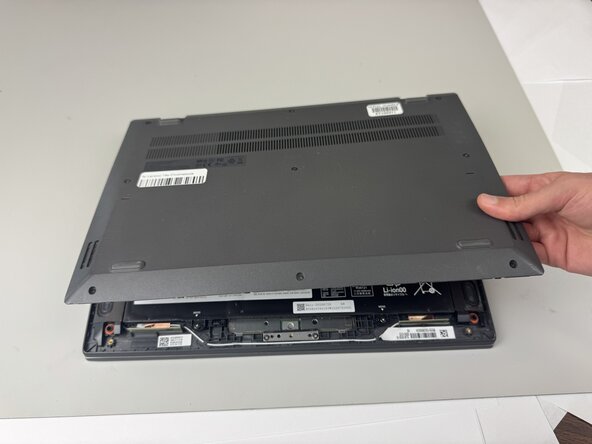
Use a Phillips #0 screwdriver to remove the nine 8.6 mm screws from the back cover.
 Ask FixBot
-
-
-
Use a Phillips #0 screwdriver to remove the four 5.5 mm screws holding the battery in place.
-
-
-
Gently disconnect the power interface using a pair of tweezers.
-
Lift the battery out of the Chromebook.
-
-
-
-
-
-
Disconnect the display cable from the top of the motherboard.
-
Detach the white speaker cable connector from the bottom of the motherboard.
-
-
-
Using a Phillips #0 screwdriver, remove the 5.5mm screw holding the WLAN card in place.
-
Disconnect the two wires from the WLAN card.
-
Remove the WLAN card.
-
-
-
Remove the 8.3 mm screw holding the bracket in place using a Phillips #0 screwdriver.
-
Remove the bracket.
-
-
-
Remove the black 5.5 mm screw in the top right hinge using a Phillips #0 screwdriver.
-
Pull the hinge up.
-
-
-
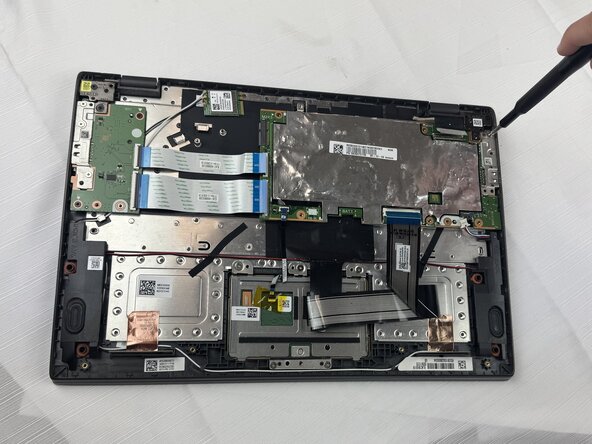
Remove the 5.5mm screws surrounding the motherboard using a Phillips #0 screwdriver.
-
-







To reassemble your device, carefully follow these instructions in reverse order.

Team

Texas Tech, Team 2-4, Johansen Fall 2025 Member of Texas Tech, Team 2-4, Johansen Fall 2025
TTU-JOHANSEN-F25S2G4
5 Members
60 Guides authored
