
Hyper Mega Tech! Taito Super Pocket Back Panel Replacement

Isabela Castro and
Last updated on May 26, 2026
Views: 301
View statistics:
- Past 24 Hours:
- 2
- Past 7 Days:
- 8
- Past 30 Days:
- 67
- All Time:
- 301
Comments: 0
No one has left comments on this guide. Will you be first?
Go to guide commentsCompleted: 0 1
No one has marked this guide "completed." Will you be the first?
1 person has marked this guide "completed." It's you — great job!
Favorites: 0 1
No one has favorited (and subscribed to) this guide. Will you be the first?
1 person has favorited (and subscribed to) this guide — and that's you!
Introduction
Go to step 1 ↓If your Hyper Mega Tech! Super Pocket is experiencing issues, removing the back panel is typically the first step to access, clean, or replace internal components like the battery, speaker, buttons, and mainboard. The back panel serves as the primary structural shell, protecting the internal electronics from dust, debris, and minor impacts.
Use this step-by-step guide to safely remove the back cover. Before beginning, ensure the device is powered off and completely disconnected from any external power sources.
What you need
Tools


-
-
-
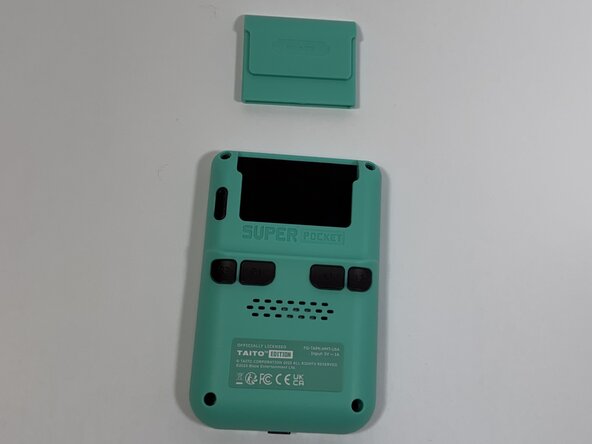
Face the back of the device, then remove the Super Pocket gaming cartridge from the device.
-
-
-
-
Use a Phillips #000 screwdriver to remove the four 2 mm screws from the four corners.
-
-
-
Face the front of the device and use the iFixit opening tool to lift the front panel from the back cover.
-

 Ask FixBot



To reassemble your device, follow these instructions in reverse order.

Team

Idaho State University, Team 1-4, Watkins Spring 2026 Member of Idaho State University, Team 1-4, Watkins Spring 2026
ISU-WATKINS-S26S1G4
4 Members
84 Guides authored
