Free Shipping on Domestic Orders $75+

Huawei Ideos S7 Slim Logic Board Replacement

Views: 1.2K

View statistics:

Past 24 Hours:
3
Past 7 Days:
20
Past 30 Days:
94
All Time:
1,186
Comments: 1

1 comment on steps.

Completed: 1

1 person has marked this guide "completed." Will you be next?

Favorites: 0

No one has favorited (and subscribed to) this guide. Will you be the first?

Time Required: 5 - 8 minutes
Difficulty: Moderate
Huawei Ideos S7 Slim Logic Board Replacement

Introduction

Go to step 1 ↓

The logic board is the main circuit board that drives all the information to the various parts on the tablet. If the tablet stops working and it is not the battery being faulty, then the logic board is the next part that needs to be checked. Use this guide to replace the logic board within a few steps.

What you need

Tools

    1. Huawei Ideos S7 Slim Logic Board Replacement, Battery: step 1, image 1 of 3 Huawei Ideos S7 Slim Logic Board Replacement, Battery: step 1, image 2 of 3 Huawei Ideos S7 Slim Logic Board Replacement, Battery: step 1, image 3 of 3
      • Place the tablet on a flat clear surface to keep the screen safe.

      • Slide the larger portion of the back cover off the tablet.

      • This will reveal the battery.

      Ask FixBot

      Add Comment

    2. Huawei Ideos S7 Slim Logic Board Replacement: step 2, image 1 of 2 Huawei Ideos S7 Slim Logic Board Replacement: step 2, image 2 of 2
      • Lift the battery out with your finger.

      • Make sure you use the slot near the bottom of the device as shown. Trying to lift from anywhere else will not work and may damage the battery or the device.

      Ask FixBot

      Add Comment

    1. Huawei Ideos S7 Slim Logic Board Replacement, Logic Board: step 3, image 1 of 2 Huawei Ideos S7 Slim Logic Board Replacement, Logic Board: step 3, image 2 of 2
      • Using a plastic opening tool, pry off the top cover casing gently by moving the tool along all three sides.

      Ask FixBot

      Add Comment

    2. Huawei Ideos S7 Slim Logic Board Replacement: step 4, image 1 of 1
      • With a T5 hexagonal head, remove the nine black 2.5 mm torx screws. Place them carefully aside on the magnetic mat.

      Ask FixBot

      Add Comment

    3. Huawei Ideos S7 Slim Logic Board Replacement: step 5, image 1 of 3 Huawei Ideos S7 Slim Logic Board Replacement: step 5, image 2 of 3 Huawei Ideos S7 Slim Logic Board Replacement: step 5, image 3 of 3
      • Using a plastic opening tool, pry off the back casing gently on each side of the tablet.

      Ask FixBot

      Add Comment

    4. Huawei Ideos S7 Slim Logic Board Replacement: step 6, image 1 of 3 Huawei Ideos S7 Slim Logic Board Replacement: step 6, image 2 of 3 Huawei Ideos S7 Slim Logic Board Replacement: step 6, image 3 of 3
      • Using a Phillips #00 screwdriver, remove the following screws:

      • Four 5mm wide grey Phillips screws on the logic board.

      • One of the 5mm screws is hidden under the circular white tape in the center of the logic board.

      • Seven 3mm small grey Phillips screws (four on one side, three on the other) from the black side casing.

      Ask FixBot

      Add Comment

    5. Huawei Ideos S7 Slim Logic Board Replacement: step 7, image 1 of 3 Huawei Ideos S7 Slim Logic Board Replacement: step 7, image 2 of 3 Huawei Ideos S7 Slim Logic Board Replacement: step 7, image 3 of 3
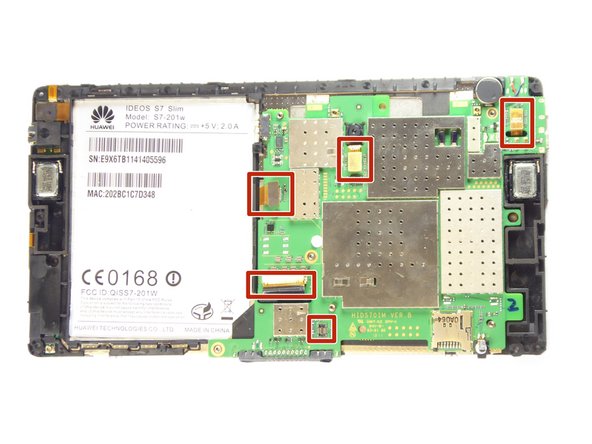
      • Disconnect the five cables connected to the logic board and then carefully lift the logic board out of the casing.

      Ask FixBot

      Add Comment

Conclusion

To reassemble your device, follow these instructions in reverse order.

Cancel: I did not complete this guide.

One other person completed this guide.

Gregory Philip

Member since: 09/21/16

585 Reputation

4 Guides authored

Team

UC Davis, Team 1-1, Oliver Fall 2016 Member of UC Davis, Team 1-1, Oliver Fall 2016

UCD-OLIVER-F16S1G1

5 Members

60 Guides authored

0 Guide Comments

Add Comment

View Statistics:

Past 24 Hours: 3

Past 7 Days: 20

Past 30 Days: 94

All Time: 1,186