Free Shipping on Domestic Orders $75+

Hipstreet Titan 2 HD Battery Replacement

Views: 4.9K

View statistics:

Past 24 Hours:
1
Past 7 Days:
22
Past 30 Days:
99
All Time:
4,857
Comments: 0

No one has left comments on this guide. Will you be first?

Go to guide comments
Completed: 1

1 person has marked this guide "completed." Will you be next?

Favorites: 0

No one has favorited (and subscribed to) this guide. Will you be the first?

Time Required: 15 - 20 minutes
Difficulty: Moderate
Needs Better Images

Better photos will improve this guide. Help out by taking, editing, or uploading new ones!

Hipstreet Titan 2 HD Battery Replacement

Introduction

Go to step 1 ↓

Users must disassemble the front cover to replace the battery. A replacement battery will be needed. This is a difficult process for users who do not have experience with soldering connections.

What you need

Tools

    1. Hipstreet Titan 2 HD Battery Replacement, Rear Case: step 1, image 1 of 1
      • Using the PH#00 screwdriver, remove the two 0.145 inch Phillips head screws.

      • The screws are located on the bottom face of the device, near the power and volume controls.

      Ask FixBot

      Add Comment

    2. Hipstreet Titan 2 HD Battery Replacement: step 2, image 1 of 1
      • Place the small suction cup on your screen.

      • Moisturize the bottom of the suction cup to ensure a proper seal.

      • If the screen is cracked, the suction cup may not seal correctly; too much pressure may crack or damage the screen.

      Ask FixBot

      Add Comment

    3. Hipstreet Titan 2 HD Battery Replacement: step 3, image 1 of 1
      • Insert the plastic opening tool between the screen cover and rear cover of the tablet.

      • Grasp the small suction cup.

      Ask FixBot

      Add Comment

    4. Hipstreet Titan 2 HD Battery Replacement: step 4, image 1 of 2 Hipstreet Titan 2 HD Battery Replacement: step 4, image 2 of 2
      • Slide the plastic opening tool along device edge to separate the screen cover from the rear cover.

      • Pull upward on the small suction cup handle while sliding the opening tool.

      • When sliding the plastic opening tool, avoid sliding the tool too far into the cover. This could damage the speaker connector on the back cover.

      Ask FixBot

      Add Comment

    5. Hipstreet Titan 2 HD Battery Replacement: step 5, image 1 of 2 Hipstreet Titan 2 HD Battery Replacement: step 5, image 2 of 2
      • Use the plastic opening tool to remove the speaker from the rear cover.

      • The speaker is held in place with adhesive and is easily removed.

      • Do not pull on the speaker wires. This could damage the soldering connections.

      Ask FixBot

      Add Comment

    6. Hipstreet Titan 2 HD Battery Replacement: step 6, image 1 of 1
      • Once the speaker is disconnected, the cover removal is complete.

      Ask FixBot

      Add Comment

    1. Hipstreet Titan 2 HD Battery Replacement, Battery: step 7, image 1 of 2 Hipstreet Titan 2 HD Battery Replacement, Battery: step 7, image 2 of 2
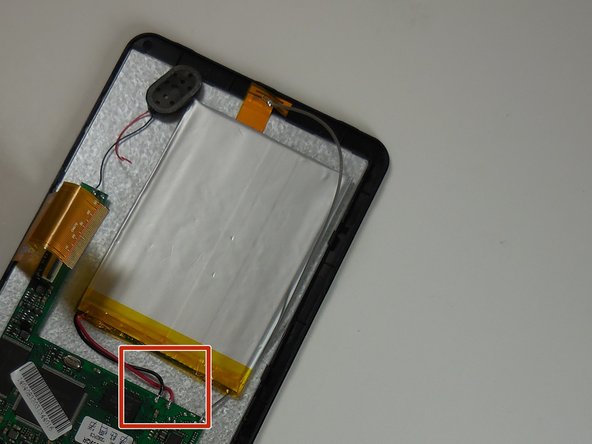
      • Remove the black placement tape from the battery.

      • Find the two battery solder connections on the circuit board.

      Ask FixBot

      Add Comment

    2. Hipstreet Titan 2 HD Battery Replacement: step 8, image 1 of 1
      • Remove the red and black battery wires from the circuit board with the solder removal tool.

      Ask FixBot

      Add Comment

    3. Hipstreet Titan 2 HD Battery Replacement: step 9, image 1 of 1
      • Solder the new battery wire connectors to the circuit board.

      • The battery wires must be installed with the red wire on the left and black wire on the right.

      Ask FixBot

      Add Comment

Conclusion

To reassemble your device, follow these instructions in reverse order.

Cancel: I did not complete this guide.

One other person completed this guide.

Jeffrey

Member since: 03/11/15

766 Reputation

5 Guides authored

Team

0 Guide Comments

Add Comment

View Statistics:

Past 24 Hours: 1

Past 7 Days: 22

Past 30 Days: 99

All Time: 4,857