
Dell Venue Pro Rear Camera Assembly Replacement

Last updated on Jan 16, 2026
Views: 326
View statistics:
- Past 24 Hours:
- 3
- Past 7 Days:
- 15
- Past 30 Days:
- 65
- All Time:
- 326
Comments: 0
No one has left comments on this guide. Will you be first?
Go to guide commentsCompleted: 0 1
No one has marked this guide "completed." Will you be the first?
1 person has marked this guide "completed." It's you — great job!
Favorites: 0 1
No one has favorited (and subscribed to) this guide. Will you be the first?
1 person has favorited (and subscribed to) this guide — and that's you!
Action Shots
Be an action hero! This guide needs images that better demonstrate how to perform specific actions.
Confusing Text
Some of this guide's text is confusing, duplicated, or off-topic. Clarify it by editing!
Markup Mishap
This guide needs better markups. Help out by correcting or making some markup annotations.
Introduction
Go to step 1 ↓The rear camera assembly in the Dell Venue Pro is mounted on a separate board inside the device. To access and replace the rear camera, the phone must be opened and the motherboard fully exposed.
This guide shows how to safely remove and replace the rear camera assembly.
What you need
Tools


-
-
-
Remove Back Cover
-
Remove the back cover using the instructions in the Dell Venue Pro Back Cover Removal guide.
-
Lift the battery from the top edge and set it aside.
 Ask FixBot
-
-
-
Remove the Battery
-
Lift the battery from the bottom edge using the notch.
-
Remove the battery from the phone and set it aside.
-
-
-
Remove Screws (Midframe)
-
Use a Phillips #00 screwdriver to remove the 4.57 mm screws securing the midframe to the phone.
-
Keep track of each screw and its original location to ensure correct reassembly.
-
-
-
Remove the Midframe
-
Insert a plastic opening tool into the seam between the midframe and phone body.
-
Gently twist the tool to release the clips around the edges.
-
Once all clips have disengaged, pull the midframe upward to remove it completely.
-
-
-
-
Disconnect Ribbon Cables
-
At this point, the motherboard should be fully visible, as shown in your reference photos. You should see:
-
Disconnect the following cables:
-
Display cable
-
Metal shielding in the center
-
Micro-USB charging port at the bottom
-
Secondary daughterboard connection on the left side
-
-
-
Disconnect ribbon
-
Use tweezers or a fingernail to gently lift the ribbon-cable connectors. Disconnect the following:
-
Display cable
-
Keyboard slider cable
-
Antenna cable
-
Any additional flex connectors shown on your motherboard
-
-
-
Remove the Motherboard Screws
-
Remove the screws securing the motherboard to the frame. Set all screws aside.
-
Bottom right corner (charging port area)
-
Middle left side
-
Top of the board
-
-
-
Starting from the top edge, gently lift the motherboard up and away from the phone housing.
-
The bottom micro-USB port may be slightly snug inside its opening — lift carefully to avoid bending the board.
-
Once free, remove the entire motherboard from the device.
-
-
-
Starting from the top edge, gently lift the motherboard up and away from the phone housing.
-
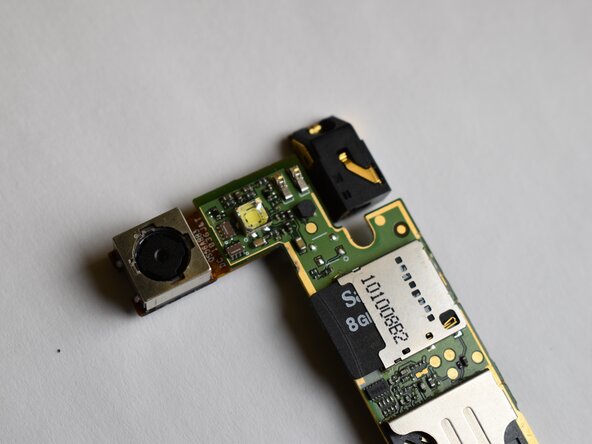
Locate the rear camera assembly on the motherboard.
-
Gently lift the rear camera assembly straight up to disconnect it from its socket.
-
Remove the rear camera assembly from the motherboard.
-
-
-
Install the New Rear Camera Assembly
-
Align the replacement rear camera assembly with its socket on the motherboard.
-
Press gently on the edges of the camera module until it is fully seated.
-
-
-
Reinstall the Motherboard
-
Place the motherboard back into the phone frame, starting with the top edge.
-
Ensure the rear camera, charging port, and side connectors align with their openings.
-
Press gently to seat the motherboard flat against the frame.
-
-



To reassemble your device, follow the above steps in reverse order.
After reassembly, power on the phone and test the rear camera to confirm it focuses and captures images correctly.
Team

Purdue University Northwest, Team 3-7, Dieterle Fall 2025 Member of Purdue University Northwest, Team 3-7, Dieterle Fall 2025
PNW-DIETERLE-F25S3G7
4 Members
72 Guides authored
