Free Shipping on Domestic Orders $75+

Canon EOS Rebel T2i Eyepiece Replacement

Views: 5.8K

View statistics:

Past 24 Hours:
3
Past 7 Days:
25
Past 30 Days:
108
All Time:
5,803
Comments: 3

3 guide comments.

Go to guide comments
Completed: 7

7 people have marked this guide "completed." Will you be next?

Favorites: 1

1 person has favorited (and subscribed to) this guide. Will you be next?

Time Required: 45 minutes
Difficulty: Difficult
Community-Contributed Guide

An awesome member of our community made this guide. It was not created by iFixit staff.

Better Introduction

Improve this guide by completing or revising its introduction.

Canon EOS Rebel T2i Eyepiece Replacement

Introduction

Go to step 1 ↓

The Phillips #000 screwdriver is marked as an optional tool as you can always use the JIS #000 screwdriver in its place (JIS screwdrivers won't damage Phillips head screws).

What you need

Tools

    1. Canon EOS Rebel T2i Eyepiece Replacement, I/F Terminal Cover: step 1, image 1 of 3 Canon EOS Rebel T2i Eyepiece Replacement, I/F Terminal Cover: step 1, image 2 of 3 Canon EOS Rebel T2i Eyepiece Replacement, I/F Terminal Cover: step 1, image 3 of 3
      • Before beginning, ensure that the camera is off, and the battery is removed.

      • Pry open the rubber I/F terminal cap with your finger.

      • Remove the two M1.7x2.5mm JIS #000 screws that are underneath the I/F terminal cap.

      • Using a plastic pick, or another thin plastic prying tool, pop off the I/F terminal cover from the camera.

      Ask FixBot

      Add Comment

    1. Canon EOS Rebel T2i Eyepiece Replacement, Remove the back casing.: step 2, image 1 of 2 Canon EOS Rebel T2i Eyepiece Replacement, Remove the back casing.: step 2, image 2 of 2
      • On the left side of the camera, remove the following screw:

      • One M1.7x6.0mm JIS #000 screw

      • On the right side, remove the following screws:

      • One M1.7x5.5mm JIS #000 screw

      • One M1.7x3.5mm JIS #000 screw

      Ask FixBot

      Add Comment

    2. Canon EOS Rebel T2i Eyepiece Replacement: step 3, image 1 of 2 Canon EOS Rebel T2i Eyepiece Replacement: step 3, image 2 of 2
      • Remove the battery door.

      • Open the battery door to about a 35° angle.

      • Pull the battery door straight outwards.

      • Remove the following screws from the bottom of the camera:

      • One M1.7x6.0mm JIS #000 screw

      • Two M1.7x2.5mm JIS #000 screws

      • One M1.7x5.5mm JIS #000 screw

      Ask FixBot

      Add Comment

    3. Canon EOS Rebel T2i Eyepiece Replacement, Open the back panel.: step 4, image 1 of 3 Canon EOS Rebel T2i Eyepiece Replacement, Open the back panel.: step 4, image 2 of 3 Canon EOS Rebel T2i Eyepiece Replacement, Open the back panel.: step 4, image 3 of 3
      • Slide the viewfinder eyepiece vertically upwards.

      • Start to pull the back cover partially off of the camera.

      • Use caution when removing the back cover, there is a ribbon cable that connects the LCD screen to the main PCB board.

      • Disconnect the LCD screen ribbon cable from the main PCB board.

      • Use a plastic spudger to lift up the black locking tab.

      • Carefully pull out the ribbon cable from its connector using a pair of angled tweezers.

      • Finish pulling the back cover off of the camera body.

      Ask FixBot

      Add Comment

    1. Canon EOS Rebel T2i Eyepiece Replacement, Front Cover: step 5, image 1 of 2 Canon EOS Rebel T2i Eyepiece Replacement, Front Cover: step 5, image 2 of 2
      • Remove the following screws from the front of the camera:

      • Two M1.7x5.5mm JIS #000 screws

      • On the bottom of the camera, remove the following screws:

      • Three M1.7x5.5mm JIS #000 screws

      Ask FixBot

      Add Comment

    2. Canon EOS Rebel T2i Eyepiece Replacement: step 6, image 1 of 3 Canon EOS Rebel T2i Eyepiece Replacement: step 6, image 2 of 3 Canon EOS Rebel T2i Eyepiece Replacement: step 6, image 3 of 3
      • Slide a spudger tool towards the tripod mount, underneath the plastic cover.

      • Push the plastic cover up and over the tripod mount.

      • Pull the front cover off of the camera.

      • Electric Shock Warning: With the front cover off, the high voltage capacitor on the DC PCB board is now exposed. It is recommended that you use a capacitor discharge tool to ensure the capacitor is fully discharged before proceeding further.

      Ask FixBot

      Add Comment

    1. Canon EOS Rebel T2i Eyepiece Replacement, Top Casing: step 7, image 1 of 2 Canon EOS Rebel T2i Eyepiece Replacement, Top Casing: step 7, image 2 of 2
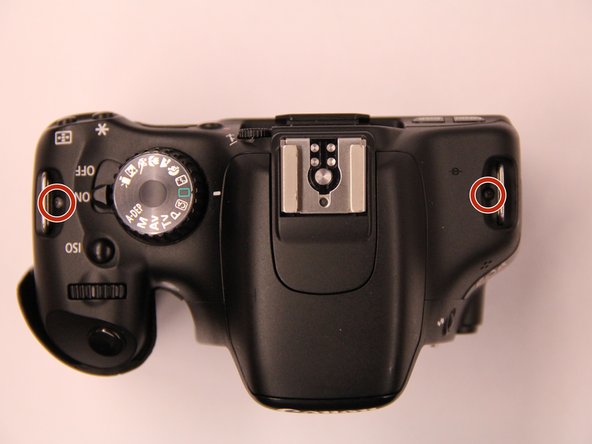
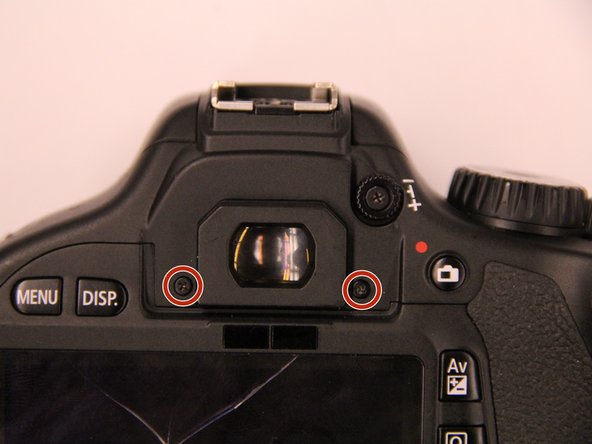
      • Remove the screws next to the viewfinder:

      • Two M1.7x2.5mm JIS #000 screws

      • One M2.0x8.9mm JIS #000 diopter screw

      • Remove the following screws from the top of the camera:

      • One M1.7x2.5mm JIS #000 screw

      • One M1.7x5.0mm Phillips #000 screw

      Ask FixBot

      Add Comment

    2. Canon EOS Rebel T2i Eyepiece Replacement: step 8, image 1 of 2 Canon EOS Rebel T2i Eyepiece Replacement: step 8, image 2 of 2
      • Disconnect the microphone cable from the main PCB board.

      • Position a flathead 2.5mm screwdriver between the main PCB board connector and the microphone connector.

      • Gently wiggle the flathead screwdriver back and forth until the microphone connector comes free.

      • If you do not have a flathead 2.5mm screwdriver, another similarly sized flathead screwdriver should work.

      Ask FixBot

      Add Comment

    3. Canon EOS Rebel T2i Eyepiece Replacement: step 9, image 1 of 3 Canon EOS Rebel T2i Eyepiece Replacement: step 9, image 2 of 3 Canon EOS Rebel T2i Eyepiece Replacement: step 9, image 3 of 3
      • Locate the ribbon cable which connects the top cover the main PCB board.

      • Use a plastic spudger tool to carefully pry off the connector.

      • Use caution when handling ribbon connectors and their connectors.

      • Take note of where this fiber optic cable connects to the main PCB board.

      • The cable will slide out of the connector when you pull the top cover off. You will need to remember to slide this cable back into the connector with a pair of tweezers when reinstalling the top cover. This cable is crucial for the function of the camera flash.

      Ask FixBot

      Add Comment

    4. Canon EOS Rebel T2i Eyepiece Replacement: step 10, image 1 of 2 Canon EOS Rebel T2i Eyepiece Replacement: step 10, image 2 of 2
      • Disconnect these two cables connected to the DC PCB board.

      • Use the same method as with removing the microphone cable, except with using a flathead 3.0mm screwdriver.

      • Gently wiggle the flathead screwdriver back and forth until the connectors comes free.

      • If you do not have a flathead 3.0mm screwdriver, another slightly larger flathead screwdriver should work.

      • Gently lift the top cover up and off of the camera body, being careful that the loose cables do not snag on anything.

      Ask FixBot

      Add Comment

    1. Canon EOS Rebel T2i Eyepiece Replacement, Eyepiece: step 11, image 1 of 2 Canon EOS Rebel T2i Eyepiece Replacement, Eyepiece: step 11, image 2 of 2
      • Remove the red wire that travels across the mirror box.

      Ask FixBot

      Add Comment

    2. Canon EOS Rebel T2i Eyepiece Replacement: step 12, image 1 of 1
      • Remove the following screws holding the mirror box in place:

      • Four M1.7x4.5mm Phillips #000 screws

      Ask FixBot

      Add Comment

    3. Canon EOS Rebel T2i Eyepiece Replacement: step 13, image 1 of 1
      • Remove three JIS #000 screws to disconnect the ribbon mount assembly

      Ask FixBot

      Add Comment

    4. Canon EOS Rebel T2i Eyepiece Replacement: step 14, image 1 of 2 Canon EOS Rebel T2i Eyepiece Replacement: step 14, image 2 of 2
      • Now that the top assembly is free, this exposes another screw on the right side of the mirror box.

      • Remove the following screw:

      • One M2.0x4.3mm JIS #000 screw

      • Remove the orange ribbon cable.

      Ask FixBot

      Add Comment

    5. Canon EOS Rebel T2i Eyepiece Replacement: step 15, image 1 of 1
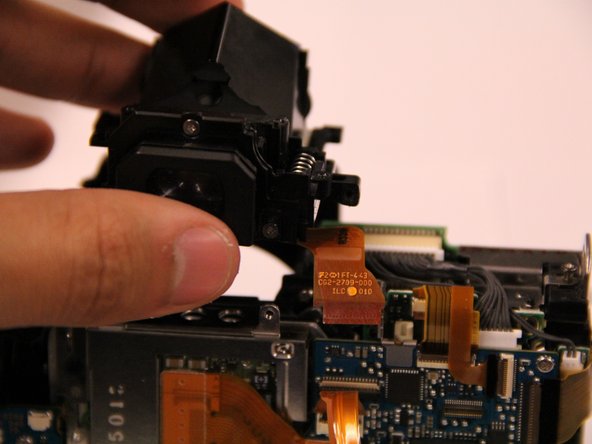
      • Remove the viewfinder assembly from the camera. The screws that hold the eyepiece in place are accessible. Remove these three JIS #000 screws from the rear face of the eyepiece. Two screws are located at the bottom and one screw is located on top.

      Ask FixBot

      Add Comment

    6. Canon EOS Rebel T2i Eyepiece Replacement: step 16, image 1 of 2 Canon EOS Rebel T2i Eyepiece Replacement: step 16, image 2 of 2
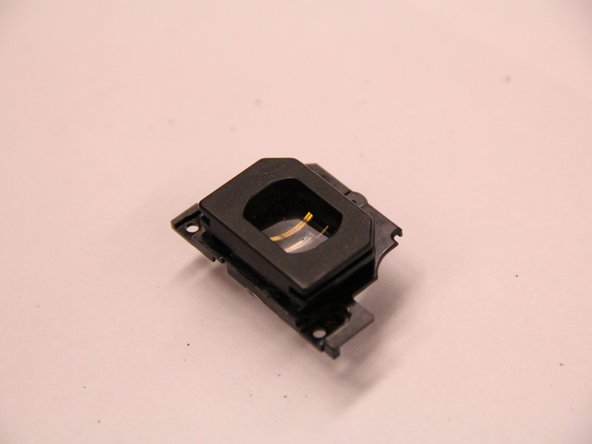
      • With the screws removed, the eyepiece can easily be pulled free.

      Ask FixBot

      Add Comment

Conclusion

To reassemble your device, follow these instructions in reverse order.

Cancel: I did not complete this guide.

7 other people completed this guide.

Attached Documents

Jacob Jaskolka

Member since: 03/30/15

793 Reputation

4 Guides authored

Team

3 Guide Comments

I used this guide to fix my 600D (Rebel T3i), and it worked like a charm.

The middle lens of my viewfinder had popped out of its plastic holder. it is now back in place, thanks to this guide.

I have added a couple of marker, to make it just that little bit easier to spot the screws and ribbon cables.

Thanks again!

dauffret - Reply Share

I used this guide to fix my 600D, and it also worked like a charm.

The front lens of my viewfinder (the one closest to the eyepiece) has popped out of its plastic holder.

Leo Sauermann - Reply Share

Thank you so much for this guide. The viewfinder lens of my 1100D came loose some days ago and this guide served perfectly.

Just a heads-up to the newbies like me: Take a lot of care with the focusing screen (the one with the focus points printed on it), I tried to clean it and ruined it. Fortunately, the replacement is not expensive, but still, better not touching it with anything.

Martin - Reply Share

Add Comment

View Statistics:

Past 24 Hours: 3

Past 7 Days: 25

Past 30 Days: 108

All Time: 5,803