Free Shipping on Domestic Orders $75+

Bose QuietComfort 25 Motherboard Replacement

What you need

    1. Bose QuietComfort 25 Motherboard Replacement, Motherboard: step 1, image 1 of 1
      • Begin repair by removing the ear cushion.

      • The cushion is held on by a few small plastic clips. Pry carefully with plastic opening tool or fingernails.

      Ask FixBot

      Add Comment

    2. Bose QuietComfort 25 Motherboard Replacement: step 2, image 1 of 1
      • Next, remove the soft lining behind the cushion. This is held on with adhesive and is easily removed by hand.

      Ask FixBot

      Add Comment

    3. Bose QuietComfort 25 Motherboard Replacement: step 3, image 1 of 3 Bose QuietComfort 25 Motherboard Replacement: step 3, image 2 of 3 Bose QuietComfort 25 Motherboard Replacement: step 3, image 3 of 3
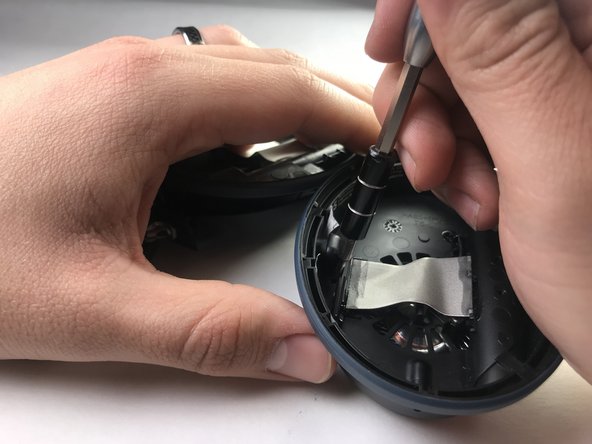
      • Once the soft lining is removed from behind the ear cushion, two screws will be exposed.

      • Carefully remove the two 5 mm screws with a precision screwdriver (PH00) and put aside.

      Ask FixBot

      Add Comment

    4. Bose QuietComfort 25 Motherboard Replacement: step 4, image 1 of 1
      • Flip the earphones back over and carefully pry around the outside cover of the earpiece.

      • Try a plastic opening tool before moving on to harder metal tools.

      • This cover will come loose with moderate pressure.

      Ask FixBot

      Add Comment

    5. Bose QuietComfort 25 Motherboard Replacement: step 5, image 1 of 3 Bose QuietComfort 25 Motherboard Replacement: step 5, image 2 of 3 Bose QuietComfort 25 Motherboard Replacement: step 5, image 3 of 3
      • There are 3 screws holding the motherboard to the earpiece.

      • Remove these screws to make the next step easier.

      Ask FixBot

      Add Comment

    6. Bose QuietComfort 25 Motherboard Replacement: step 6, image 1 of 1
      • Once the motherboard is exposed, all of the soldered connection will need to be removed.

      • Be careful of this step and take note of the position of each wire.

      • This should only be attempted by someone with experience soldering small components, as irreparable damage may be result from improper methods. For help with this step see this guide on How To Solder and Desolder Connections

      Ask FixBot

      Add Comment

    7. Bose QuietComfort 25 Motherboard Replacement: step 7, image 1 of 1
      • After removing all the soldered joints, the motherboard can be removed by hand.

      • The connections will all need to be re-soldered into their respective locations.

      Ask FixBot

      Add Comment

Conclusion

To reassemble your device, follow these instructions in reverse order.

Cancel: I did not complete this guide.

7 other people completed this guide.

Samuel Coss

Member since: 03/26/18

363 Reputation

1 Guide authored

Team

IUPUI, Team S2-G3, Harley Spring 2018 Member of IUPUI, Team S2-G3, Harley Spring 2018

IUPUI-HARLEY-S18S2G3

3 Members

24 Guides authored

1 Guide Comment

bei meinem QC25 hat sich auf der Seite mit dem Kabelanschluss die Lautsprecherkapsel gelockert und klappert jetzt. Wenn ich auf der Seite die Alu-Abdeckung entferne, komme ich an die Kapsel noch nicht dran, weil da eine weitere Schicht Plastik vor ist.

War da schon mal jemand und kann weiterhelfen?

Thorsten - Reply Share

Add Comment

View Statistics:

Past 24 Hours: 1

Past 7 Days: 17

Past 30 Days: 75

All Time: 13,635