Free Shipping on Domestic Orders $75+

Bosch 3727DEVS Motor Brushes Replacement

Views: 1.7K

View statistics:

Past 24 Hours:
1
Past 7 Days:
15
Past 30 Days:
125
All Time:
1,656
Comments: 0

No one has left comments on this guide. Will you be first?

Go to guide comments
Completed: 1

1 person has marked this guide "completed." Will you be next?

Favorites: 0

No one has favorited (and subscribed to) this guide. Will you be the first?

Time Required: 10 minutes
Difficulty: Moderate
Bosch 3727DEVS Motor Brushes  Replacement

Introduction

Go to step 1 ↓

Purchase a new motor brush. The sander should be unplugged from any power sources. Make sure you organize the removed screws, so you can reinstall them in the correct location.

What you need

    1. Bosch 3727DEVS Motor Brushes  Replacement, Motor Brushes: step 1, image 1 of 3 Bosch 3727DEVS Motor Brushes  Replacement, Motor Brushes: step 1, image 2 of 3 Bosch 3727DEVS Motor Brushes  Replacement, Motor Brushes: step 1, image 3 of 3
      • Ensure that the power chord is not plugged into an outlet.

      • Using the T20 Torx Screwdriver, remove the four 15.6 mm screws securing the top cover to the sander.

      • Lift the top cover off the sander.

      Ask FixBot

      Add Comment

    2. Bosch 3727DEVS Motor Brushes  Replacement: step 2, image 1 of 3 Bosch 3727DEVS Motor Brushes  Replacement: step 2, image 2 of 3 Bosch 3727DEVS Motor Brushes  Replacement: step 2, image 3 of 3
      • Remove the two white wires connected to each motor brush by pulling on the spade terminals.

      Ask FixBot

      Add Comment

    3. Bosch 3727DEVS Motor Brushes  Replacement: step 3, image 1 of 3 Bosch 3727DEVS Motor Brushes  Replacement: step 3, image 2 of 3 Bosch 3727DEVS Motor Brushes  Replacement: step 3, image 3 of 3
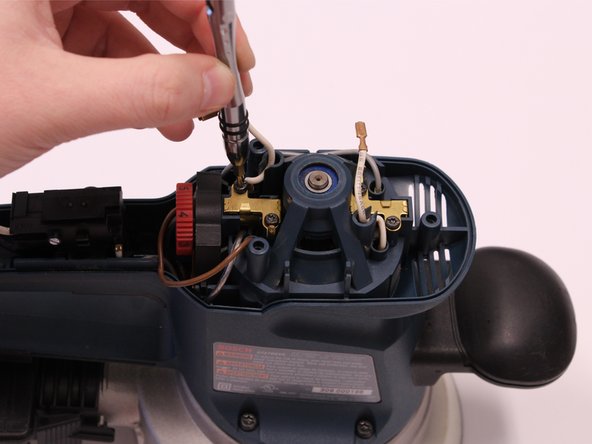
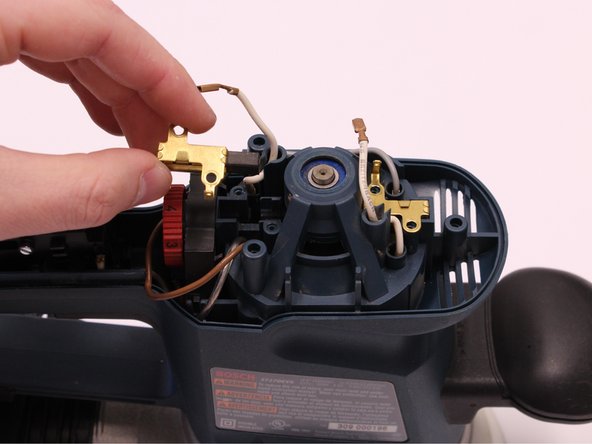
      • Using the T10 Torx Screwdriver, remove the four 9.7 mm screws securing the motor brushes to the housing.

      • After the screws are removed, both motor brushes can be lifted out of their position by hand.

      Ask FixBot

      Add Comment

Conclusion

To reassemble your device, follow these instructions in reverse order.

Cancel: I did not complete this guide.

One other person completed this guide.

0 Guide Comments

Add Comment

View Statistics:

Past 24 Hours: 1

Past 7 Days: 15

Past 30 Days: 125

All Time: 1,656