Free Shipping on Domestic Orders $75+

Acer Chromebook C720-2827 Trackpad Replacement

Views: 735

View statistics:

Past 24 Hours:
3
Past 7 Days:
23
Past 30 Days:
73
All Time:
735
Comments: 0

No one has left comments on this guide. Will you be first?

Go to guide comments
Completed: 1

1 person has marked this guide "completed." Will you be next?

Favorites: 0

No one has favorited (and subscribed to) this guide. Will you be the first?

Time Required: 15 - 20 minutes
Difficulty: Moderate
Acer Chromebook C720-2827 Trackpad Replacement

Introduction

Go to step 1 ↓

Use this guide to replace the trackpad on your Acer Chromebook C720-2827. This guide may also be useful for cleaning or readjusting a trackpad that is semi-functional. It will require opening the device and removal of the battery. A plastic cover sits atop the trackpad joined by adhesive, so some light adhesive may be desired for reassembly.

What you need

Tools

    1. Acer Chromebook C720-2827 Trackpad Replacement, Back Panel Assembly: step 1, image 1 of 2 Acer Chromebook C720-2827 Trackpad Replacement, Back Panel Assembly: step 1, image 2 of 2
      • Remove the thirteen 6.0mm screws on the back panel using your Phillips #1 screwdriver.

      Ask FixBot

      Add Comment

    2. Acer Chromebook C720-2827 Trackpad Replacement: step 2, image 1 of 2 Acer Chromebook C720-2827 Trackpad Replacement: step 2, image 2 of 2
      • Pry the back panel open with the plastic opening tool.

      Ask FixBot

      Add Comment

    1. Acer Chromebook C720-2827 Trackpad Replacement, Battery: step 3, image 1 of 1
      • Remove the two 6.0mm screws securing the battery with your Phillips #1 screwdriver.

      Ask FixBot

      Add Comment

    2. Acer Chromebook C720-2827 Trackpad Replacement: step 4, image 1 of 2 Acer Chromebook C720-2827 Trackpad Replacement: step 4, image 2 of 2
      • Carefully pull out the battery wire connected to the battery port.

      Ask FixBot

      Add Comment

    3. Acer Chromebook C720-2827 Trackpad Replacement: step 5, image 1 of 1
      • Slowly lift the battery to remove it from the Chromebook.

      Ask FixBot

      Add Comment

    1. Acer Chromebook C720-2827 Trackpad Replacement, Trackpad: step 6, image 1 of 3 Acer Chromebook C720-2827 Trackpad Replacement, Trackpad: step 6, image 2 of 3 Acer Chromebook C720-2827 Trackpad Replacement, Trackpad: step 6, image 3 of 3
      • Using a spudger, pry up the locking bar of the ZIF connector on the trackpad and remove the ribbon cable.

      Ask FixBot

      Add Comment

    2. Acer Chromebook C720-2827 Trackpad Replacement: step 7, image 1 of 3 Acer Chromebook C720-2827 Trackpad Replacement: step 7, image 2 of 3 Acer Chromebook C720-2827 Trackpad Replacement: step 7, image 3 of 3
      • Peel off the clear plastic covering the screws.

      • Remove the five grey 2.5 mm screws securing the trackpad with a Phillips #1 screwdriver.

      • Remove another four silver 2.9mm Phillips #1 screws from the silver bracket atop the trackpad with your driver.

      Ask FixBot

      Add Comment

    3. Acer Chromebook C720-2827 Trackpad Replacement: step 8, image 1 of 2 Acer Chromebook C720-2827 Trackpad Replacement: step 8, image 2 of 2
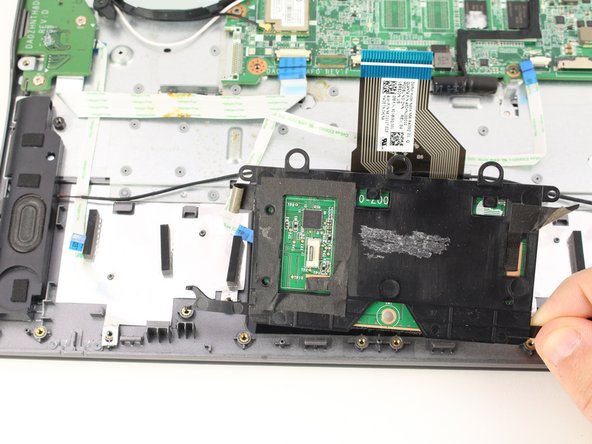
      • Lift up the silver bracket.

      • Remove the trackpad by lifting it up from the case.

      Ask FixBot

      Add Comment

Conclusion

To reassemble your device, follow these instructions in reverse order.

Cancel: I did not complete this guide.

One other person completed this guide.

Austin Blakely

Member since: 03/11/19

23,335 Reputation

53 Guides authored

0 Guide Comments

Add Comment

View Statistics:

Past 24 Hours: 3

Past 7 Days: 23

Past 30 Days: 73

All Time: 735