Free Shipping on Domestic Orders $75+

2008-2010 Mitsubishi Lancer Radio/CD Player Replacement

What you need

  1. 2008-2010 Mitsubishi Lancer Radio/CD Player Replacement, 2008-2010 Mitsubishi Lancer Radio/CD Player Replacement: step 1, image 1 of 1
    • The only tool required for this install is a Phillips #2 screwdriver. Of course, you will also need the new replacement radio/CD player unit that you will be installing.

    • Make sure that the car is not on before proceeding since we will be accessing some electrical components. However, you do not need to disconnect the car's battery.

    Ask FixBot

    Add Comment

  2. 2008-2010 Mitsubishi Lancer Radio/CD Player Replacement: step 2, image 1 of 2 2008-2010 Mitsubishi Lancer Radio/CD Player Replacement: step 2, image 2 of 2
    • Using both hands, apply inward pressure to the sides of the glove compartment until the compartment is free to slide out.

    • The clips on the side of the glove compartment must be freed.

    Ask FixBot

    Add Comment

  3. 2008-2010 Mitsubishi Lancer Radio/CD Player Replacement: step 3, image 1 of 1
    • Remove the attached plastic arm by simply pulling outward so that the arm snaps out of its socket.

    Ask FixBot

    Add Comment

  4. 2008-2010 Mitsubishi Lancer Radio/CD Player Replacement: step 4, image 1 of 2 2008-2010 Mitsubishi Lancer Radio/CD Player Replacement: step 4, image 2 of 2
    • The glove compartment can now be removed completely by raising it off its hinges.

    Ask FixBot

    Add Comment

  5. 2008-2010 Mitsubishi Lancer Radio/CD Player Replacement: step 5, image 1 of 1
    • Using the Philips #2 screwdriver, remove a 15 mm screw located just above the glove compartment damper piston.

    Ask FixBot

    Add Comment

  6. 2008-2010 Mitsubishi Lancer Radio/CD Player Replacement: step 6, image 1 of 1
    • Carefully remove the plastic trim by pulling outwards.

    Ask FixBot

    Add Comment

  7. 2008-2010 Mitsubishi Lancer Radio/CD Player Replacement: step 7, image 1 of 1
    • Using a Philips #2 screwdriver remove a 15 mm screw from the trim piece.

    Ask FixBot

    Add Comment

  8. 2008-2010 Mitsubishi Lancer Radio/CD Player Replacement: step 8, image 1 of 3 2008-2010 Mitsubishi Lancer Radio/CD Player Replacement: step 8, image 2 of 3 2008-2010 Mitsubishi Lancer Radio/CD Player Replacement: step 8, image 3 of 3
    • Using both hands, carefully pull the trim outward section by section.

    • The dashboard and decorative trim are attached to each other, so they will come out as one unit.

    • When pulling out the trim start from the right and work your way toward the center console.

    Ask FixBot

    Add Comment

  9. 2008-2010 Mitsubishi Lancer Radio/CD Player Replacement: step 9, image 1 of 1
    • Optional: If you choose, you can remove the harness shown. (See directions on Step 12 for removing a harness clip.) Otherwise you can simply rest the fixture on top of the shift knob.

    Ask FixBot

    Add Comment

  10. 2008-2010 Mitsubishi Lancer Radio/CD Player Replacement: step 10, image 1 of 1
    • Using a Philips #2 screwdriver remove four 12 mm screws attached to the mounting bracket.

    Ask FixBot

    Add Comment

  11. 2008-2010 Mitsubishi Lancer Radio/CD Player Replacement: step 11, image 1 of 2 2008-2010 Mitsubishi Lancer Radio/CD Player Replacement: step 11, image 2 of 2
    • Pull out the radio unit to expose the connections behind it.

    Ask FixBot

    Add Comment

  12. 2008-2010 Mitsubishi Lancer Radio/CD Player Replacement: step 12, image 1 of 2 2008-2010 Mitsubishi Lancer Radio/CD Player Replacement: step 12, image 2 of 2
    • Remove the black antenna connection by simply pulling it out.

    Ask FixBot

    Add Comment

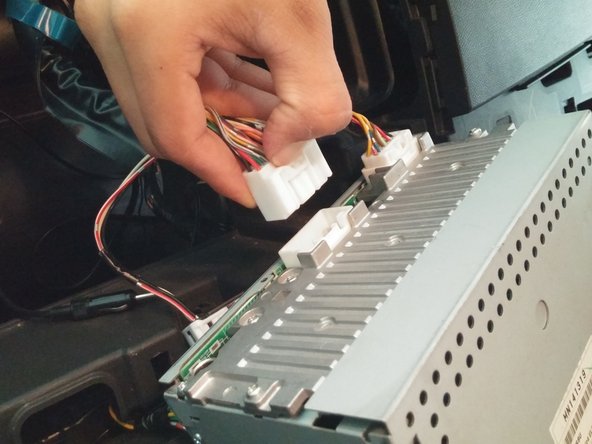
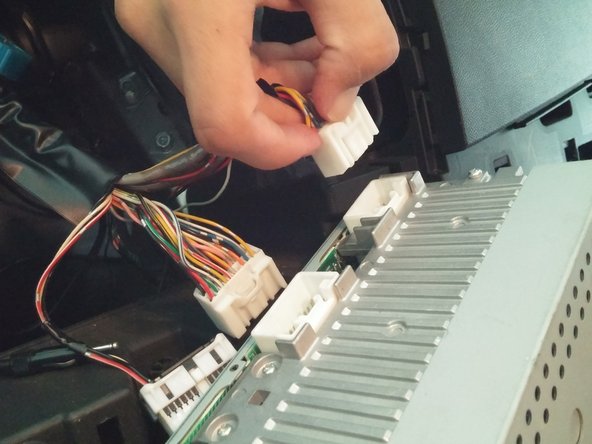
  13. 2008-2010 Mitsubishi Lancer Radio/CD Player Replacement: step 13, image 1 of 3 2008-2010 Mitsubishi Lancer Radio/CD Player Replacement: step 13, image 2 of 3 2008-2010 Mitsubishi Lancer Radio/CD Player Replacement: step 13, image 3 of 3
    • Remove both the large and small wire harnesses by firmly pressing in and holding the retaining clip.

    • While continuing to hold down the retaining clip, firmly pull the harnesses out.

    • Do not pull harnesses out by the wires, as you may damage or break the wires. Instead pull out by the white plastic harness.

    Ask FixBot

    Add Comment

  14. 2008-2010 Mitsubishi Lancer Radio/CD Player Replacement: step 14, image 1 of 3 2008-2010 Mitsubishi Lancer Radio/CD Player Replacement: step 14, image 2 of 3 2008-2010 Mitsubishi Lancer Radio/CD Player Replacement: step 14, image 3 of 3
    • You are now ready to replace your radio with your new unit.

    Ask FixBot

    Add Comment

Conclusion

To reassemble your device, follow these instructions in reverse order.

Cancel: I did not complete this guide.

7 other people completed this guide.

Carlos Esquivel

Member since: 02/23/15

317 Reputation

1 Guide authored

Team

Cal Poly, Team 12-1, Green Winter 2015 Member of Cal Poly, Team 12-1, Green Winter 2015

CPSU-GREEN-W15S12G1

6 Members

8 Guides authored

5 Guide Comments

Thx. Saved me hrs of wrongful disassembly. Lol

Phil - Reply Share

Any Mitsubishi radio code can be recovered for free by online generating tool : https://www.radiocodescalculator.com/mit...

Blaze Angelov - Reply Share

Hi I own a 2008 Mitsubishi lancer just brought it CD player doesn't work only radio so wondering where I can buy a new stereo thanks. Or a way to fix mine it's like it's not working at all turn onto CD mode but won't even try read

JAD BLAXLAND - Reply Share

Had the same problem with my 08 lancer. Replaced with a refurbished unit.

sanjurjo54 - Reply Share

If you break some of the white clips like i did, the replacement part number from Mitsubishi is MR402859

gregshep - Reply Share

Add Comment

View Statistics:

Past 24 Hours: 11

Past 7 Days: 51

Past 30 Days: 206

All Time: 24,643