
2008-2012 Buick Enclave Stereo Head Unit Replacement

n3rdbug96 and
Last updated on Jul 8, 2026
Views: 456
View statistics:
- Past 24 Hours:
- 2
- Past 7 Days:
- 24
- Past 30 Days:
- 92
- All Time:
- 456
Comments: 0
No one has left comments on this guide. Will you be first?
Go to guide commentsCompleted: 1 2
1 person has marked this guide "completed." Will you be next?
2 people have marked this guide "completed." Including you — great job!
Favorites: 0 1
No one has favorited (and subscribed to) this guide. Will you be the first?
1 person has favorited (and subscribed to) this guide — and that's you!
Community-Contributed Guide
An awesome member of our community made this guide. It was not created by iFixit staff.
Introduction
Go to step 1 ↓Use this guide to remove the factory stereo head unit for either replacement or in order to upgrade with an aftermarket head unit.
What you need
Tools

-
-
-
Use a plastic trim removal tool to release the clips holding the trim piece to the dashboard
-
Then, carefully pull the trim straight away from the dashboard and set it to the side
 Ask FixBot
-
-
-
Use a 7mm socket or nut driver to remove the 4 bolts securing the head unit
-
Then, carefully pull the head unit out from inside the dashboard.
-
-
-
-
On the back of the head unit, release the 2 black connectors by pressing the button on top of the connector and carefully pulling the connectors away from the head unit
-
-
-
To remove the antenna cable, grip the connector by the black plastic ring and carefully pull it away from the head unit
-
-


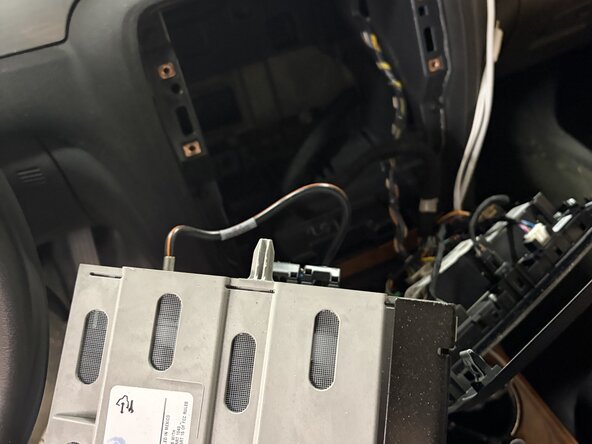


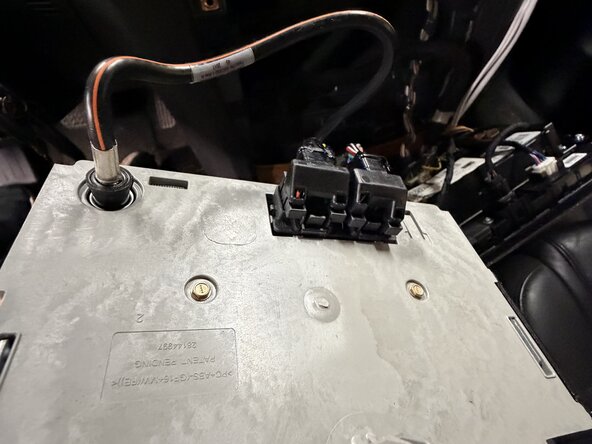


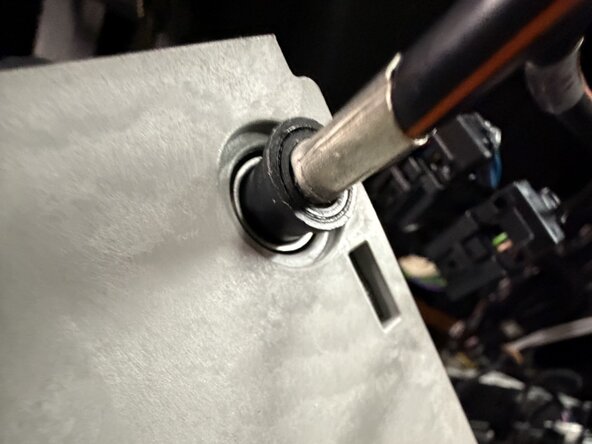


At this point, you may replace the factory head unit or install an aftermarket one. To reassemble your dashboard, follow these instructions in reverse order.
Cancel: I did not complete this guide.
One other person completed this guide.

