Shop the Holiday Gift Guide
Free Shipping on Domestic Orders $75+

2005 GMC Sierra SLT 1500 Rear Passenger Side Window Motor Replacement

Views: 915

View statistics:

Past 24 Hours:
2
Past 7 Days:
17
Past 30 Days:
78
All Time:
915
Comments: 0

No one has left comments on this guide. Will you be first?

Go to guide comments
Completed: 0

No one has marked this guide "completed." Will you be the first?

Favorites: 0

No one has favorited (and subscribed to) this guide. Will you be the first?

Time Required: 30 - 45 minutes
Difficulty: Moderate
Community-Contributed Guide

An awesome member of our community made this guide. It was not created by iFixit staff.

2005 GMC Sierra SLT 1500 Rear Passenger Side Window Motor Replacement

Introduction

Go to step 1 ↓

This guide is specifically for the rear passenger side door window motor. However, this guide will also apply for the rear driver side door window motor. Aside from some minor differences when removing the door panels, this guide will also apply for the front door window motors.

This guide is specifically for the 2005 model. However, this guide will apply for models from 2003-2006.

    1. 2005 GMC Sierra SLT 1500 Rear Passenger Side Window Motor Replacement, Removing the Door Handle Cover: step 1, image 1 of 2 2005 GMC Sierra SLT 1500 Rear Passenger Side Window Motor Replacement, Removing the Door Handle Cover: step 1, image 2 of 2
      • Using a flat head screwdriver to pry around the edges until the door handle cover pops off, remove the door handle cover from behind the door handle.

      Ask FixBot

      Add Comment

    2. 2005 GMC Sierra SLT 1500 Rear Passenger Side Window Motor Replacement, Unbolting the Door Panel: step 2, image 1 of 2 2005 GMC Sierra SLT 1500 Rear Passenger Side Window Motor Replacement, Unbolting the Door Panel: step 2, image 2 of 2
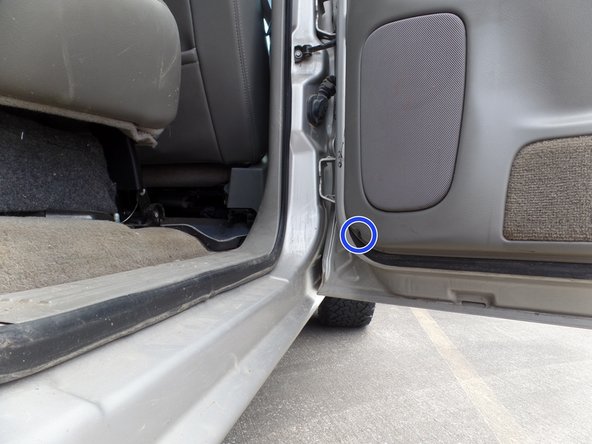
      • Remove the (2) 7mm bolts from the door panel.

      • One is at the bottom left of the door panel and another is behind the arm rest.

      Ask FixBot

      Add Comment

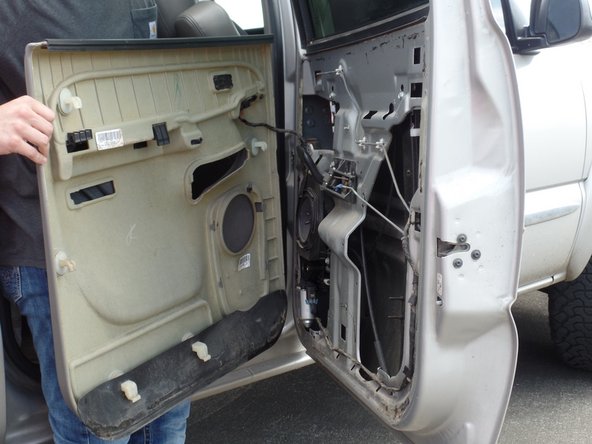
    3. 2005 GMC Sierra SLT 1500 Rear Passenger Side Window Motor Replacement, Separating the Door Panel from the Door: step 3, image 1 of 3 2005 GMC Sierra SLT 1500 Rear Passenger Side Window Motor Replacement, Separating the Door Panel from the Door: step 3, image 2 of 3 2005 GMC Sierra SLT 1500 Rear Passenger Side Window Motor Replacement, Separating the Door Panel from the Door: step 3, image 3 of 3
      • After grabbing the armrest and the bottom of the door panel, pull straight up to separate the door panel from the door.

      Ask FixBot

      Add Comment

    4. 2005 GMC Sierra SLT 1500 Rear Passenger Side Window Motor Replacement, Unplugging the Window Switch: step 4, image 1 of 2 2005 GMC Sierra SLT 1500 Rear Passenger Side Window Motor Replacement, Unplugging the Window Switch: step 4, image 2 of 2
      • Using a flat head screwdriver to push in the clip, pull the plug from the window switch to unplug the window switch.

      Ask FixBot

      Add Comment

    5. 2005 GMC Sierra SLT 1500 Rear Passenger Side Window Motor Replacement, Unbolting the Speaker: step 5, image 1 of 3 2005 GMC Sierra SLT 1500 Rear Passenger Side Window Motor Replacement, Unbolting the Speaker: step 5, image 2 of 3 2005 GMC Sierra SLT 1500 Rear Passenger Side Window Motor Replacement, Unbolting the Speaker: step 5, image 3 of 3
      • Remove the (3) 10mm bolts from the speaker.

      Ask FixBot

      Add Comment

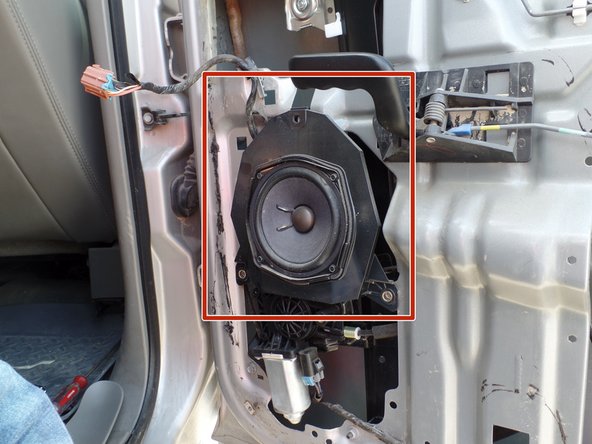
    6. 2005 GMC Sierra SLT 1500 Rear Passenger Side Window Motor Replacement, Separating the Speaker from the Door: step 6, image 1 of 1
      • Pull the speaker out to separate it from the door.

      Ask FixBot

      Add Comment

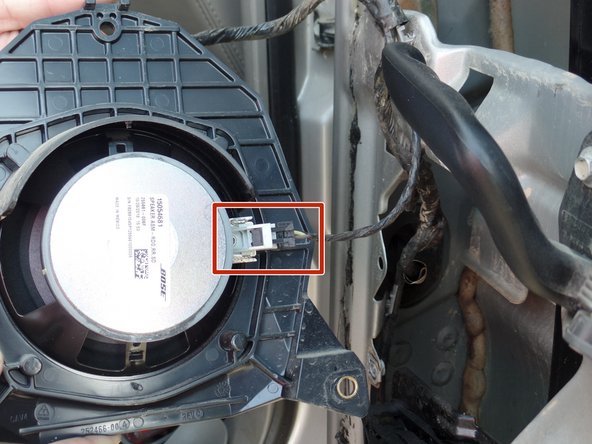
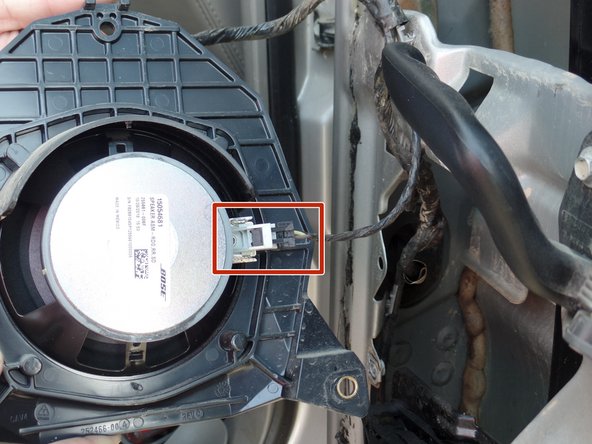
    7. 2005 GMC Sierra SLT 1500 Rear Passenger Side Window Motor Replacement, Unplugging the Speaker: step 7, image 1 of 1
      • Using a flat head screwdriver to push in the clip, pull the plug from the speaker to unplug the speaker.

      Ask FixBot

      Add Comment

    8. 2005 GMC Sierra SLT 1500 Rear Passenger Side Window Motor Replacement, Unbolting the Old Window Motor: step 8, image 1 of 3 2005 GMC Sierra SLT 1500 Rear Passenger Side Window Motor Replacement, Unbolting the Old Window Motor: step 8, image 2 of 3 2005 GMC Sierra SLT 1500 Rear Passenger Side Window Motor Replacement, Unbolting the Old Window Motor: step 8, image 3 of 3
      • Remove the (3) 8mm mounting bolts from the old window motor.

      • The bolts are inside the door, on the backside of the old window motor.

      Ask FixBot

      Add Comment

    9. 2005 GMC Sierra SLT 1500 Rear Passenger Side Window Motor Replacement, Removing the Old Window Motor: step 9, image 1 of 3 2005 GMC Sierra SLT 1500 Rear Passenger Side Window Motor Replacement, Removing the Old Window Motor: step 9, image 2 of 3 2005 GMC Sierra SLT 1500 Rear Passenger Side Window Motor Replacement, Removing the Old Window Motor: step 9, image 3 of 3
      • Gently remove the old window motor from the pulley housing.

      Ask FixBot

      Add Comment

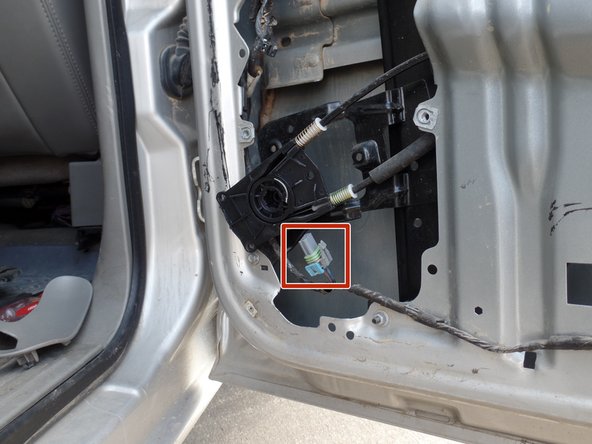
    10. 2005 GMC Sierra SLT 1500 Rear Passenger Side Window Motor Replacement, Unplugging The Old Window Motor: step 10, image 1 of 2 2005 GMC Sierra SLT 1500 Rear Passenger Side Window Motor Replacement, Unplugging The Old Window Motor: step 10, image 2 of 2
      • Pushing in the clip, pull the plug from the old window motor to unplug the old window motor.

      Ask FixBot

      Add Comment

    11. 2005 GMC Sierra SLT 1500 Rear Passenger Side Window Motor Replacement, Plugging in the New Window Motor: step 11, image 1 of 2 2005 GMC Sierra SLT 1500 Rear Passenger Side Window Motor Replacement, Plugging in the New Window Motor: step 11, image 2 of 2
      • Attach the plug to the new window motor to plug in the new window motor.

      Ask FixBot

      Add Comment

    12. 2005 GMC Sierra SLT 1500 Rear Passenger Side Window Motor Replacement, Placing the New Window Motor: step 12, image 1 of 3 2005 GMC Sierra SLT 1500 Rear Passenger Side Window Motor Replacement, Placing the New Window Motor: step 12, image 2 of 3 2005 GMC Sierra SLT 1500 Rear Passenger Side Window Motor Replacement, Placing the New Window Motor: step 12, image 3 of 3
      • Gently place the new window motor into the pulley housing.

      Ask FixBot

      Add Comment

    13. 2005 GMC Sierra SLT 1500 Rear Passenger Side Window Motor Replacement, Placing the Bolts into the New Window Motor: step 13, image 1 of 1
      • Place the (3) 8mm bolts into the new window motor.

      • The bolts go inside the door, on the backside of the new window motor.

      Ask FixBot

      Add Comment

    14. 2005 GMC Sierra SLT 1500 Rear Passenger Side Window Motor Replacement, Bolting the New Window Motor: step 14, image 1 of 1
      • Tighten the (3) 8mm bolts to secure the new window motor.

      Ask FixBot

      Add Comment

    15. 2005 GMC Sierra SLT 1500 Rear Passenger Side Window Motor Replacement, (Optional) Testing the New Window Motor: step 15, image 1 of 1
      • To test the new window motor, follow Steps 16 through 21 before proceeding to Step 22.

      • Otherwise, skip ahead to Step 22.

      Ask FixBot

      Add Comment

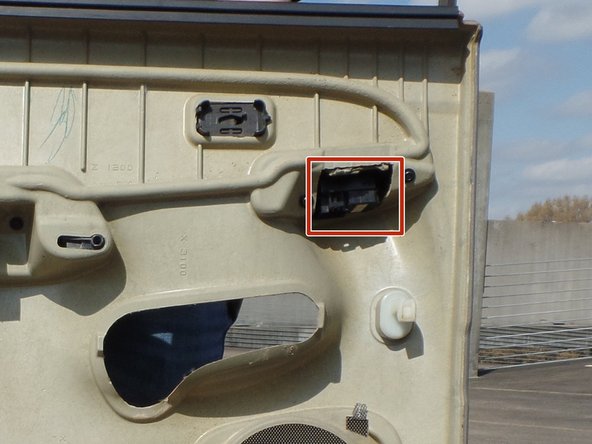
    16. 2005 GMC Sierra SLT 1500 Rear Passenger Side Window Motor Replacement, (Optional) Removing the Window Switch: step 16, image 1 of 1
      • By pushing out the window switch from the backside of the door panel, remove the window switch from the door panel.

      Ask FixBot

      Add Comment

    17. 2005 GMC Sierra SLT 1500 Rear Passenger Side Window Motor Replacement, (Optional) Plugging in the Window Switch: step 17, image 1 of 2 2005 GMC Sierra SLT 1500 Rear Passenger Side Window Motor Replacement, (Optional) Plugging in the Window Switch: step 17, image 2 of 2
      • Attach the plug to the window switch to plug in the window switch.

      Ask FixBot

      Add Comment

    18. 2005 GMC Sierra SLT 1500 Rear Passenger Side Window Motor Replacement, (Optional) Applying Power: step 18, image 1 of 1
      • Turn the truck key to the "on" position to apply power.

      Ask FixBot

      Add Comment

    19. 2005 GMC Sierra SLT 1500 Rear Passenger Side Window Motor Replacement, (Optional) Operating the Window Switch: step 19, image 1 of 1
      • By operating the window switch, test that the new window motor works correctly.

      Ask FixBot

      Add Comment

    20. 2005 GMC Sierra SLT 1500 Rear Passenger Side Window Motor Replacement, (Optional) Unplugging the Window Switch: step 20, image 1 of 2 2005 GMC Sierra SLT 1500 Rear Passenger Side Window Motor Replacement, (Optional) Unplugging the Window Switch: step 20, image 2 of 2
      • Pushing in the clip, pull the plug from the window switch to unplug the window switch.

      Ask FixBot

      Add Comment

    21. 2005 GMC Sierra SLT 1500 Rear Passenger Side Window Motor Replacement, (Optional) Placing the Window Switch: step 21, image 1 of 1
      • Place the window switch back into the frontside of the door panel.

      Ask FixBot

      Add Comment

    22. 2005 GMC Sierra SLT 1500 Rear Passenger Side Window Motor Replacement, Plugging in the Speaker: step 22, image 1 of 1
      • Attach the plug to the speaker to plug back in the speaker.

      Ask FixBot

      Add Comment

    23. 2005 GMC Sierra SLT 1500 Rear Passenger Side Window Motor Replacement, Placing the Speaker: step 23, image 1 of 1
      • Place the speaker in its spot against the door.

      Ask FixBot

      Add Comment

    24. 2005 GMC Sierra SLT 1500 Rear Passenger Side Window Motor Replacement, Placing the Bolts into the Speaker: step 24, image 1 of 1
      • Place the (3) 10mm bolts back into the speaker.

      Ask FixBot

      Add Comment

    25. 2005 GMC Sierra SLT 1500 Rear Passenger Side Window Motor Replacement, Bolting the Speaker: step 25, image 1 of 1
      • Tighten the (3) 10mm bolts to secure the speaker.

      Ask FixBot

      Add Comment

    26. 2005 GMC Sierra SLT 1500 Rear Passenger Side Window Motor Replacement, Plugging in the Window Switch: step 26, image 1 of 1
      • Attach the plug to the window switch to plug in the window switch.

      Ask FixBot

      Add Comment

    27. 2005 GMC Sierra SLT 1500 Rear Passenger Side Window Motor Replacement, Repositioning the Door Panel: step 27, image 1 of 2 2005 GMC Sierra SLT 1500 Rear Passenger Side Window Motor Replacement, Repositioning the Door Panel: step 27, image 2 of 2
      • After lining up the hooks on the door panel with the correct holes in the door, place the door panel against the door.

      Ask FixBot

      Add Comment

    28. 2005 GMC Sierra SLT 1500 Rear Passenger Side Window Motor Replacement, Reattaching the Door Panel: step 28, image 1 of 1
      • Gently push the door panel in and down.

      • If the door panel does not easily fall into place, remove the door panel and ensure that there are no obstructions in the door before lining the door panel up again.

      Ask FixBot

      Add Comment

    29. 2005 GMC Sierra SLT 1500 Rear Passenger Side Window Motor Replacement, Placing the Bolts into the Door Panel: step 29, image 1 of 2 2005 GMC Sierra SLT 1500 Rear Passenger Side Window Motor Replacement, Placing the Bolts into the Door Panel: step 29, image 2 of 2
      • Place the (2) 7mm bolts back into the door panel.

      • One goes behind the armrest and the other goes at the bottom left of the door panel.

      Ask FixBot

      Add Comment

    30. 2005 GMC Sierra SLT 1500 Rear Passenger Side Window Motor Replacement, Bolting the Door Panel: step 30, image 1 of 2 2005 GMC Sierra SLT 1500 Rear Passenger Side Window Motor Replacement, Bolting the Door Panel: step 30, image 2 of 2
      • Tighten the (2) 7mm bolts to secure the door panel.

      Ask FixBot

      Add Comment

    31. 2005 GMC Sierra SLT 1500 Rear Passenger Side Window Motor Replacement, Placing the Door Handle Cover: step 31, image 1 of 2 2005 GMC Sierra SLT 1500 Rear Passenger Side Window Motor Replacement, Placing the Door Handle Cover: step 31, image 2 of 2
      • Place the door handle cover back behind the door handle.

      Ask FixBot

      Add Comment

Conclusion

The window motor replacement process is now complete.

Cancel: I did not complete this guide.

Author

with

Jackson Landry

Member since: 04/11/22

433 Reputation

1 Guide authored

0 Guide Comments

Add Comment

View Statistics:

Past 24 Hours: 2

Past 7 Days: 17

Past 30 Days: 78

All Time: 915