Shop the Holiday Gift Guide
Free Shipping on Domestic Orders $75+

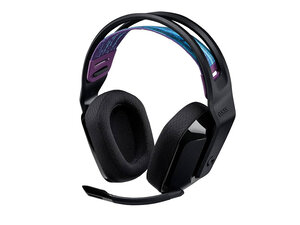
Repair guides, disassembly, and troubleshooting information for the Logitech G535 wireless headset. Released in July 2021.

I can't hear anything through my headphones.

One day I was watching videos, I touched the headset, and the sound stopped working; I don't know how to fix it.

Answer this question I have this problem too

Is this a good question?

Score 0
Add a comment

1 Answer

Most Helpful Answer

Hi!

Have you dropped your headset, or spilled water on it? Do you have any other symptoms? Are you using your headset wireless or wired? What device are you using the headset with? Does your headset loose charge quickly?

This does sounds like a broken connection or a broken cable.

But some initial troubleshooting steps:

  • Make sure that your headset is connected to your device. If you are using Bluetooth, enter Bluetooth settings and select "forget device" and then repair with the device.
  • Make sure your volume on your device (or headset) is not muted, and that you have the correct sound output selected.
  • Restart your device.

To troubleshoot and verify where the problem occurs, please:

  • Plug in your headset with a 3.5 mm headphone cable.
    • Make sure that your device's volume is not muted, and that the sound output is put to the wired connection.
    • If you hear sound with a wired connection, then it is either the battery connection, or your wireless connection that is the issue.
      • To troubleshoot your wireless connection, put your wireless receiver in another port and try again, else try to plug the wireless receiver into another device.
      • To troubleshoot your battery connection, follow this battery replacement iFixit guide to unplug the battery, and then plug it back in again. Take note if the battery is swollen. If you can, use a multimeter and take the voltage reading of the battery, the appropriate battery voltage will be written on the battery, you can take a picture and update your question (see this guide) on the battery text for us to help you reading the expected voltage.
  • If you do not hear a sound with a wired connection/3.5 mm headphone cable, then it is likely a wire break.
    • You the beginning of the battery replacement guide to open your ear cups, it should be the same procedure for each earcup.
    • Observe if you see any loose, damaged or broken wire or connector.
    • If you can, take a continuity reading with a multimeter to make sure that there is not a break between the circuit boards and the drivers.

Please respond with updated information, and your results, then we can guide you further if this does not solve your problem.

Good luck,

Cheers

iFixit Image

Guide

Adding images to an existing question

Difficulty:

Very easy

—

2 - 5 minutes

Logitech G535 Battery Image

Guide

Logitech G535 Battery Replacement

Difficulty:

Moderate

—

15 - 30 minutes

Was this answer helpful?

Score 1
Add a comment

Add your answer

Salvi Ruiz will be eternally grateful.
View Statistics:

Past 24 Hours: 3

Past 7 Days: 15

Past 30 Days: 46

All Time: 127