
Shop the Holiday Gift Guide
Free Shipping on Domestic Orders $75+

Released on September 24th 2021, the iPhone 13 mini is a smaller version of Apple's iPhone 13 and is the second mini iPhone. It features a 5.4-inch OLED, an A15 Bionic processor, and dual rear cameras.

I received the lens covers, but can't remove the bezel?

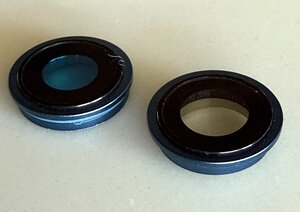
I received the lens covers, but can't remove the bezel. How on earth do you remove the existing bezel around the camera lens cover (blue ring on the blue iPhone 13 Mini in my case)?

Here's a photo of what I received:
Image

Thanks in advance for your help.

Answer this question I have this problem too

Is this a good question?

Score 1
3 Comments

I moved your comment back into your question, as the iFixit site doesn't allow for images within comments.

by Share

I was expecting the lenses and bezels to be separated but I just received both already fixed together. You can not say lenses and bezels on your list. So how do I install ?

by Share

@peteroziga67793 Are you saying you bought the bezels with the lenses already installed from iFixit? If that's the case you should go ahead and return them and instead buy this: iPhone 13/13 mini Rear Camera Lens Covers

My previous answer already discusses why the bezels won't help if you just need to replace the glass.

by Share

Add a comment

1 Answer

Most Helpful Answer

Am I correct in assuming you're trying to replace the glass covering your camera lenses? If you ordered replacement parts, it should simply consist of a circle of glass with adhesive on it. To replace the glass, you would heat the original glass to soften the adhesive, then use something like an X-Acto knife to pry the old glass out. Removing the bezel shouldn't come into the equation at all; they're spot welded in and have to be removed by chiseling them off or possibly using a Dremel type tool to grind them off, neither of which is possible with the back glass still in place.

The upshot is if you're just replacing the glass, taking the bezels off shouldn't come into play.

If I've misunderstood what you're trying to do, please explain why you want to remove the bezels, as it's not something that's usually done for any kind of repair.

Was this answer helpful?

Score 1

2 Comments:

Hmm. I was expecting just a lens, but it looks like the part I received has a blue bezel/ring around the glass as well, which looks like the existing bezel needs to be removed somehow. Here's what I bought:

iPhone 13/13 mini Rear Camera Lenses and Bezels.

by Share

@ojak Are the lenses already installed in the bezels, or are they separate? If they're two different pieces, then you should just use the lenses and toss the bezels; as I said, you can't remove the bezels with the rear glass in place, and even if you could, how do you reinstall them? I don't know about you, but I don't have one of the micro spot welders Apple uses to secure the bezels.

The upshot is the bezels won't help you, and if the glass is already installed in the bezels, you should return them and just go online and search for replacement lenses without the bezels.

by Share

Add a comment

Add your answer

ojak will be eternally grateful.
View Statistics:

Past 24 Hours: 3

Past 7 Days: 12

Past 30 Days: 75

All Time: 482