Introduction
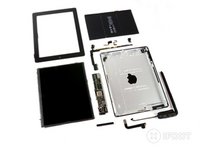
We got our hands on the fourth generation of iPad; we shall call it iPad 4. The iPad 4 is kind of like a fourth book added on to a trilogy: its release was a bit sudden and unexpected, but it's a part of the group, nonetheless. This fourth iteration of iPad shares a lot of similarities with the previous version, so instead of our traditional, exploratory teardown, we're going to play "spot the differences" by illustrating all the changes from the last generation.
Need more teardowns in your life? Follow us on Twitter, like us on Facebook, or subscribe to our YouTube channel. Heck, you could even do all three!
What you need
-
-
Welcome, ladies and gentlemen.
-
Apple has stunned the tech world once again. A mere 7 months after the announcement of the iPad 3, the iPad 4 was introduced on October 23, 2012.
-
Tech Specs:
-
Dual-core A6X processor with quad-core GPU
-
9.7 inch LCD, backlit in-plane switching LED with 2048×1536 pixel Retina display
-
16, 32, or 64 GB flash memory (at launch)
-
5 MP rear-facing camera
-
Lightning connector
-
-
-
Continuing the trend, this iPad is glued shut. This isn't our first adhesive-riddled iPad, and we've been working to figure out how to make the painful opening process a lot easier.
-
Our heated-up iOpener lets us apply heat just where it's needed, softening the troublesome adhesive. Once we've snuck a few guitar picks in the seam, we're nearly home-free.
-
-
-
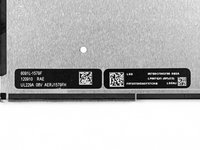
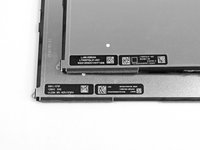
As opposed to the Samsung display we found in the iPad 3, the new iPad LCD is manufactured by LG.
-
Apple has reportedly been working to move away from Samsung as a primary supplier, so this LG display is not surprising. However, Apple often relies on multiple suppliers for a single component, meaning there are quite likely other LCD manufacturers lurking inside other iPad 4s.
-
-
-
-
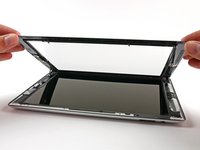
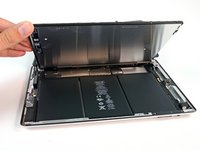
We lift up the LCD to reveal the battery.
-
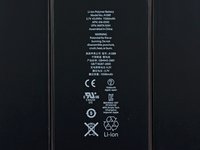
The battery is labeled with the same model number (A1389) as in the last round, so it's no surprise that it's another 3.7 V, 43 Whr package.
-
Like the iPad 3, the battery is adhered very securely to the rear case. Since batteries are consumables that wear out, the trend of glued-in, hard-to-access batteries in iPads and other Apple devices is unfortunate.
-
-
-
Skipping ahead to the good stuff, we get a quick look at the biggest improvement in the iPad 4—the A6X and its supporting hardware:
-
Apple A6X Processor
-
SK Hynix H2JTDG8UD2MBR 16 GB NAND Flash
-
Apple 338S1116 Cirrus Logic Audio Codec
-
343S0622-A1 Dialog Semi PMIC
-
Apple 338S1077 Cirrus Logic Class D Audio Amplifier
-
QVP TI 261 A9P2 Boost Converter (likely)
-
-
-
The backside of the board, however, boasts no dramatic improvements:
-
Broadcom BCM5974 Touch Screen Controller
-
Broadcom BCM5973A1 Touch Screen Controller
-
Texas Instruments CD3240B0 Touch Screen Line Driver
-
2 x 4Gb Elpida LP DDR2 = 1 GB DRAM in separate packages in a 64-bit configuration
-
2 x Fairchild BCHAH/FDMC Voltage Regulator / Reference
-
Murata 339S0171 Broadcom BCM4334 WiFi Module
-
-
-
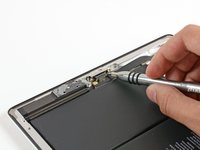
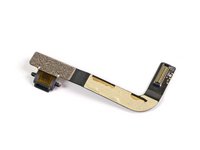
If you're new to our site, we'll let you in on a little secret: we love our 54 Bit Driver Kit. It makes quick work freeing the Lightning connector, even with a couple of hard to find screws.
-
There is a bit of adhesive holding the connector in, but nothing compared to some adhered components we've seen before.
-
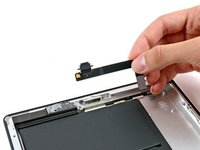
Repair techs, DIY-ers, and clumsy iPad-users, rejoice! The Lightning connector is on its very own ribbon cable, meaning that procuring a replacement connector should be fairly inexpensive.
-
-
-
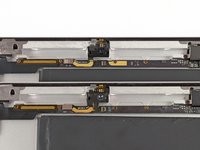
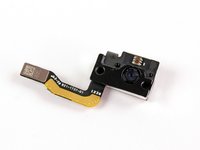
Despite looking almost identical in this shot, we do spot one more difference between the 3rd (top) and 4th (bottom) generations: the front-facing camera!
-
We've got a 1.2MP FaceTime HD camera, with the ability to shoot 720p HD video. That's a big improvement from the .3MP FaceTime camera in the iPad 3.
-
Compared to the iPad 3, this camera is actually slightly thicker (an extra .4 mm), but it still manages to fit into the same space.
-
-
-
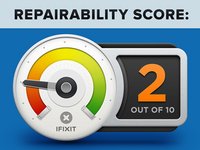
iPad 4 Repairability Score: 2 out of 10 (10 is easiest to repair)
-
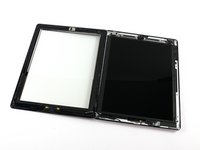
The LCD is easy to remove once the front panel is gone.
-
The battery is not soldered to the logic board, making the replacement process a tad less difficult.
-
Just like in the iPad 2 & 3, the front panel is glued to the rest of the device, greatly increasing the chances of cracking the glass when trying to remove it.
-
Gobs, gobs, and gobs of adhesive hold everything in place, including the prone-to-start-a-fire-if-punctured battery.
-
The LCD has foam sticky tape adhering it to the front panel, increasing chances of it being shattered during disassembly.
-
You can't access the front panel's connector until you remove the LCD.
-













14 Guide Comments
Be careful with the home button flex!
I know! I tore mine. Does anyone know where to get a replacement?
can the home button flex be torn taking the glass out or is it if your trying to remove the flex it's self.
keith -
I assume also from because they dont comment on the glass that it is the same as the ipad 3 glass?
keith -
