Introduction
Sony has finally stepped up to the motion controlled video gaming stage, where the Nintendo Wii has sat alone since 2006.
In case you missed it, recently we celebrated a major milestone. We now have parts and repair manuals for most game consoles!
What you need
-
-
Our PlayStation Move arrived this morning, and we can't wait to see what's inside.
-
Tech Specs:
-
Three-axis gyroscope
-
Three-axis accelerometer
-
Terrestrial magnetic field sensor
-
Bluetooth 2.0
-
Look at that price tag: $99.99. The bundle includes the PlayStation Eye camera, a single Move motion controller, and the Wii Sports Resort doppelgänger, Sports Champions. The wireless Navigation controllers are $29.99 each, and additional motion controllers are $49.99. It's safe to say that PlayStation Move is definitely not a cheap alternative to the Wii.
-
-
-
A quick side-by-side comparison of the Wii Remote controller and the Sony PlayStation Move motion controller.
-
The Wii and the PlayStation use different methods of locating their controllers.
-
The Wii Remote has an infrared (IR) sensor built into the controller, and uses triangulation from the IR emitters on the sensor bar placed near the TV to locate itself.
-
The PlayStation Move, unlike the Wii, can locate the motion controller in 3D space. The PlayStation Eye camera visually recognizes the X/Y position as well as the relative size of the glowing orb on the motion controller to pinpoint the controller's location.
-
The strap design on the Wii Remote and the motion controller are strikingly similar...
-
-
-
The motion controller features nine input buttons: the standard four control buttons (O, ☐, ∆, X), the standard start and select buttons on the side, a standard PS button, a trigger button, and a large Move button.
-
The PlayStation Eye camera has actually been around for quite some time, being released in October of 2007. It has had minimal success, with only thirty compatible games since its release.
-
It features two focus modes: close up (for web-cam use) and far field (for gameplay).
-
The PlayStation Move's motion controller lithium-ion battery is charged via a USB Mini-B controller port located on the bottom of the controller.
-
-
-
The orb at the head of the motion controller simply lifts right off the assembly.
-
Three LEDs are responsible for the glowing of the orb, and they are capable of putting out a full spectrum of colors.
-
They light up different colors to differentiate between different players, and can change colors mid-game, creating another source of user feedback. The color of the orb also changes in response to its environment, ensuring optimal visibility and detection by the PlayStation Eye.
-
-
-
-
The battery gets brownie points for being able to be disconnected from the Move without any soldering. Just unplug the connector and plug the new one in.
-
The internal lithium-ion rechargeable battery lists a minimum capacity of 1320 mAh at 3.7 Volts.
-
At this capacity, Sony lists a maximum playing time of 10 hours on a full charge.
-
The length of the Move's Li-Ion battery is about the same as a AA battery, but is about 35% larger in diameter.
-
-
-
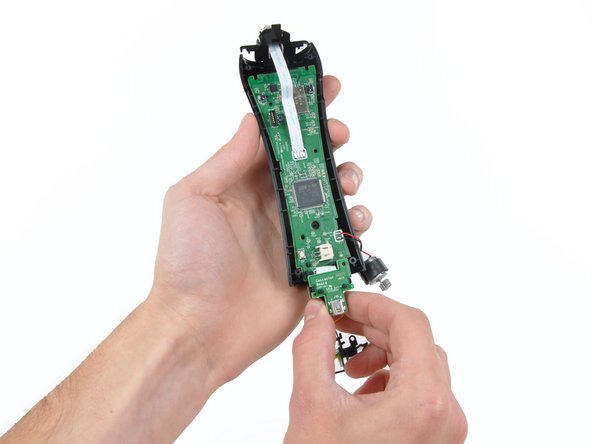
STM32F103VBT6 ARM-based 32-bit MCU with Flash, USB, CAN, seven 16-bit timers, two ADCs and nine communication interfaces.
-
Y5250H 2029 K8QEZ. This is quite possibly the gyroscope, but we won't be able to tell for sure without decapping the chip.
-
Kionix KXSC4 10227 2410 accelerometer
-
Texas Instruments BQ24080 1-cell Li-Ion Charger.
-
A little birdy helped us identify this TPS63030 High Efficient Single Inductor Buck-Boost Converter.
-
CSR (Cambridge Silicon Radio) BC4RE A16U Bluetooth transmitter
-
AKM AK8974 three-axis Electronic Compass (MEMS)
-
-
-
The components of the light assembly from left to right: lens, LED, heat sink (!?), housing bracket.
-
The clear plastic lens on the far left helps diffuse the light from the LEDs to light up the orb uniformly.
-
The LEDs in the end of the motion controller are capable of 24-bit color resolution.
-
-
-
PlayStation Move Repairability: 8 out of 10 (10 is easiest to repair)
-
Good: You can easily open the controller to access the internals.
-
Good: Battery can be easily replaced once you open the controller -- it has a connector instead of soldered contacts.
-
Good: The trigger comes out as one unit, making it easy to replace.
-
Good: The LED has a heatsink that will make it operate more efficiently and last longer.
-
Bad: Other components, such as the vibrator motor and LED, are soldered to the motherboard.
-




2 Comments
you can find these controllers at gamestop stores for $20
