Introduction
This Macintosh IIsi was made in 1990. It was a part of Apples Three Tier strategy of low end macs in 1990. This included the Classic, LC, and the IIsi.
The IIsi is a cut down IIci with a slightly slower processor and a newer motherboard design with built in cache. It has a 250mb hard disk and 8mb of RAM, running System 7.1
-
-
Yes, it only has a floppy drive. Its also 20 years old!
-
Lets begin the repair guide!
-
-
-
It is now open! This Macintosh was designed for manufacturing, which meant it had few or no screws involved with building it. It is all held together by clips and latches. It is extremely easy to work in.
-
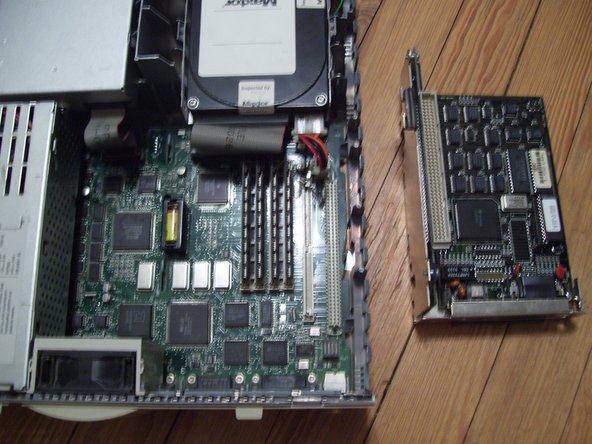
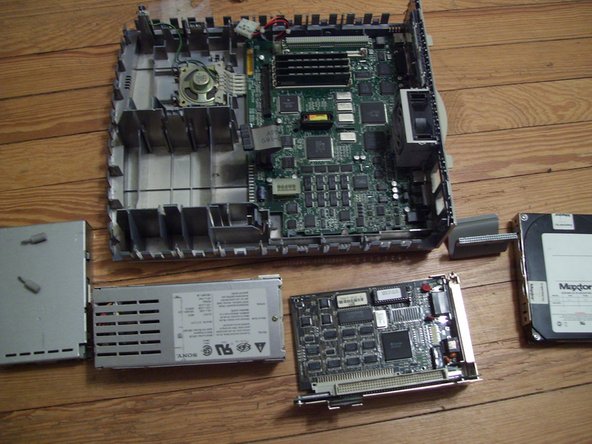
There is a 240mb Maxtor Hard Disk and the PDS-Nubus adapter installed. In order to work on the mac, we must remove these first. The Hard disk is an Apple ROM'ed SCSI drive.
-
The top right metal box is the power supply, rated at 100 watts and made by Sony. The bottom box is the Sony Superdrive floppy.
-
Notice the clean, easy to access design. You will never see this again from apple!
-
-
-
-
Remove these two thumbscrews if you have them. Then remove the PDS bracket by pulling straight up.
-
You should now have access to the RAM and PRAM battery.
-
To remove the hard disk, remove the SCSI cable, Power Cable, and pull on the outermost tab on the drive bracket. Lift the drive beyond this tab. Then do the other tab and the drive should come out.
-
-
-
The motherboard of the IIsi.
-
CPU is a Motorola 68030 at 20mhz. The CPU can easily be clocked at 25 or 30Mhz by replacing the tin can oscillator to the right of the CPU with ones of a higher value. The system can have a FPU via the PDS to Nubus Adapter.
-
System Chipset, designed by apple and made by VLSI. Condensed version of the IIci system logic.
-
Serial Controllers for the LocalTalk ports.
-
Apple Sound Chip (ASC), custom design by apple. It uses the same sound controller as the LC and Classic. These are the first computers with built in sound input!
-
AMD 53C80 SCSI Controller
-
SIWM (Super Integrated Wozniak Machine) controls floppy and power functions.
-
100 ns soldered on RAM
-







To reassemble your device, follow these instructions in reverse order.
Cancel: I did not complete this guide.
2 other people completed this guide.


1 Guide Comment
Who would have thought a 11si teardown would have been useful, until today! Thanks so much… one forgets how simple these machines were to work on; LC’s, Performas, PowerMacs, etc…
