Introduction
Stay tuned for an exciting look into one of Apple's latest revision of its MacBook Pro line, the Intel Core i5 MacBook Pro.
We gutted the Core i5 on April 14, 2010.
What you need
-
-
Apple's need for faster and better processors has led it to incorporate Core i5s and i7s into its latest lineup of MacBook Pros.
-
Our new MacBook Pro's specifications:
-
2.4 GHz Intel Core i5 with 3 MB shared level 3 cache
-
4 GB of 1066 MHz DD3 SDRAM
-
15.4 inch LED-backlit glossy widescreen display
-
Intel HD Graphics and NVIDIA GeForce GT 330M with 256 MB of GDD3 RAM
-
-
-
Silly sticker... You can't stop us!
-
For some odd reason, Apple has stopped using five-point Torx screws found on other MBP 15" Unibodies in favor of Tri-point screws. Try as you may, Apple, you won't win. We got all the screwdrivers right here.
-
The battery is now rated at 77.5 Wh. That's just a tad bit more than the 73 Wh battery found in last year's 15" model, but not enough to explain the 1-2 hour battery life improvement Apple is claiming for this machine.
-
Perhaps they optimized the Pro's power consumption?
-
-
-
The Wi-Fi/Bluetooth board location is one of the few major changes made to the new model.
-
Its layout closely resembles that of the MacBook Unibody.
-
-
-
-
A close up view of the AirPort Extreme card.
-
This AirPort card is a bit different than the one mounted in the clutch cover of the Late 2008 and Early 2009 MBP 15" Unibody.
-
This is in fact the same AirPort/Bluetooth board found in the plastic MacBook Unibody.
-
-
-
The connectors as viewed, from left to right:
-
Wi-Fi/Bluetooth antenna
-
Camera cable
-
Optical drive
-
Speaker wires
-
Hard drive
-
Due to the redesign of the AirPort/Bluetooth interface, its connections are no longer integrated into the camera cable, greatly decreasing the size of the connector.
-
-
-
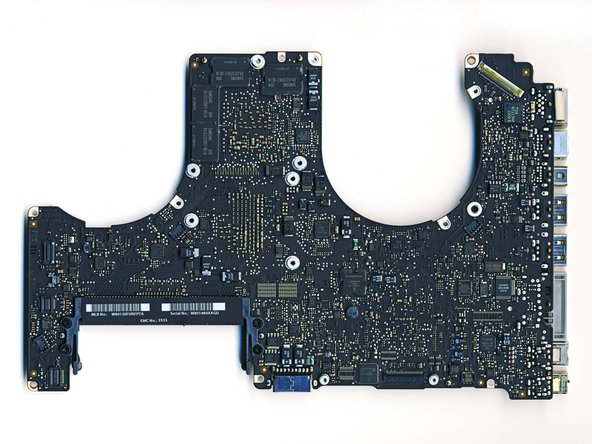
Intel Core i5 processor with integrated graphics.
-
NVIDIA GeForce GT 330M. The OS switches to the NVIDIA graphics for higher demand applications.
-
Intel BD82HM55 S LGZS Platform Controller Hub. Interestingly enough, the hub is not connected to the heat sink. Apparently, enough heat is convected from the surface of the silicon to remove the small amount of heat generated by the graphics switching operations.
-
-
-
Upclose of the Intel BD82HM55 S LGZS Platform Controller Hub.
-
We assume this chip could be some sort of switch between the Intel and NVIDIA graphics.
-




One Comment
Hi Walter,
I’m working to try to repair a MacBook Pro A1286 - it won’t start up. The owner said his 7-yr old dropped it, and it’s been sitting for some time. A visual inspection reveals no obvious damage externally, or internally, as a matter of fact, the MBP appears to be in pristine condition. There are no lights from the Magsafe power adapter port. I’ve tested the Magsafe adapter on another MacBook Pro, and it works. Any idea what other test I might try? Thank you in advance for your reply.
