Introduction
No audio? Replace the headphone jack!
What you need
-
-
Insert a SIM card eject tool or paper clip into the hole next to the headphone jack.
-
Press down on the paper clip until the SIM card tray pops out.
-
-
-
Insert an iPod opening tool in the gap between the antenna cover and the front bezel. The wedge of the tool should be pointing towards the antenna cover. Slide the tool around the corner and up until you reach the metal backing.
-
Repeat the same procedure on the other side of the dock connector.
-
-
-
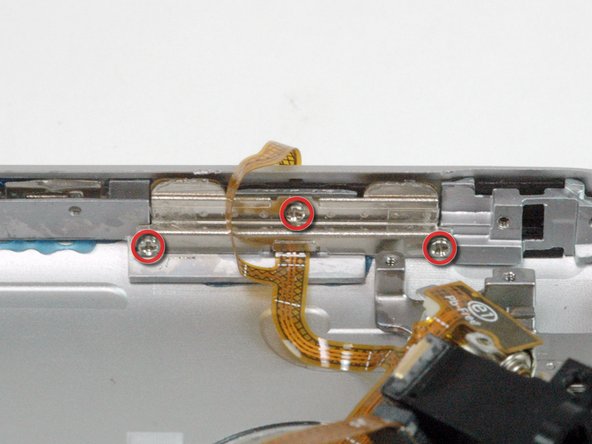
Remove the three Phillips #00 screws securing the rear panel to the iPhone.
-
-
-
The small square hole is the location to insert the dental pick in the next step.
-
Insert the pointed end of a heavy-duty spudger into the space between the gray metal bar and the rear panel. Pry the panel up enough until you can get the tip of the iPod opening tool into the seam between the front bezel and rear panel.
-
-
-
-
Pry up the rear panel by pulling the dental pick counterclockwise in a quick motion. Apply force perpendicular to the plane of the display assembly. You may be afraid to go fast, but going slowly is more likely to bend the case.
-
The rear panel is still attached to the iPhone by the headphone jack cable, so don't entirely remove the rear panel from the iPhone just yet.
-



To reassemble your device, follow these instructions in reverse order.
To reassemble your device, follow these instructions in reverse order.
Cancel: I did not complete this guide.
52 other people completed this guide.


2 Comments
Keep in mind there is two different models - always check part number on actual flex - if you'll replace it with wrong one audio will work "other way around" - if you plug in headphones - speakers will start to work, if you unplug them speakers will not work.
I bought a iphone 2g off ebay and it has this problem.. :( Please is there anyway to fix it? There is 0 information on the internet about this problem.
Robert -
