Introduction
You can install hard drives up to 9.5mm thick.
What you need
-
-
Pull the keyboard release tabs toward you and lift up on the keyboard until it pops free.
-
Flip the keyboard over, away from the screen, and rest it face-down on the trackpad area.
-
-
-
Use a pin (or anything you like) to remove the three rubber feet from the lower case.
-
-
-
-
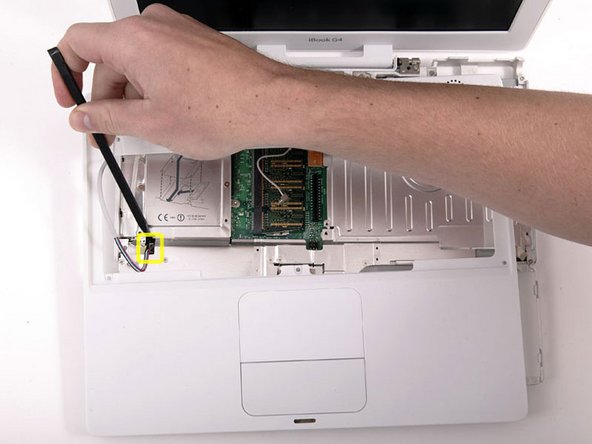
Remove the following 7 screws from the edges of the keyboard area.
-
Three 2 mm Phillips along the right edge.
-
One 4.5 mm Phillips underneath where the magnet was.
-
One 6 mm Phillips with a small head in the lower left corner.
-
Two 6 mm Phillips with large heads, one in the upper left corner and one in the middle
-
-
-
Remove the following 15 screws:
-
Fourteen 3 mm Phillips.
-
One 5.5 mm Phillips in the upper left corner.
-




To reassemble your device, follow these instructions in reverse order.
To reassemble your device, follow these instructions in reverse order.
Cancel: I did not complete this guide.
206 other people completed this guide.
Attached Documents


8 Comments
Wow! I just needed to remove the functioning hard drive from a 2003 iBook (not sure which model). We hadn't used it in a few years because the screen was shot and I suspect the motherboard was on its way out. These instructions were close enough for this slightly different model. What a pain and I am so glad I didn't need to put the thing back together! Thanks a bunch, iFixIt, because I don't think I could have figured it out without this guide.
Thanks for the guide. I had to use this a few years back to replace a hard drive. It was a challenge, took a couple hours, but go slow and steady and be patien. The guide was perfect. I would suggest printing the screw guide, sticking double sided tape over the screw diagrams, and placing your screws on there as you disassemble. This make reassembly a ton easier. Trickiest part for me was actually removing the lower case. Don't forget step 16 and go slowly.
Wow! Just followed this guide to remove a drive from an old machine before disposing of it. Glad I don't have to put it back together again and hope it still works! It should not be this difficult to take a HD out!! Thanks for the guide, would have been almost impossible without it :)
Very well explained and illustrated . Thank you.
