
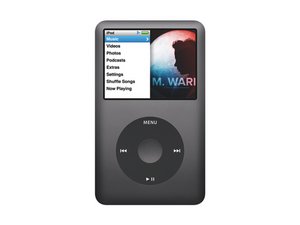
The iPod Classic looks like the 5th Generation iPod, but with a metal front case and multiple case color options. Troubleshooting and replacing parts is somewhat complex, but we have made it easier below.
Note: There are two versions of iPod Classic: thin and thick. The thin version refers to the 80 GB, 120 GB, and thin 160 GB models. The thick version refers to the thick 160 GB model. If you are unsure which 160 GB version you have (as some parts are not interchangeable between models), perform the following steps:
1) Locate the serial etched on the rear panel of the iPod
2) Go to Apple's Online Service Assistant and enter your serial number and country
3) Look at the text under the picture on the left. If it reads "iPod Classic," you have the thick version. If it reads "iPod Classic (Late 2009)," you have the thin version.
iPod won't turn on
No matter what you do, you can't get your iPod to turn on.
Hold switch is on
Before delving into the guts of your iPod, check to make sure the hold switch isn't activated. If the hold switch is on, the iPod will ignore any input on the click wheel and refuse to do anything. If your iPod's problem isn't so easily solved, read on.
Drained/bad battery
If your iPod won't turn on, especially if it has not been used recently, you may simply have a drained battery. Plug your iPod into your computer or AC adapter and see if anything happens. Ideally your iPod will recognize it has been connected to a power source and charge its battery. If it will no longer charge, the battery must be replaced. We sell replacement batteries for both thin and thick iPod Classics.
Bad display
It is possible that it appears nothing is happening because the display is bad. If you hold the iPod up to your ear you should be able to hear the hard drive spinning. If the iPod sounds like it is working properly but nothing is visible, it is possible the display is bad and must be replaced.
Bad logic board
If your iPod does nothing when plugged into a computer, the problem most likely lies in the logic board. We stock logic boards, and we offer the instructions for installing them.
Bad click wheel connection
If the click wheel is not seated correctly, it is possible that the iPod will not boot. Be sure that the bar on the click wheel is completely flipped down to ensure a positive connection.
No audio or distorted audio
Your iPod turns on and appears to work, but when you plug in headphones or speakers, the audio doesn't play properly.
Bad headphones/speakers
It's unlikely your headphones or speakers are bad, but it's worthwhile to eliminate these as the source of your problem at the beginning. Try your iPod with another set of headphones or speakers just to make sure that the problem is with the iPod.
Bad audio jack
The most likely cause of audio output problems on iPods is a bad audio-out jack. We sell the thin and thick headphone jacks, and we offer free guides for replacement.
Restore icon on startup
Your iPod displays the text "Use iTunes to restore" on startup
Corrupted software
It isn't often that Apple gives specific directions about how to fix your problem! Restoring the iPod will erase everything on it, so make sure everything on the iPod is stored elsewhere prior to restoring. To restore, connect your iPod to a computer with iTunes installed. Upon connecting, a message may pop up, informing you that your hard drive is corrupted and/or in recovery mode. If one of these messages pops up, click the "Restore Now" button and follow the directions. If no pop up message appears, click "Restore" on the iPod summary page (click on your iPod icon on the left menu to find this page). Follow the directions to restore. If your iPod displays the text "Please wait. Very Low Battery," leave it plugged in. This charges the iPod enough to be able to restore. If the iPod hangs on this screen for long periods of time, you may need a new battery.
Bad hard drive cable
It is also possible that the sad iPod icon is caused by a bad hard drive cable. In this instance, re-connecting or replacing the hard drive cable (thin or thick) first is a good idea.
Bad click wheel connection
If the click wheel is not seated correctly, it is possible that the iPod will go to this screen. Be sure that the bar on the click wheel is completely flipped down to ensure a positive connection.
Bad hard drive
If checking the connections does not work, you may have a bad hard drive. If no information is being sent to the iPod from the hard drive, it makes the iPod quite unhappy! Note: iPod Classics have unique connectors, and only specific hard drives will work in them. Browse our hard drives (thin or thick) and check out our iPod ID page for compatible drives.
Bad logic board
If attempting to restore the iPod and diagnosing the hard drive and connections does not fix the problem, the issue is probably the logic board.
Sad iPod icon on startup
The iPod displays an image of a sad iPod when turned on
Corrupted software
Sometimes, a reset and restore will fix a sad iPod. Connect your iPod to your computer and use iTunes to restore the iPod. Restoring the iPod will erase everything on it, so make sure everything on the iPod is stored elsewhere prior to restoring. Sometimes it may be necessary to restore the iPod several times before it works properly. If you are unable to restore your iPod using iTunes, you can hard reset your iPod. iPod Classics can be hard reset by booting while holding the menu and play/pause buttons. This should result in a quick dark screen followed by the standard Apple boot graphic.
Bad hard drive
It is also possible that the sad iPod icon is caused by a bad or poorly connected hard drive. If no information is being sent to the iPod from the hard drive, it makes the iPod quite unhappy! Note: Video iPods have unique connectors, and only specific hard drives will work in them. Browse our hard drives (thin or thick) and check out our iPod ID page for compatible drives.
Bad battery connection
Another potential issue is the battery's connection to the logic board (a bad battery should not cause this error, however). To test this, carefully detach the battery and re-connect it to the logic board.
Bad logic board
If restoring the iPod and diagnosing the hard drive and battery connection does not fix the problem, the sad iPod is likely caused by a problem with the logic board. There's not much to troubleshoot here. Basically, the only option is to replace the logic board.
Folder icon appears on startup
The iPod displays an image of a folder when turned on.
Bad hard drive or cable
One of the best methods to diagnose a failing hard drive is to listen to the drive. If you put your iPod up to your ear, you should hear a smooth-sounding whirr of the hard drive spinning. Any loud clicking or grinding sounds may mean that your iPod's drive is failing. If you don't hear anything, the drive is not getting power or is very damaged and can't spin up.
One possible way of predicting whether the hard drive or cable is the culprit is to watch what happens when the iPod is attempting to boot. If the iPod goes from the Apple logo to the folder icon almost immediately, the cable is most likely at fault. In this instance, re-connecting or replacing the hard drive cable (thin or thick) first is a good idea. If the iPod hangs on the Apple screen for a few seconds before displaying the folder icon, the hard drive is probably the problem and must be replaced.
Note: Video iPods have unique connectors, and only specific hard drives will work in them. Browse our hard drives and check out our iPod ID page for compatible drives.
iPod doesn't boot past Apple logo
The iPod either boots to an Apple logo and freezes or continuously reboots.
Bad logic board
This is likely the cause, and the logic board must be replaced.




140 Comments
Ok my ipod classic 160g only turns on when connected to the computer. When you unplug it, there's no response from pushing the wheel and it jus goes dim. Do you guys do repairs?
bedboy - Reply
No, we don't do repairs. But I'm sure you can fix it yourself! It sounds like you have a dead battery. Read the 'iPod won't turn on' section for more details.
Kyle Wiens - Reply
Picture of circle with X in the middle. bottom of screen directs to ipod support etc? Did I miss this in troubleshoot or is it the same as Folder icon?
jperschino - Reply
I put my IPod onto a speaker dock that I've used many times before with no problem. I heard a funny sound (sort of like a zzzt), and my IPod went dark and wouldn't work or charge. I reset it and it came on and played fine. But then when I tried to connect to the computer to synchronize, it went dead again. I reset it again, and again it was fine. But I can't connect it to sync and when I leave it connected to the computer, the IPod gets very warm. However, our wall charger works just fine with it. So I can play it and recharge it with the wall charger, but I can't synchronize or connect to the speakers. What's going on with it, and is it repairable?
Puzzled - Reply
sounds like something got into the charging port and is causing a short which would drain your battery would probably be good idea to clean port and replace battery
sha muro -