Introduction
I did not take any of these images. I took these images from various iFixIt Staff guides, as well as google images. Thanks to all of you for reading, hope this helps! Feel free to leave any comments, good or bad, to help me improve the guide for others.
What you need
-
-
If your display glass is cracked, keep further breakage contained and prevent bodily harm during your repair by taping the glass.
-
Lay overlapping strips of clear packing tape over the iPhone's display until the whole face is covered.
-
-
-
Remove the 2 Phillips #00 screws at the bottom of the iPhone, located on both sides of the dock connector.
-
-
-
-
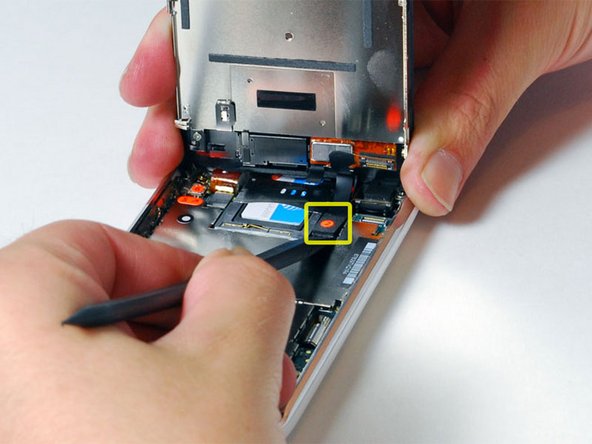
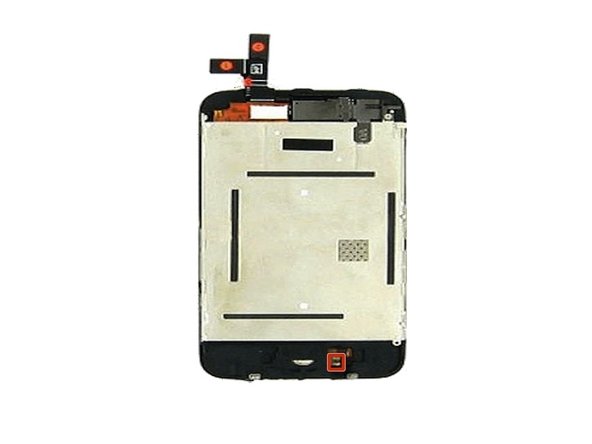
If any cables or pins are broken , you could buy new cables, as mentioned before. However, if the home-button screws are broken or missing, or the home-button is completely broken, you might want to buy a new home button assembly. This assembly is displayed on this step's adjoining image.
-





To reassemble your device, follow these instructions in reverse order.
To reassemble your device, follow these instructions in reverse order.
Cancel: I did not complete this guide.
41 other people completed this guide.


Team

5 Comments
Please add comments to help me figure out what to improve about my guide!
hmm, but how do i REALLY get the home button changed? sad.
So following your instructions I found that one of the "springs" on the home button assy was missing. I ordered a replacement assembly but I can't figure out how to replace that assembly. Do I need to take the whole display apart?
Any inputs would be greatly appreciated.
Cheers,
Hans
fix3g on my LG phone
