Repairing Nintendo 64 Motherboard

User-Contributed Guide

User-Contributed Guide

An awesome member of our community made this guide. It is not managed by iFixit staff.

Confusing Text

Confusing Text

Some of this guide's text is confusing, duplicated, or off-topic. Clarify it by editing!

Featured Guide

Featured Guide

This guide has been found to be exceptionally cool by the iFixit staff.

Install replacement motherboard

  • Author: tonymag28
  • Time required: 15 to 20 minutes
  • Difficulty: Easy
  • Add Note x
  • x 3

This guide will show how to replace the Nintendo 64 motherboard.

Sections
Image #1

Add Note Edit Step 1 — Top Cover  ¶ 

  • Remove the expansion pack cover.

Image #1

Add Note Edit Step 2  ¶ 

  • Remove the expansion pack using the metal spudger.

  • This can also be accomplished using a small spoon.

Image #1

Add Note Edit Step 3  ¶ 

  • Remove the 6 screws shown with a gamebit head or screwdriver.

Image #1

Add Note Edit Step 4  ¶ 

  • Remove the 2 front legs.

Image #1

Add Note Edit Step 5  ¶ 

  • Lift off the top cover.

Image #1 Image #2

Add Note Edit Step 6 — Metal Plate  ¶ 

  • Remove the 14 screws shown using the large Phillips screwdriver.

Image #1 Image #2

Add Note Edit Step 7  ¶ 

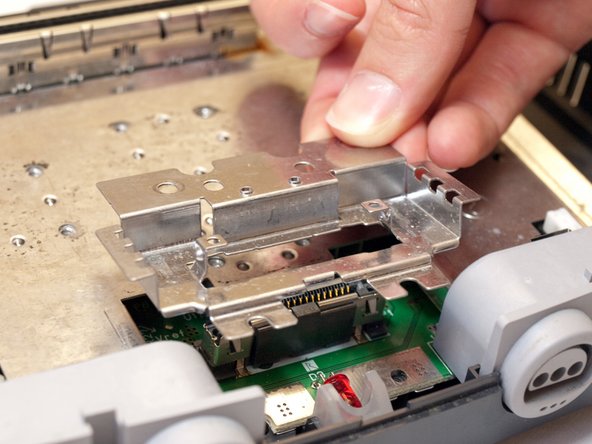
  • Remove the metal plate by sliding it back then up.

Image #1

Add Note Edit Step 8  ¶ 

  • Remove the 2 screws shown using the small Phillips screwdriver.

Next » « Previous

Required Tools

Metal Spudger

$2.95 · 2 In stock

Popular Products

Spudger

$2.95 · 50+ In stock

Metal Spudger Set

$7.95 · 50+ In stock

Heat Gun

$24.95 · 24 In stock

Detailing Brush

$2.95 · 1 In stock

Inspection Scope

$39.95 · 17 In stock

Comments Add Note Comments are offturn on