Repairing LG 17LX1R LCD Television Power board

Grammar Police

Grammar Police

Embrace your inner English teacher and help improve this guide's grammar!

Action Shots

Action Shots

Be an action hero! This guide needs images that better demonstrate how to perform specific actions.

Bullets!

Bullets!

Better coordination with markups and the color/type of bullets will help make this guide more clear!

Confusing Text

Confusing Text

Some of this guide's text is confusing, duplicated, or off-topic. Clarify it by editing!

Slice and Dice

Slice and Dice

The steps in this guide should be split up and made into a series of prerequisite guides.

Step Trimmer

Step Trimmer

This guide has unnecessary steps. Trim them to be more concise!

User-Contributed Guide

User-Contributed Guide

An awesome member of our community made this guide. It is not managed by iFixit staff.

Here is a decent 17" television that doubles as a PC monitor. According to the previous owner, it did not come on again after a thunderstorm. It is out of production and deemed an obsolete model.

  • Author: oldturkey03
  • Time required: 1 1/2 to 2 hours
  • Difficulty: Moderate

Here is a decent looking LCD TV/monitor that would no longer turn on. I expected a few capacitors etc. that needed to be replaced. In this case, it was a single diode at the cost of 29cents and a bit of over 1 hour of labor. It also shows the importance of a good visual inspection. A new power board for this TV would have cost somewhere around $80...

Image #1 Image #2 Image #3

Add Note Edit Step 1 — Power board  ¶ 

  • Here is the LG 17LX1R that will no longer turn on.

  • Remove the cover from the stand by

    • simply pressing down on the two tabs. The cover will come off easily

  • Remove the four screws that hold the stand assembly to the chassis.

Image #1 Image #2 Image #3

Add Note Edit Step 2  ¶ 

  • Here again are the four screws to be removed from the stand.

  • Remove the eight Phillips screws that hold the back to the chassis. Once the screws are removed, the back will simply snap off. No excessive force or tools are needed.

  • This is the view with the back off. Time to remove the metal shield. It is fastened with six Phillips screws.

Image #1 Image #2 Image #3

Add Note Edit Step 3  ¶ 

  • Remove the two on the left

  • Remove the two on the right.

  • Remove the two on top.

    • Once the six screws are removed the shield can be lifted away easy.

Image #1 Image #2 Image #3

Add Note Edit Step 4  ¶ 

  • After the shield is removed, the power board as well as the main board are immediately visible.

    • Power Board

    • Main Board

    • Fuse

    • Check all capacitors for blown tops and/or leakage.

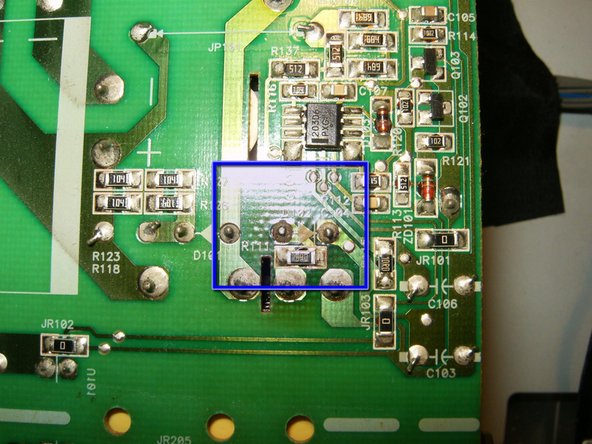
  • Here is the importance of a good visual inspection. Brown discoloration around Diode D102 is good evidence of a short circuit, possible blown component.

  • Disconnect all connectors from the power board

    • Remove the four screws that mount the power board to the chassis.

Image #1 Image #2 Image #3

Add Note Edit Step 5  ¶ 

  • Chassis with the power board removed

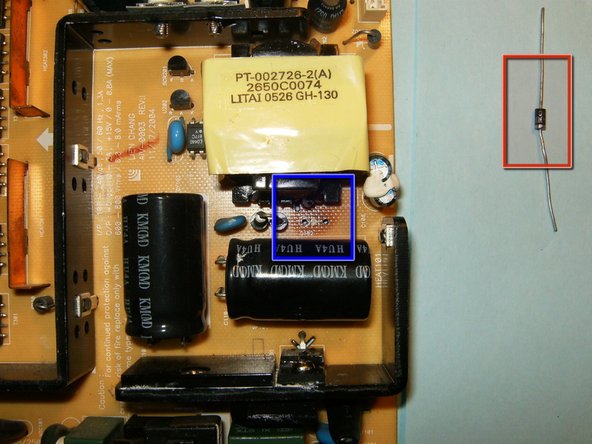
  • Discoloration of the back side of the power board points again to a bad diode.

  • Unsolder the diode from the power board

    • Replacement diode

Image #1 Image #2 Image #3

Add Note Edit Step 6  ¶ 

  • Here is the unsoldered diode. description on the diode reads LT526 IN4007. Arranged to purchase at $0.29 per diode.

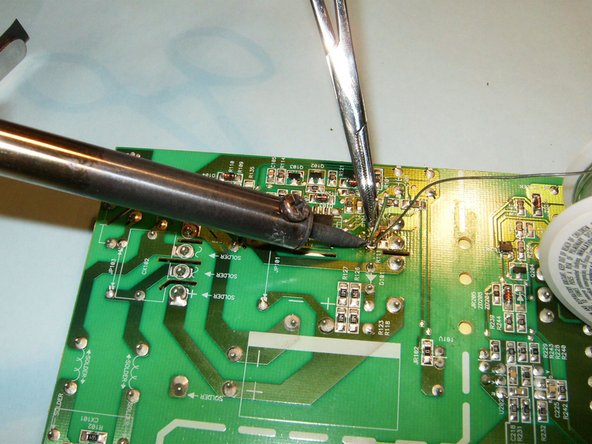
  • Solder the new diode onto the power board. Use a pair of tweezers or hemostat to hold the diode in place while soldering.

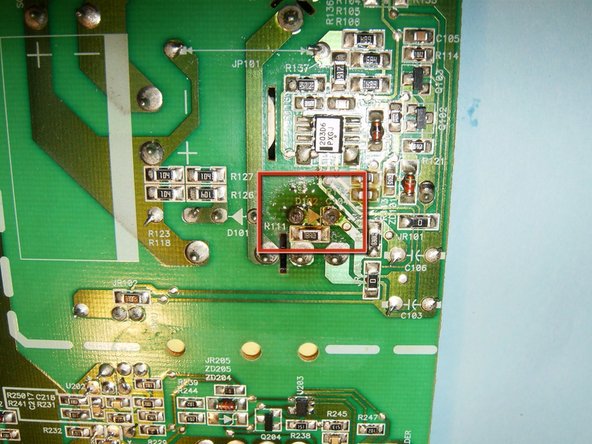
  • Diode replaced, clean the board with isopropyl alcohol to get rid of any debris or old flux.

Image #1

Add Note Edit Step 7  ¶ 

  • Hopefully this is what you see once you reassemble the TV. It shows snow due to no cable connection is made. :)

Required Tools

Phillips #1 Screwdriver

$4.95 · 6 In stock

Soldering Station

$24.95 · 13 In stock

Recommended Tools

Universal Drive Adaptor

$29.95 · 50+ In stock

iFixit Lock Pick Set

$29.95 · 26 In stock

Inspection Scope

$39.95 · 40 In stock

Frictionless Ratchet

$24.95 · 49 In stock

Portable Anti-Static Mat

$24.95 · 18 In stock

Popular Products

iPad 2 Bluetooth/Wi-Fi Antenna

$24.95 · 45 In stock

iPad 2 Front Panel

$94.95 · 50+ In stock

iPad Retina Front Panel

$94.95 · 50+ In stock

iPad 3rd Gen Front Panel Assembly

$134.95 · 50+ In stock

iPad 4th Gen Front Panel Assembly

$134.95 · 33 In stock

Comments Add Note Comments are offturn on