Introduction
The motherboard of your iPod controls everything in the iPod.
What you need
-
-
The following step can be challenging and time consuming. Be sure to go slowly and have patience to prevent damaging your iPod.
-
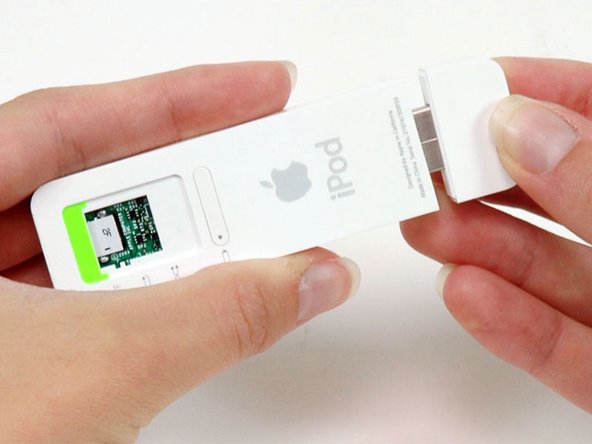
Use an Exacto knife to separate the glue holding the USB port on the iPod. Run the knife along the seam between the two sections of the iPod until the glue is separated. Expect to run the knife along this edge 20-30 times before the glue will be entirely freed.
-
-
-
-
Use a spudger to flip up the black plastic tab holding the USB port ribbon in place. The black tab will rotate up 90 degrees, releasing the ribbon cable.
-
-
-
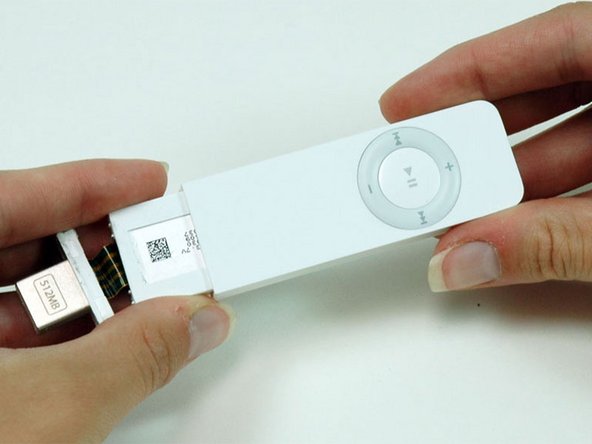
Gently pull back the white plastic framework to free the left edge of the logic board. Pull up on the logic board slightly to prevent the logic board from falling back into place.
-






To reassemble your device, follow these instructions in reverse order.
Cancel: I did not complete this guide.
48 other people completed this guide.


5 Guide Comments
It would be helpful if the board images of the soldering process were included for these procedures. I have not tried the removal process and installation of the battery. And, why can’t we see an Ipod mini shuffle Gen 2? I can send you the one I own..
Not hard,i believe in u
Thanks, for this guide
Toll, die Anleitung erklärt nur 2/3 des Weges hin zu einer neuen Batterie.
Sehr anschaulich aber völlig wertlos. Jetzt habe ich einen säuberlich
zerlegten iPod und weiß nicht weiter.
